Interview Just Got a Major Upgrade
Last updated: October 13, 2026
Software engineering has changed. Today’s best engineers aren’t writing code anymore - they’re working alongside AI agents: reviewing generated code, debugging failures, and deciding what to trust, change, or reject. Most technical interviews, though, still test for yesterday’s workflow: a blank editor, an algorithmic puzzle, and a race to a single right answer. We rebuilt Interviews to close that gap. It’s rolling out to accounts automatically over the coming months.
What’s New
New AI-Native Development Environment
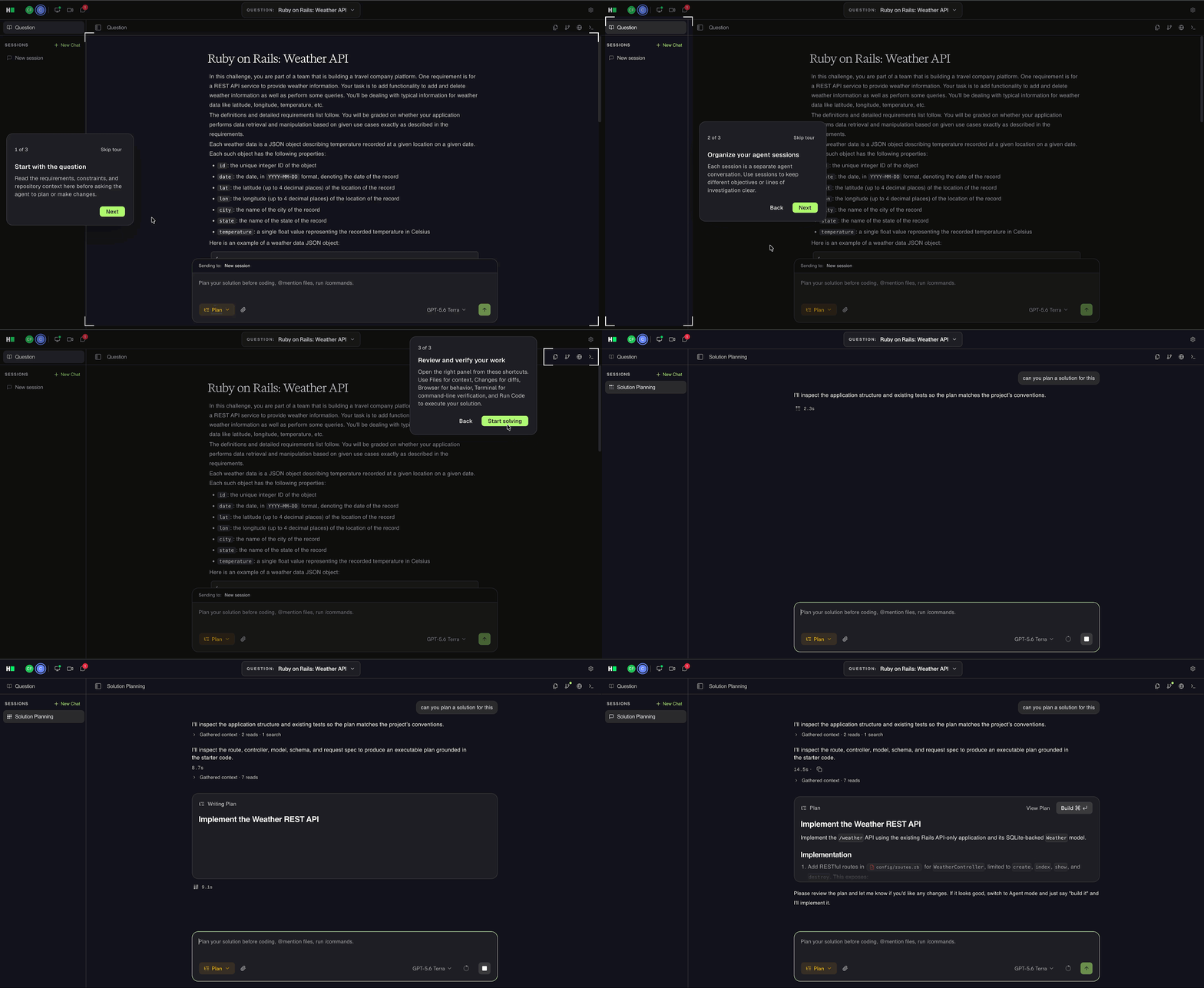
The new Agentic Development Environment (ADE) provides a workspace similar to the AI development tools that engineers use every day, such as Claude Code and Codex. The ADE provides an AI-native workspace instead, where AI is front-and-center, not a sidebar. Candidates and interviewers work in the same live sandbox where they can build and test real applications together while using an AI agent throughout the interview.
Faster and Simpler Interview Experience
The redesigned interview workflow provides faster load times and a cleaner, more modern interface. It reduces visual clutter and helps interviewers and candidates focus on the interview tasks.
Realistic Engineering Tasks
The new Interviews experience also brings new content with a question format called “Plan-Build-Review”. Candidates work on practical engineering tasks instead of algorithmic problems. The problem statements are grounded in real production-grade repos where they have to build new features or solve bug tickets. This reflects how engineers work each day. It helps you understand how candidates solve problems, make decisions, and use AI. It also provides more information than whether a candidate reaches the correct answer by passing test cases.
A New Way to Interview Integrity
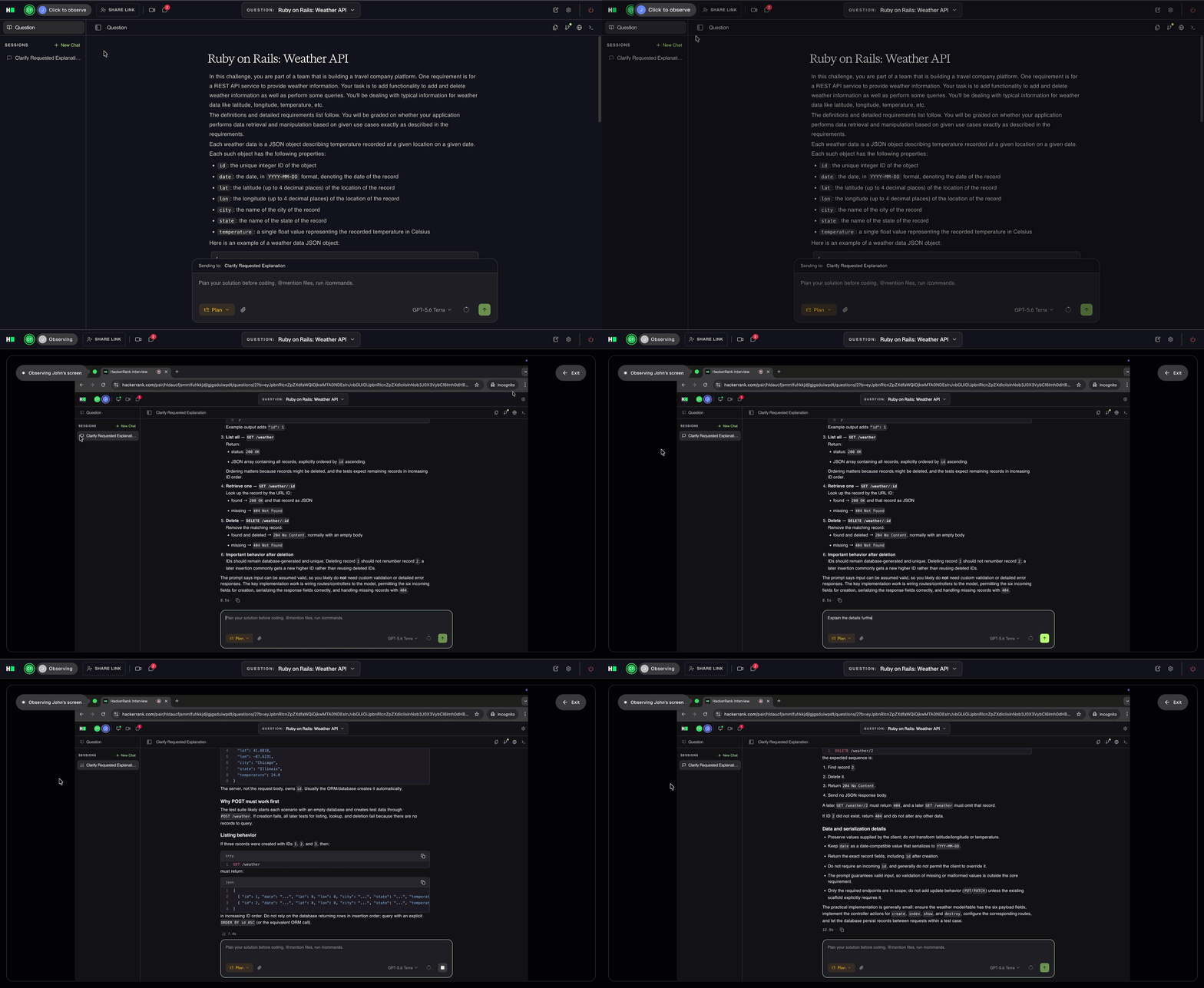
Candidates now share their entire desktop throughout the interview, and Interviewers can view it on demand at any time to see if candidates are leaving the interview experience and using other apps. This approach provides a more reliable way to review candidate activity than the previous automated flagging system. It also reduces false alerts and does not require any additional setup.
Chakra Assist (Coming soon)
Chakra Assist is an AI‑powered tool that helps interviewers conduct and interpret interviews more effectively, enabling you to extract the strongest signal from a candidate and feel confident in your hiring decision. Under the hood, a powerful engine synthesizes information from the candidate’s interview actions, AI usage, your conversation transcript, rubric, and more. Chakra Assist appears as an assistant during the interview, helping you understand the candidate’s work, recommending follow-up questions, and more. After the interview, it can generate detailed evaluation summaries and jog your memory about the session.
Changes to Existing Features
The new Interviews experience retires or updates a small number of existing features.
Scorecards and Scorecard Assist (Evolving)
Interviewer Notes replaces the Scorecard. You can take rich markdown notes to record feedback during or after an interview and sync the notes to your ATS. Chakra Assist evolves the existing Scorecard Assist experience. When available, Chakra Assist will use the interview rubric, interviewer notes, and more detailed interview evidence to create an automatic summary that enhances your notes. You’ll be able to chat with Chakra Assist and get a breakdown of what happened during the interview.
In-Interview Navigation (Evolving)
The new interface simplifies in-interview navigation, reduces visual clutter, and keeps the workspace focused on the interview task.
Question Selection: The interview launchpad now provides tiles that let you browse and select questions by category from the HackerRank Library.
Question Switching: A dropdown at the top of the workspace replaces the question tabs. This change keeps more screen space available for candidate problem-solving.
Tab Locking: Because the dropdown replaces the tabs, the new experience does not include tab locking. This change helps candidates stay focused without interruptions. Interviewers can ask candidates to switch questions at any time during the interview.
Code Repo Questions (Evolving)
The new experience groups all multi-file question types under the name Code Repos. These question types formerly referred to as Projects, Code Repos, GenAI, and Mobile questions. For Code Repo questions that contain tasks, the workspace displays each task as a ticket in Markdown format. The tickets appear in the tickets folder. You can select the tickets a candidate is working on when you load the question. However, the new experience does not support:
Showing tasks to candidates one at a time.
Adding tasks after a candidate starts the question.
Revised Suspicious Signals (Evolving)
HackerRank is retiring the previous automated integrity-flagging system in favor of expanded Observation Mode (available today) and a revised suspicious signals system (coming soon). In the expanded Observation Mode, candidates share their full screen, and interviewers can review it at any time. HackerRank also plans to introduce a broader integrity package in Q4 2026.
Multiple Choice and Subjective Questions (Retiring)
HackerRank is retiring Multiple Choice and Subjective questions as hiring shifts toward evaluating how candidates build solutions and reason with AI. If your interviewing process relies on these question types, contact your account team for help finding suitable replacements from the available question types. Templates that already contain multiple-choice or subjective questions remain available in the new Interviews experience. However, you cannot access these question types in the new experience.
Additional Question Types and Settings (Evolving or Retiring)
The current Data Science question type will remain supported. However, questions created with the Legacy Data Science or Julia stack are retiring because these stacks are either outdated or have minimal usage. Custom questions created in those stacks will no longer be supported; we recommend rebuilding them using the latest Data Science stacks.
Diagram Questions are moving to the Whiteboard editor and will no longer open in the current Diagram editor. Your diagram components will remain available in the Whiteboard editor for you to build with during the interview. Any custom Diagram questions you have created and saved will also migrate automatically to the Whiteboard question type.
Approx and HTML/CSS Design question types are retiring. Use coding questions instead of Approx and Code Repos for HTML/CSS tasks.
The start-from-scratch workflow for Project and DevOps questions is retiring. Use Code Repos for project questions and DevOps questions for DevOps tasks.
Questions using Ubuntu 16/20 environments will not work in the new experience and need individual conversion.
Settings being retired:
Interviewer self-signup: Interviewers will no longer be able to self-sign up and must be added by admins.
Account-wide question tag filter: We are removing the ability to pre-filter questions available in the library from Interview Settings. Interview templates can instead be used to provide a preset question list to interviewers.
Rollout Timing
These are broad expected availability windows. Your account will receive a notice with its upgrade date. There are also some features which are available in the new Interview experience carrying over from the original which are yet to be built, which are listed below.
Expected availability | Features |
|---|---|
Late October 2026 | Code Repos, transcript generation, GenAI Developer questions, and Deep Links |
Late November 2026 | Chakra Assist, Screen-to-Interview Import and Photo Match, and Code Review questions |
December 2026 | Mobile iOS, Android, React Native, and Flutter questions |
Get Help
Contact your account manager or email support@hackerrank.com for help with these changes and information about when the new experience becomes available in your account.
For more information, refer to the KB articles.