Lever - HackerRank Interview Integration
Last updated: September 29, 2026
Note: Lever V1 is no longer available for new integrations. This documentation is intended for existing Lever V1 users. For new integrations, use Lever V2. For more information, see the Lever V2 articles.
HackerRank Interviews integrates with Lever to facilitate a seamless hiring process for companies. The Interview is an efficient tool for recruiters and technical managers to conduct interactive coding interviews with candidates located remotely. The integration with interview allows Lever users to directly start or schedule coding interviews with their candidates.
This article provides you with detailed steps to integrate Lever with HackerRank Interview. To know how to use the integration and schedule interviews from Lever, see📄 Scheduling HackerRank Interviews with Candidates in Lever.
Lever - HackerRank Interview Integration
Prerequisites
In HackerRank for Work | In Lever |
|
|
Steps
Lever - HackerRank Interview integration is a two-step process that involves the following actions.
Obtaining Webhook signing token and API key from Lever
Obtaining webhook URL from HackerRank and connect it to Lever
Obtaining the Webhook Signing Token from Lever
Log in to Lever, click on the Settings option.

Lever Settings
Click on the Integration and API option from the left pane.

Integration and API tab in Lever
Click on the Webhooks tab to open the Webhook configurations page.

Webhooks Configuration Page
Perform one of the following two options to generate the signing token specific to the Webhook URL,
Toggle the stage change button.
Click on the '+ add webhook' option as shown below.

Options for generating the Webhook URL
On either of the options (toggle switched on or '+' is clicked) a unique signing token is generated as shown below.

Unique Signing token generation
Copy the token and store it as it needs to be added to the HackerRank.
Click on the Partner Integrations tab.

This page provides settings to enable integration with HackerRank
Scroll down on the page to the Assessment section, and enable the HackerRank CodePair option.
Note: Although you'll need to enable the HackerRank CodePair, you will not need to copy the key that is generated.

Enabling Lever's integration with HackerRank Interview
After checking on the connection status of HackerRank Tests, scroll up to the top of the page and access the API Credentials Tab (At the top of the screen)
API Credentials Tab within Lever
From the API Credentials tab, scroll down to the Lever API credentials section. (As seen highlighted above within the API Credentials tab)
You'll then need to ensure that the Key that you'll be working with for HackerRank Tests and HackerRank Interviews has the proper Read and Write endpoints assigned, including both:
Create Candidate
List Posting
The Read endpoints and Write endpoints are two separate sections; make sure both fields are checked in each section.
Scroll down past the Read endpoints section (as seen below) to access the Write endpoints section.


Read endpoints within Lever API credentials
Obtaining the Webhook URL from HackerRank and Adding it in Lever
Log in to HackerRank for Work as a Company Admin user.
On the home page, click the arrow next to the user icon on the top right corner of the page, and select the Settings option.

Accessing the settings page in HackerRank for Work
Click on the ATS Integration option, and navigate to the Lever integration area.

Lever Configuration
In the respective fields, add the Lever API Key and Lever Webhook signing token, as shown below.

The HackerRank settings page with Lever integration fields
HackerRank creates the Webhook URL. Copy this URL. The integration completes when you add this URL to Lever.
The Webhook URL from the HackerRank settings page

In Lever, navigate to the Webhooks tab on the Integrations and API page.
Click on the Webhooks tab, and under the Webhook Configuration, turn on the Candidate Stage Change event. In Lever, this is the event trigger that sends an interview link request to interview.

The 'Candidate Stage Change' event trigger sends a request to interview
Click on the Add Webhook option for the Candidate Stage Change event, and add the Webhook URL obtained from HackerRank.
Click on the Verify Connection button. When the URL is verified, you will see a checkmark displayed. You can include or remove the 'https://' from the HackerRank URL.
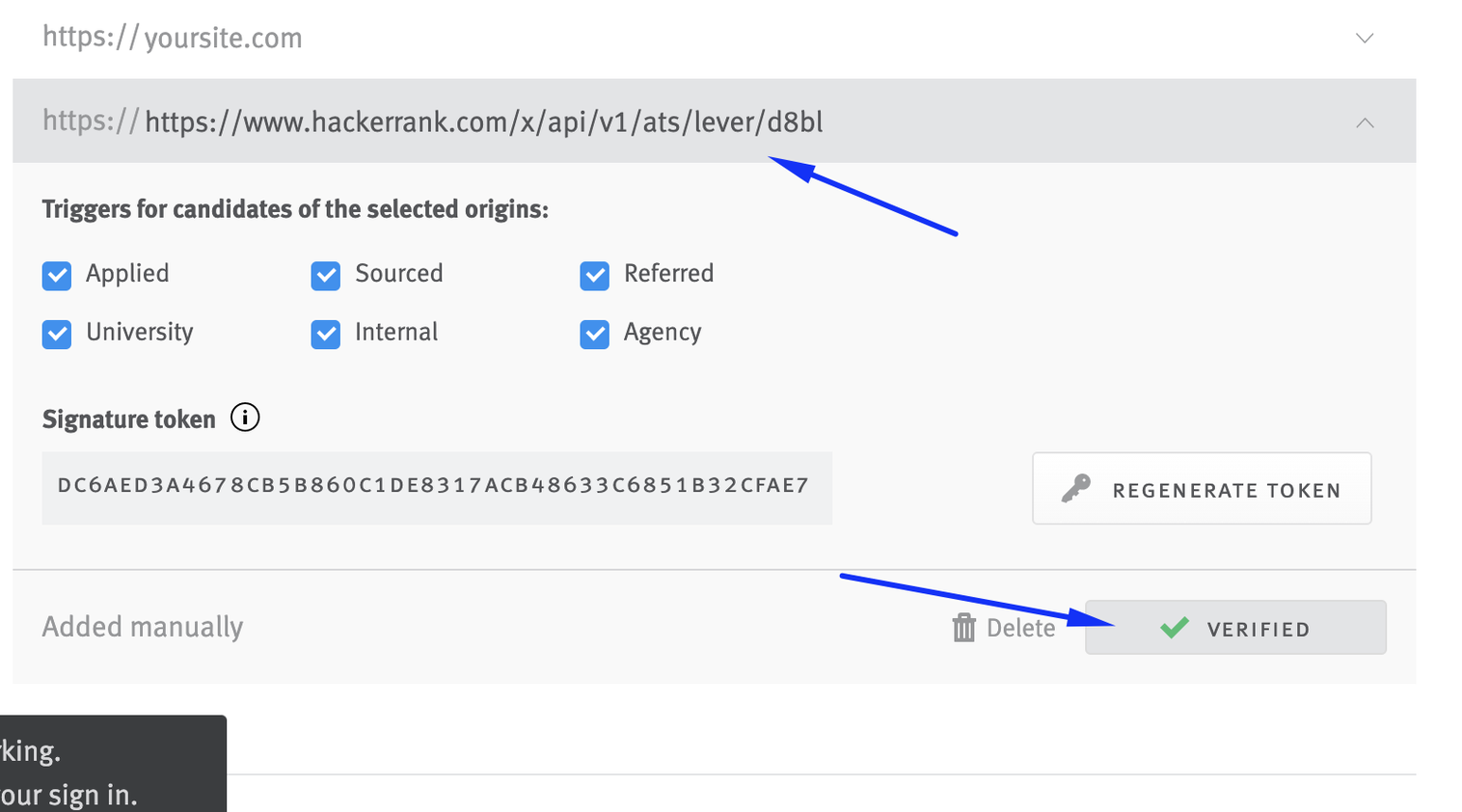
Adding HackerRank's Webhook URL in Lever

In Lever, candidate profiles must meet the following requirements before the "Candidate stage change" event can trigger a request to HackerRank Interviews:
A profile must have the candidate's name and a valid email address.
A profile must include the "HackerRank CodePair" tag or be linked with a Job that has the same tag.
When the candidate stage is changed, an interview link is automatically added to the profile. Recruiters can click on this link to quickly start or schedule an online interview session to assess the candidate.
For more information, see📄 Scheduling HackerRank Interviews with Candidates in Lever

Candidate profile in Lever with the "HackerRank Interview" tag