Interview Reinvented for Agentic Era
Last updated: November 17, 2026
HackerRank Interview is getting a major upgrade to reflect how engineers work with AI. The upgrade introduces new capabilities, a redesigned interface, and changes to existing features and workflows.
This article explains what’s new, what’s changing, which features are retiring, and what stays the same, so your team knows what to expect and how to prepare for the upgrade.
What’s new
Agentic Development Environment
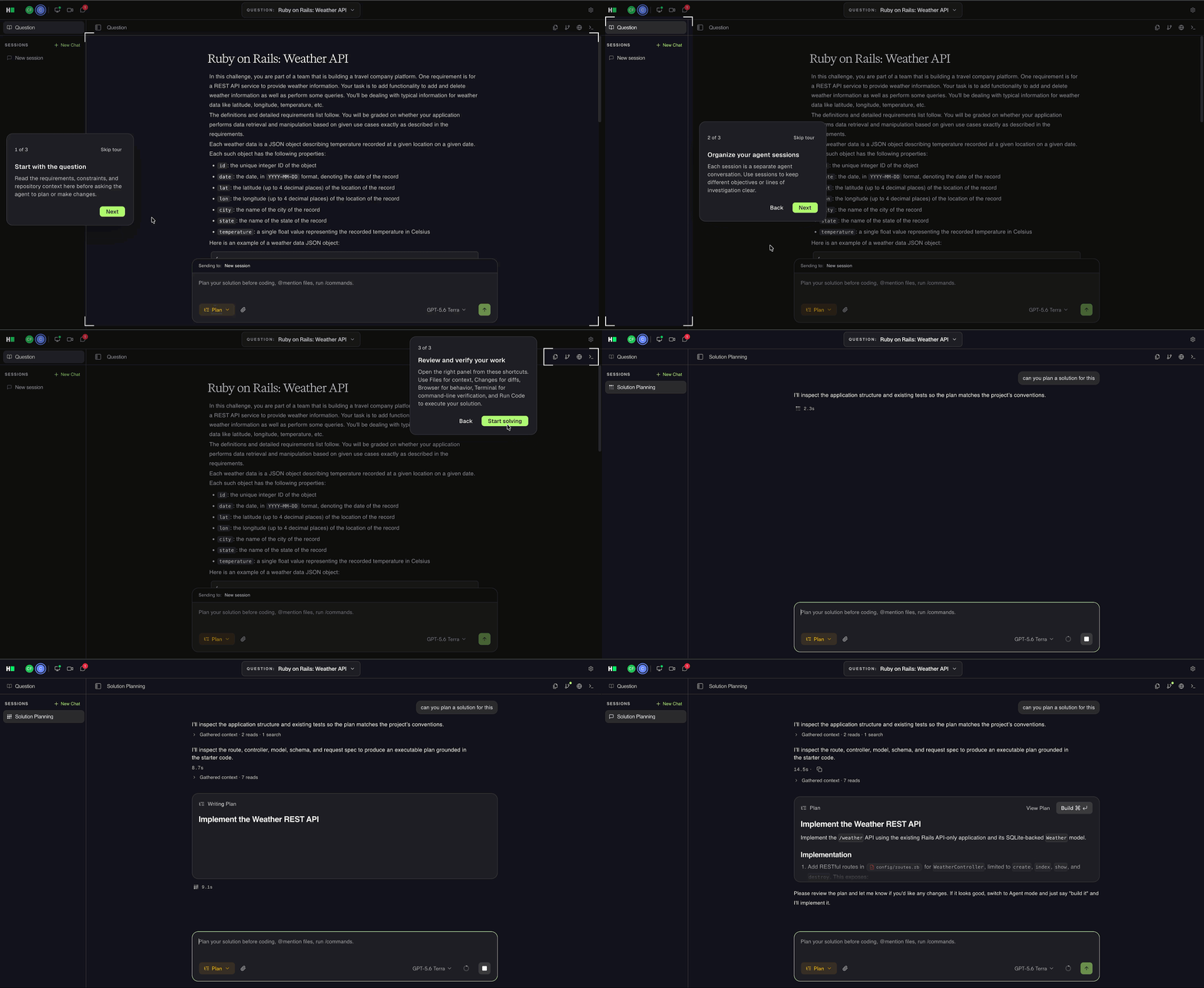
For customers on the AI add-on, Code Repository questions can now open in a shared Agentic Development Environment (ADE), an AI-native workspace similar to the Claude Code or Codex desktop apps. Candidates can use AI to explore the repository, plan an approach, implement and test changes, debug issues, and review the results. This represents a significant step up over traditional IDEs and makes interviews reflect real-world software development.
For more information, see 📄 Use ADE in Interviews and 📄 AI Assistant in Interviews.
Faster and simpler workspace
The redesigned interview workspace loads faster and has a cleaner, more responsive interface.
For more information, see 📄 Introduction to HackerRank Interview and 📄 Navigate the Interview Interface and Controls.
HackerRank MCP
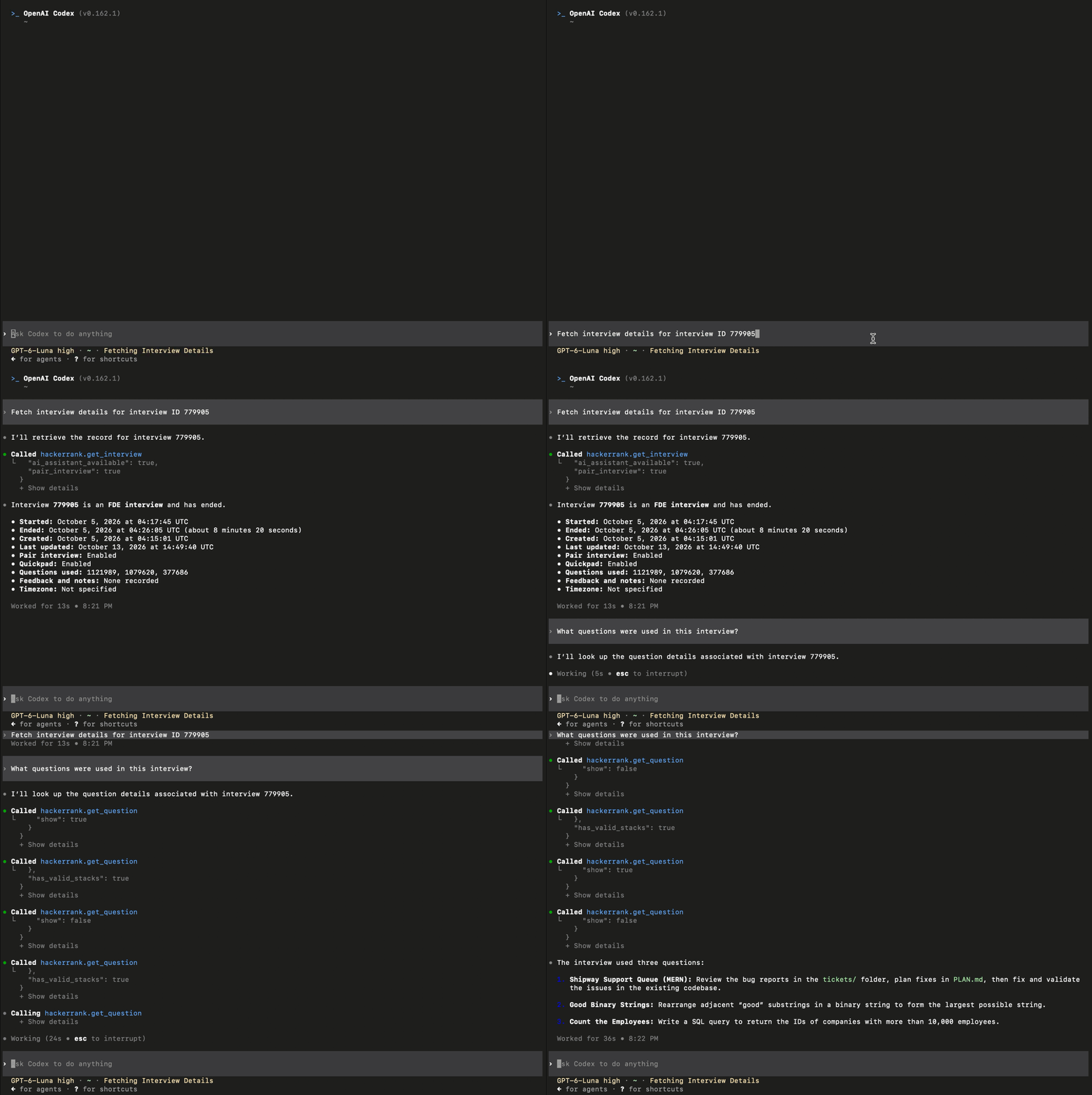
Connect an AI tool such as Claude or Codex to HackerRank MCP to review a candidate’s interview. The AI tool gets read-only access to supported interview information, including details, transcripts, reports, questions, interviewer notes, and AI chat history. This is available only for interviews conducted in the upgraded experience.
For more information, see 📄 HackerRank MCP.
What’s changing
Project questions grouped under Code Repository
Existing Project questions, such as Frontend, Backend, Full-Stack, Mobile, and Generative AI, are renamed to Code Repository Single Task. Existing Code Repository questions have been renamed to Code Repository Multi-Task.
In a Multi-task question, each task appears as a Markdown ticket in the tickets folder. When you load a question from the Library, you can select the tickets the candidate works on.
The new experience does not support showing tasks one at a time or adding tasks after the candidate starts the question.
Multi-task Code Repository deep links load all tasks
A deep link to a Code Repository question loads all its tasks. You cannot include more than one Multi-task Code Repository question in a single deep link.
Diagram questions recreated as Whiteboard questions
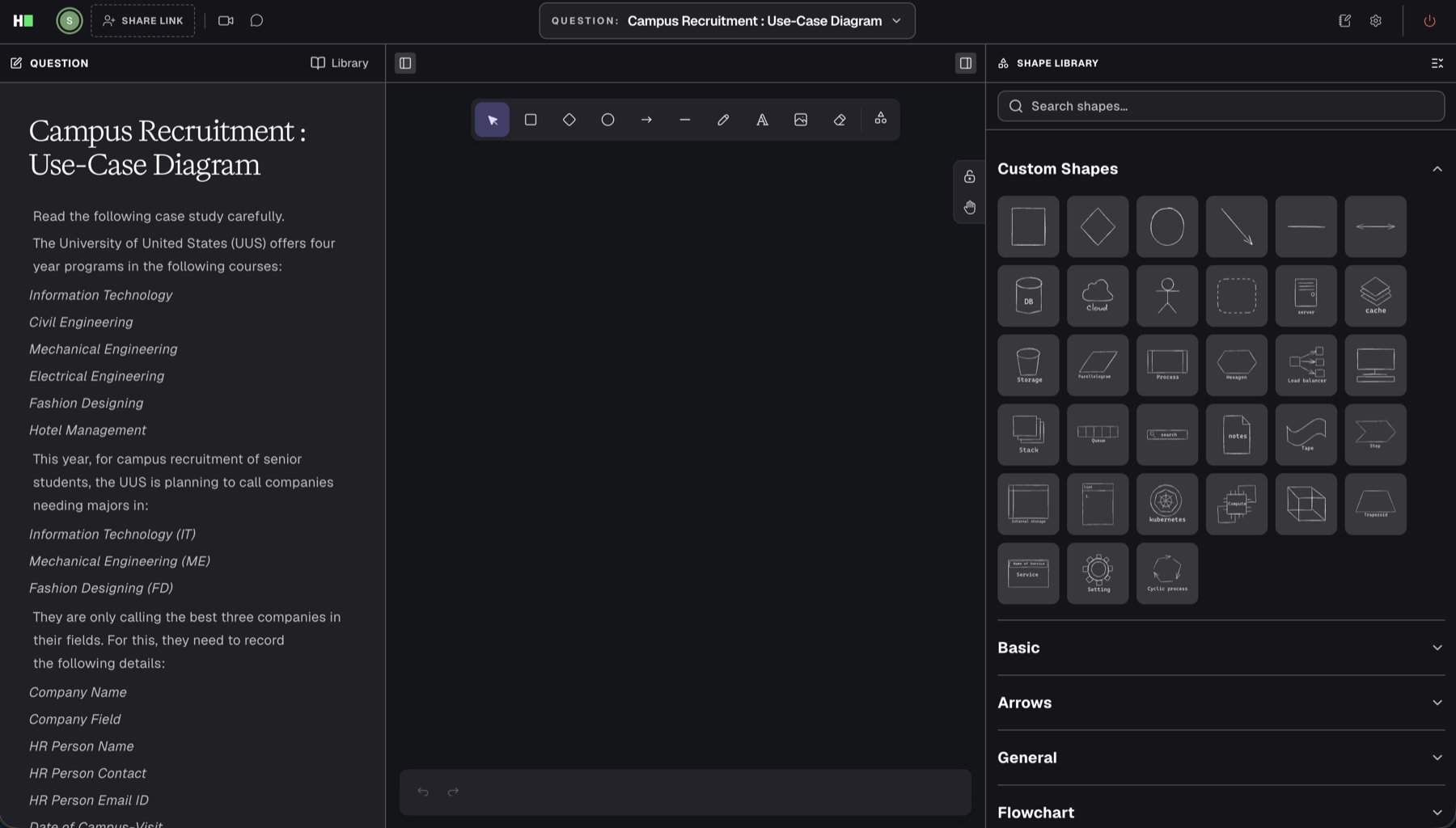
HackerRank automatically converts your existing Diagram questions to Whiteboard questions. The questions open in the Whiteboard editor and retain their content and diagram components.
Enable or disable interview transcripts at the company level
With the AI Add-on, you can enable or disable interview transcripts for your entire company in company-level interview settings. This setting applies to future interviews conducted in the upgraded experience.
Observation Mode replaces integrity checks
Observation Mode lets you view a candidate’s entire screen on demand and see what they are doing during the interview. You can review their on-screen activity for potential integrity concerns or suspicious behavior, such as using other applications or leaving the interview workspace. This direct view of candidate activity replaces the previous automated suspicious signals and reduces false alerts.
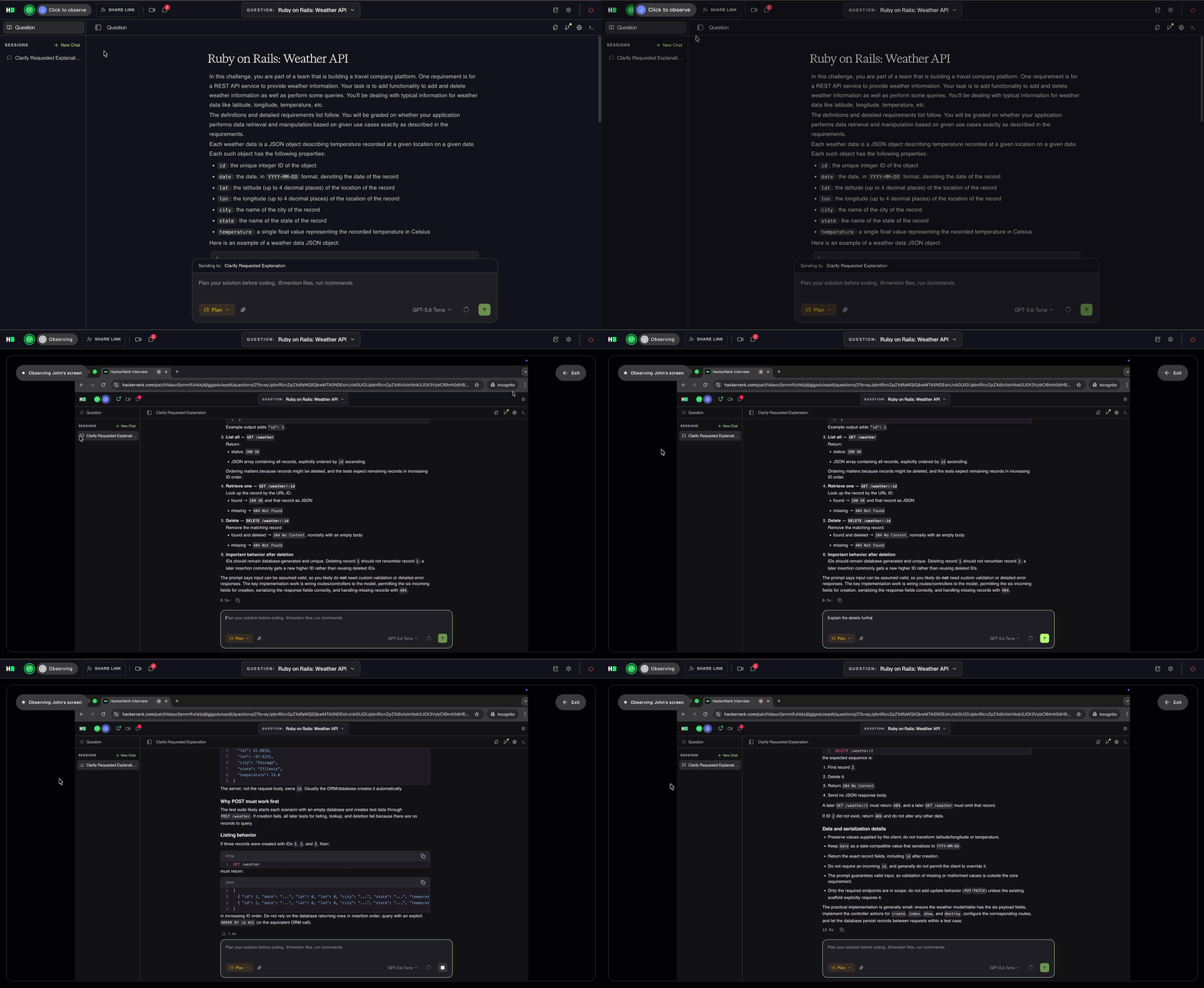
For more information, see 📄 Navigate the Interview Interface and Controls.
What’s retiring
Saving and reusing custom questions created within an interview
The previous experience lets you save custom questions created within an interview for reuse. In the new experience, you can still create a custom question within an interview and use it with the candidate. However, you cannot save it to your Library from the interview. To reuse the question in another interview, recreate it directly in your Library.
Scorecard
Scorecards are no longer available in the new experience. Use Interviewer Notes to record feedback during or after an interview. The interview report includes these notes. ATS feedback sync sends only Interviewer Notes to your ATS. For more information, see 📄 Interview Report.
Suspicious Signals
The previous automated integrity-flagging system is no longer available in the new experience. Observation Mode gives you a direct view of the candidate’s on-screen activity, so you can review their actions during the interview.
Starting Project and DevOps exercises from scratch
You can no longer start Project or DevOps exercises from scratch during an interview. Create your project exercises as Code Repository questions and your DevOps exercises as DevOps questions. Save them in your Library to select and reuse them during interviews.
Ubuntu 16 and Ubuntu 20 environments
Questions that use Ubuntu 16 or Ubuntu 20 environments do not work in the new experience. Update each affected question individually before your upgrade date.
Note: HackerRank does not convert these questions automatically.
Julia and the legacy Data Science stack
Questions that use the Julia or legacy Data Science stacks are not supported in the new experience. Data Science questions using the current Python and R stacks remain available. If your custom questions use Julia or the legacy Data Science stack, recreate them using a supported Python or R stack before using them in an interview.
Approximate Solution, HTML/CSS, Multiple Choice, and Subjective questions
Approximate Solution, HTML/CSS, Multiple Choice, and Subjective question types are no longer available in the new experience. Use the following alternatives to replace them:
Retired question type | Replacement |
|---|---|
Approximate Solution | Use a Coding question. |
HTML/CSS | Use a Code Repository question. |
Multiple Choice and Subjective | No direct replacement is available. To keep the prompt as a question, adapt it into a Coding or Code Repository question. Templates that already contain multiple-choice or subjective questions remain available in the new Interviews experience. |
Company-wide Library tag filters
The new experience removes the company-wide tag filter from Interview Settings. Interviewers can browse and search the questions available to them and apply filters as needed.
Interviewer self-signup
New interviewers can no longer sign up themselves. An account admin must add each new interviewer before their first interview.
What stays the same
You can continue using these core capabilities in the new Interview experience:
Built-in audio and video calls
Question types:
Coding questions
Code review questions
Data Science questions using supported Python and R stacks
Database questions
DevOps questions
Whiteboard questions
You can also continue scheduling interviews, inviting candidates and interviewers, managing interview templates, and reviewing interview reports. These workflows remain available with updated interfaces and controls.
Your existing integrations continue to work after the upgrade. You do not need to set them up again.
Frequently Asked Questions (FAQs)
When does my account upgrade?
Your organization will receive an email with your account’s scheduled upgrade date. Contact your account manager if you need help confirming the date or preparing for the upgrade.
Is there an additional cost?
No. The upgrade is free. You need the AI add-on to use the Agentic Development Environment (ADE). Contact your account manager if you want to add it to your plan.
Will past interviews and reports remain available?
Yes. All past interview reports remain available, and you can continue viewing the question content in those reports.
What happens to interviews already scheduled for after the upgrade?
All scheduled interviews that start after the upgrade open in the new interview experience.
Get help
Contact your account manager or email support@hackerrank.com for help with these changes and information about when the new experience becomes available in your account.
For more information, refer to the KB articles.