Recruitee - HackerRank Integration Test User Guide
Last updated: February 5, 2026
This guide outlines how to use the Recruitee - HackerRank Integration to send HackerRank test invitations and review test results.
Prerequisites
Before you begin, ensure you meet the following requirements:
You have active HackerRank and Recruitee accounts.
The HackerRank integration with Recruitee is complete. For more information, see 📄 Recruitee - HackerRank Integration Guide.
Inviting candidates to a HackerRank test
To invite candidates to a HackerRank test:
Log in to your Recruitee account using your credentials.
Go to the Candidates tab.

Select a candidate profile.
Click the more option menu and select Send HackerRank test.
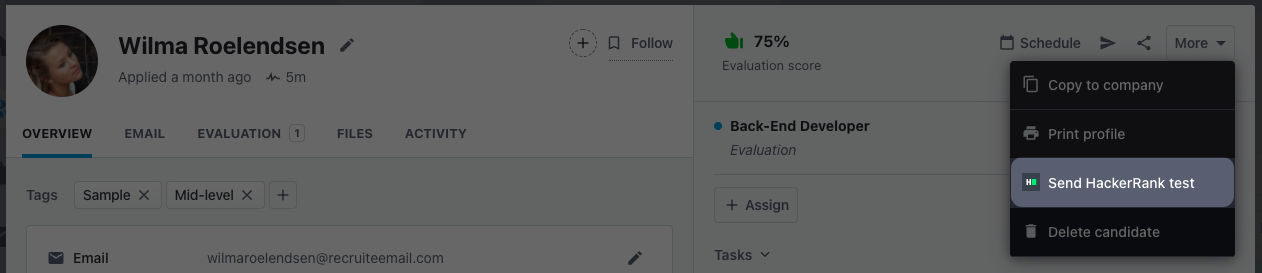
In the Send HackerRank test dialog:
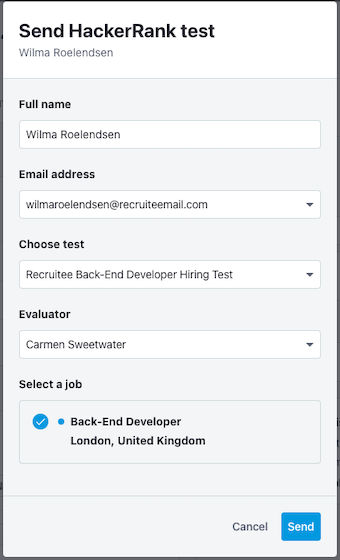
Review the candidate name and email address.
Select the Test, Evaluator, and Job.
Click Send.
After you send the test, the candidate profile displays a HackerRank badge.

Viewing test results
When the candidate completes the test, the evaluation score appears on the profile.
To view the test report:
Go to the Candidates tab.
Open the candidate’s profile.
Scroll to the HackerRank section.
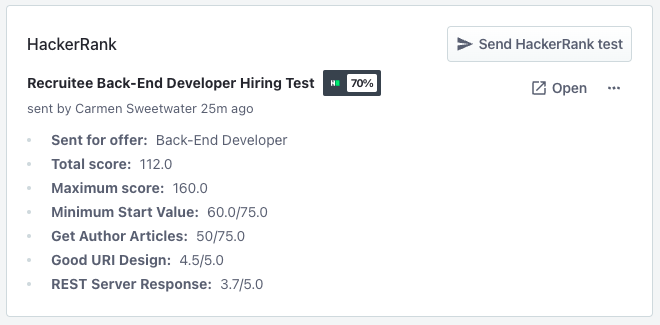
Click Open to view the test report in the HackerRank for Work account.