Create Custom Reports

Last updated: April 20, 2026

The Custom Reports feature provides on-demand access to data across both Screen and Interview. Use this feature to create, preview, save, and export tailored reports based on your organization's reporting needs.

The Custom Reports feature is available to:

  • All admin users by default.

  • Any user with access to the Insights tab on the HackerRank platform.

Key features

Custom Reports offer the following features:

  • Create, preview, and save reports:

    • Select only the columns that align with your reporting goals.

    • Hover over tooltips to understand what each column represents.

    • Preview the results before saving the report.

  • Combine business objects:

    • Combine data from multiple objects (for example, Tests, Candidate Test Attempts & Invites).

    • View unified insights in a single report.

  • Export as Excel:

    • Export reports instantly in Excel format.

    • Access saved reports anytime that is available to all admin users.

  • Copy and share reports:

    • Modify or duplicate existing reports without starting from scratch.

    • Share reports via email to collaborate across teams or departments.

  • Filter by columns: Apply filters (for example, Test Name, Attempt Start Time) to refine report content and focus on relevant data.

  • Shared admin access: All admin users can view, edit, and re-download saved reports, which helps streamline collaboration.

Creating a custom report

To create a custom report:
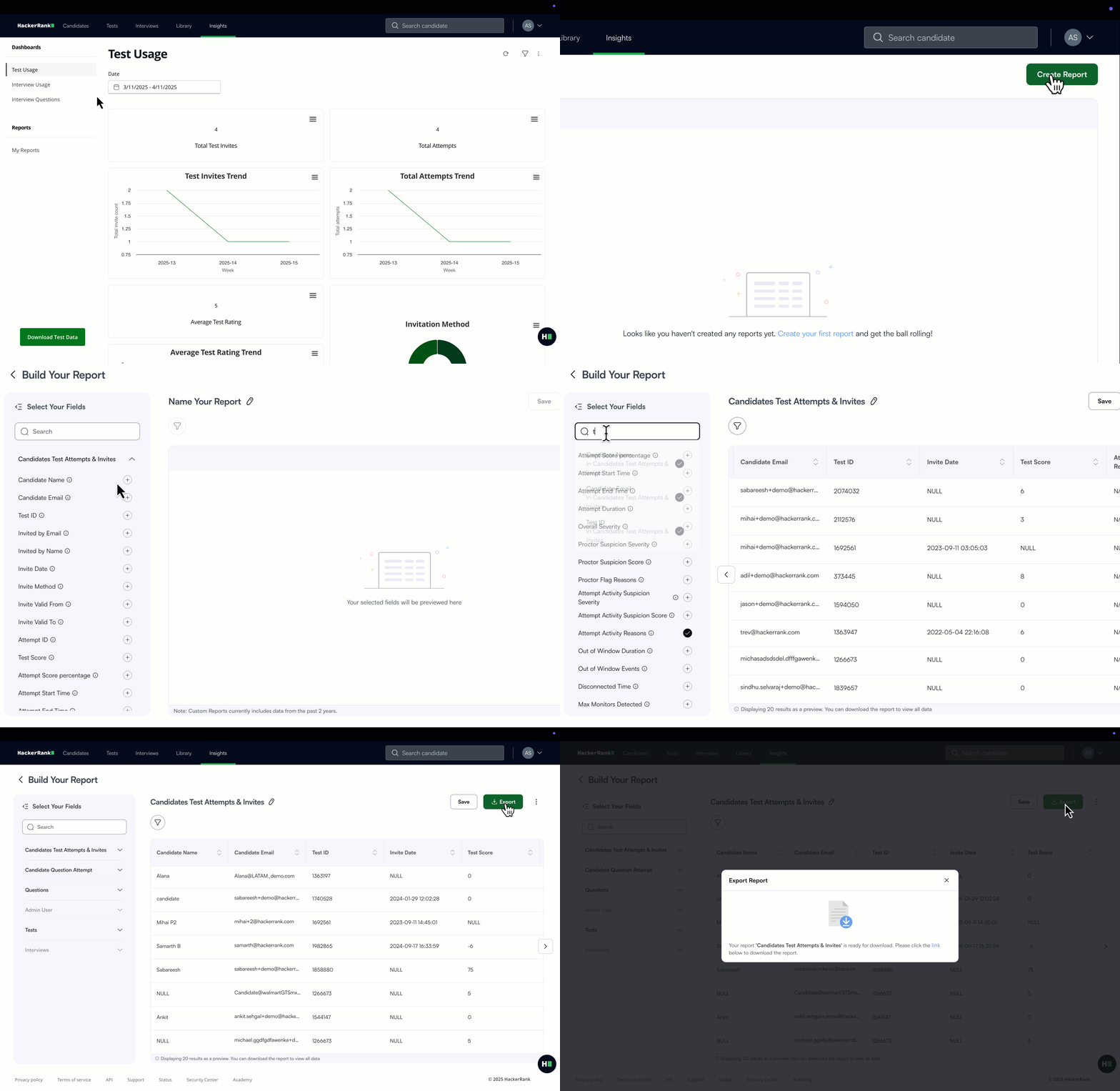
custom reportsnew.gif
  1. Log in to HackerRank for Work using your credentials.

  2. Go to the Insights tab.

  3. In the left panel, select My Reports under Reports section

  4. Click Create Report

  5. Select the required fields for your report:

    1. Use the search bar or expand categories (for example, Tests, Candidate Test Attempts & Invites) to find relevant columns.

    2. Click the plus (+) icon next to the relevant field to add it to the report.

Note: Use the tooltips (ⓘ) beside each field to view its description, or refer to the Available Functional Objects section below to see all fields and their descriptions.

  1. Preview the data in the right-hand panel. The preview table displays up to 20 rows.

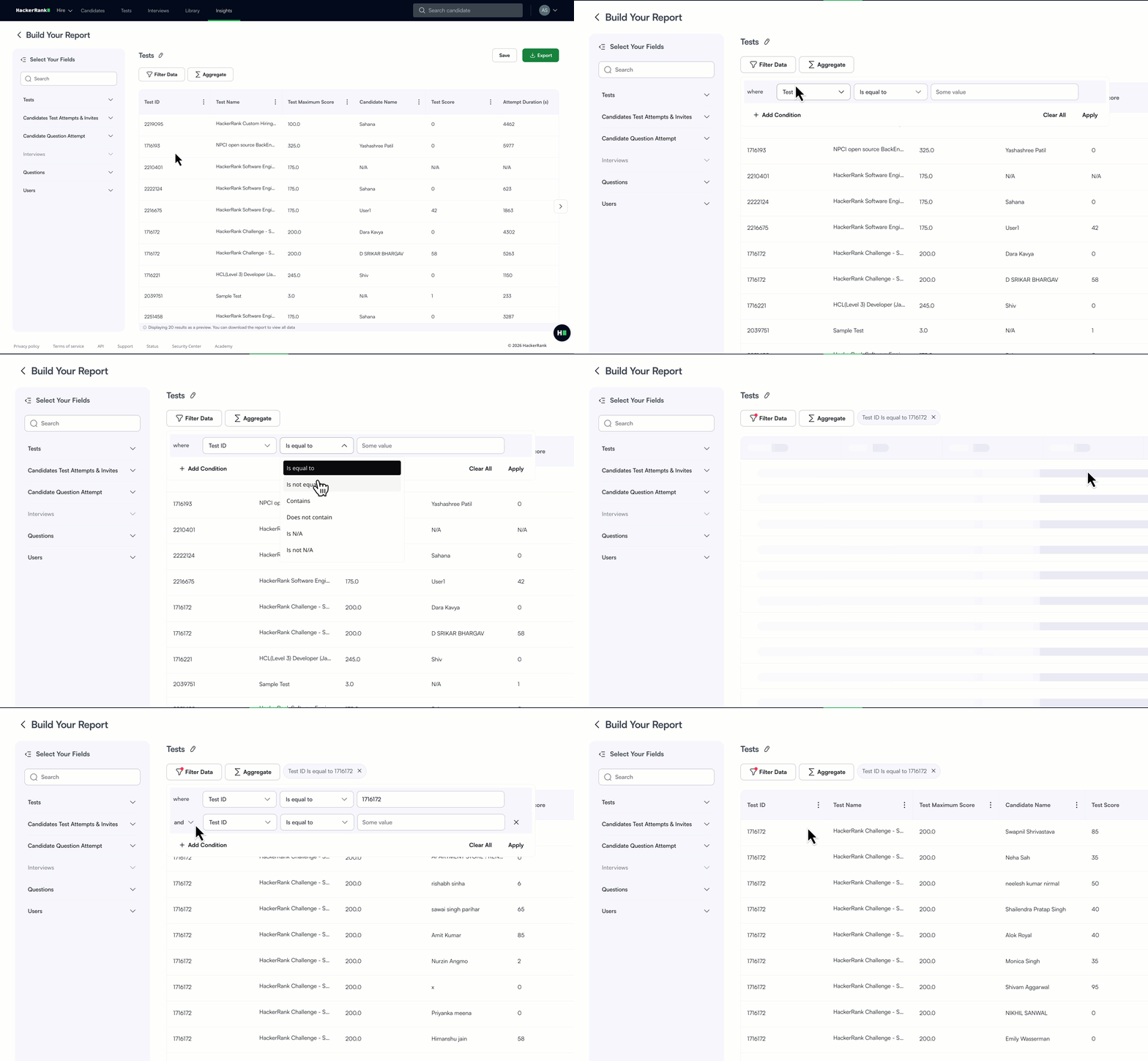
  2. (Optional) Apply filters to refine the data.
    ARTICLE REPORT 1.gif
    1. Click Filter Data.

    2. Select a field to filter on (for example, Test ID).

    3. Choose a condition:

      • Is equal to

      • Is not equal to

      • Contains

      • Does not contain

      • Is N/A

      • Is not N/A

    4. Enter the value.

    5. Click Apply.

    6. (Optional) Click Add Condition to apply multiple filters.

    7. (Optional) Click Clear All to remove all filters.

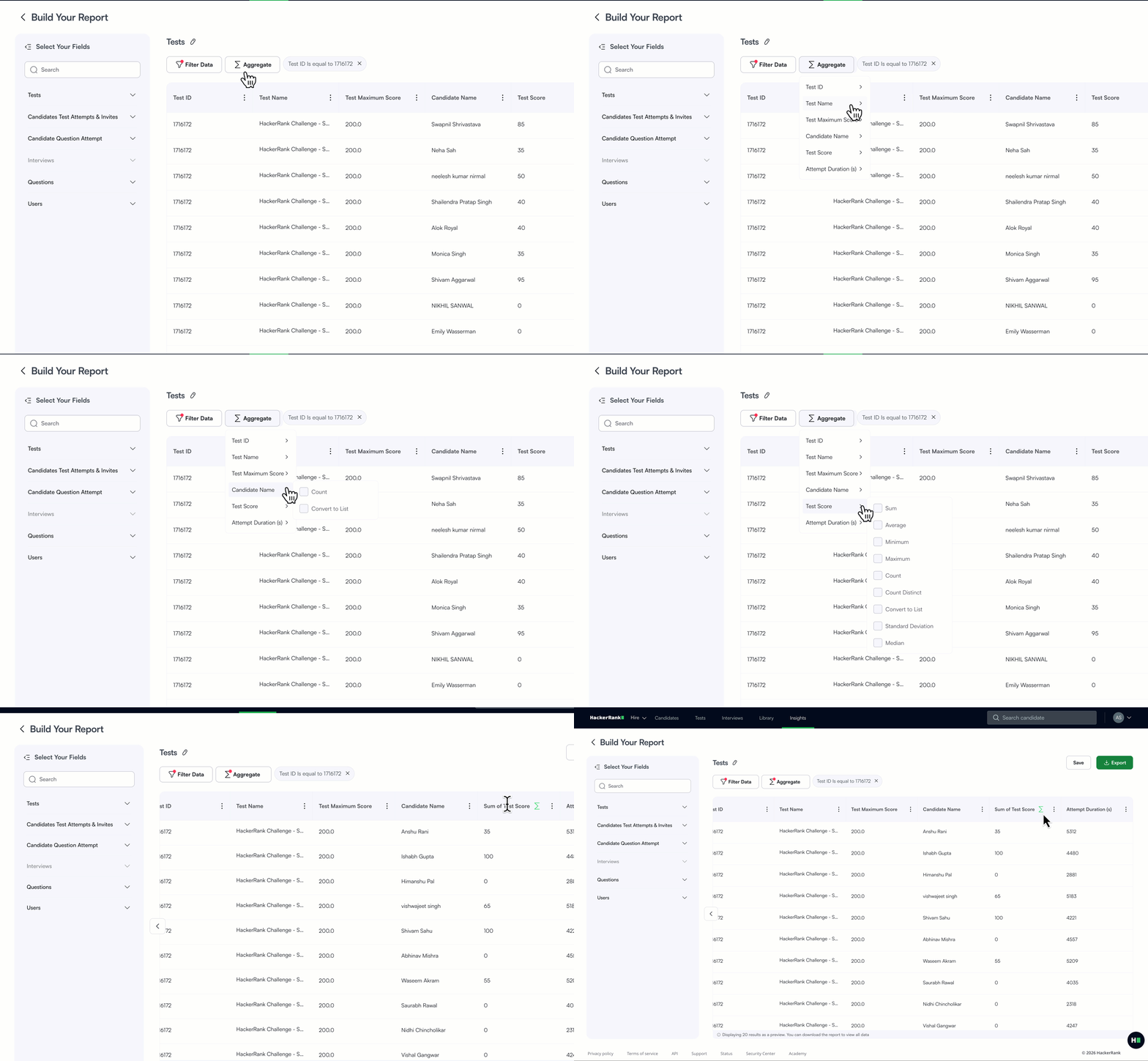
  3. (Optional) Apply aggregation to group or summarize numeric data.
    ARTICLE REPORT 2.gif
    1. Click Aggregate.

    2. Select a field (for example, Test Score)

    3. Choose one or more aggregation functions.

  4. Click Save to store the report for future access.

  5. Click Export to download the complete report as an Excel file.

Available functional objects

When creating a custom report, you can choose from the following objects:

  • Tests

  • Candidate Test Attempts and Invites

  • Candidate Question Attempt

  • Interviews

  • Questions

  • Users

These objects allow you to include data such as candidate names, test scores, question attempts, and other relevant metrics—all in one report.

The following sections provide tables that list the fields and their descriptions for each functional object.

Tests

Field

Description

Test ID

Unique identifier for the test.

Test Name

Name assigned to the test.

Target Role

Specifies the job role or position the test is designed to evaluate (for example, Cloud Engineer, Data Engineer, Full-Stack Engineer).

Test Status

Current state of the test (for example, Published, Draft).

Test Duration (min)

Total duration allowed for the test in minutes.

Current Test Version

Indicates version number of the test.

Latest Version Number

Most recent version number of the test.

Test Created At

Date and time when the test was created.

Test Updated At

Date and time when the test was last updated.

Test Cut-Off Score

Shows minimum passing score.

Test Section Count

Number of unique segments in the test.

Questions per Section

Number of questions per test section.

Test Maximum Score

Shows highest possible score.

Test Owner Name

Full name of the test owner.

Test Owner Email

Email address of the test owner.

Test Owner ID

Unique identifier of the test owner.

Admin Email

Email address of the administrator.

Is Confirmation Email Enabled

Indicates if confirmation emails are sent to candidates.

Is Reminder Email Enabled

Indicates if reminder emails are sent to candidates.

Is Copy-Paste Tracked

Shows status of copy-paste monitoring.

Is Tab Proctoring Enabled

Indicates if tab proctoring is active.

Is Photo Capture Enabled

Indicates need for photo ID.

Is Image Proctoring Enabled

Indicates if image proctoring is active.

Is Watermark Enabled

Indicates if watermarking is active.

Is Multi-Monitor Detection Enabled

Detects use of multiple monitors.

Is AI Plagiarism Detection Enabled

Checks for AI plagiarism detection.

Are Questions Shuffled

Shows if question shuffling is enabled.

Are Sections Shuffled

Shows if section shuffling is enabled.

Are Question Titles Hidden

Shows if question titles are concealed.

Are Question Points Shown

Shows if question points are displayed.

Test Link

URL link to access the test.

Test Label

Label or category assigned to the test.

Required Experience

Experience requirement for candidates.

Is Certified Assessment

Indicates official test certification status.

Test State

Indicates if the test is active or inactive.

Dynamic Section Count

Number of dynamic sections in the test.

Test History Created At

Date and time when the test history entry was created.

Candidates Test Attempts and Invites

Field

Description

Candidate Name

Name of the candidate.

Candidate Email

Email address of the candidate.

Test ID (Attempt)

Identifier of the test linked to the attempt.

Inviter Email

Email address of the person who sent the invite.

Inviter Name

Full name of the person who sent the invite.

Invite Sent At

Date and time when the invite was sent.

Invite Method

Method used to send the invite (for example, invited via email, public link).

Invite Valid From

Start date and time when the invite becomes valid.

Invite Valid To

End date and time when the invite expires.

Is Invite Valid

Indicates if the invite is valid (1 = valid, 0 = invalid).

Attempt ID (Question Attempt)

Unique identifier for the candidate’s attempt at a question.

Test Score

Candidate’s raw score on the test.

Score (%)

Candidate’s score as a percentage.

Attempt Started At

Date and time when the candidate started the attempt.

Attempt Ended At

Date and time when the candidate ended the attempt.

Attempt Duration (s)

Duration of the attempt in seconds.

Test Severity Level (Candidate Rated)

Overall severity score for the test.

Suspicious Activity Level (Proctor)

Severity for proctor-identified activities.

Suspicious Activity Score (Proctor)

Score reflecting proctor suspicion level.

Suspicious Activity Reasons (Proctor)

Reasons flagged by the proctor.

Plagiarism Suspicion Level (Attempt)

Severity level of plagiarism suspicion.

Plagiarism Suspicion Score (Attempt)

Suspicion score for plagiarism.

Plagiarism Suspicion Reasons (Attempt)

Reasons for flagging the attempt

Out-of-Window Duration (s)

Time spent outside test window.

Out-of-Window Events

Candidate window leave events.

Disconnected Time (s)

Total network disconnection time.

Monitors Detected Count (Max)

Max number of monitors detected.

Webcam Count

Number of webcams detected.

Paste Count

Number of pastes events in the editor.

Is Attempt Plagiarised

Indicates plagiarism detection status.

Candidate Full Name

Full name of the candidate.

Work Experience

Candidate’s work experience in years.

Candidate City

Candidate’s city of residence.

Student Roll Number

Candidate’s student roll number.

Personal Email

Personal email address of the candidate.

Graduation Year

Year the candidate graduated.

CGPA

Candidate’s Cumulative Grade Point Average.

GPA

Candidate’s Grade Point Average.

University/College Name

Name of the candidate’s university or college.

Contact Number

Candidate’s contact phone number.

Stream / Branch

Candidate’s academic stream or branch.

Recruiter Contact

Contact information of the recruiter.

Major

Candidate’s academic major.

Degree

Degree pursued or obtained by the candidate.

Gender

Candidate’s gender.

Job Role

Job role applied for.

Resume

Candidate’s uploaded resume.

Postgraduate Degree

Postgraduate qualification of the candidate.

Graduation City

City where the candidate graduated.

Country

Candidate’s country of residence.

Custom Question Answers

Responses provided to custom questions.

Candidate Feedback Comments

Candidate’s feedback about the test.

Product Rating

Candidate’s rating of the product experience.

Team

Name of the team associated with the test.

Team Owner

Person who owns or manages the team.

Team Region

Geographic region assigned to the team.

Team Department

Department the team belongs to.

Candidate Tags

Labels or tags assigned to the candidate.

ATS Status

Candidate’s status in the applicant tracking system.

Candidate Status

Current status of the candidate in the test workflow.

Candidate Record Created At

Date and time when the candidate record was created.

Detailed Report URL

Link to the candidate’s detailed report.

Test Max Score

Maximum possible score for the test.

Is GDPR Deleted

Indicates if candidate data has been deleted for GDPR compliance.

IP Address

IP address of the candidate.

Recency Status (Invite / Attempt)

Indicates latest invite/attempt.

Fullscreen Exit Count

Number of times the candidate exited fullscreen mode.

Plagiarism Report URL

URL of the plagiarism report.

Fullscreen Exit Duration (s)

Total time spent outside fullscreen.

Suspicion Category

Category of suspicious activity detected.

Candidate Question Attempt

Field

Description

Question ID (Attempt)

Unique identifier of the question attempt.

Test ID (Question Attempt)

Unique identifier of the test linked to the question attempt.

Candidate ID (Question Attempt)

Unique identifier of the candidate for the question attempt.

Attempt ID (Question Attempt)

Unique identifier for the attempt of the question.

Section Name

Name of the section containing the question.

Time per Question (s)

Time spent on the question in seconds.

Question Score

Candidate’s score for the question.

Question Max Score

Maximum score possible for the question.

Is Question Answered

Indicates if the question was answered.

Lines of Code

Number of lines of code submitted.

Compile and Test Count

Number of times the candidate compiled or tested the code.

Code Language

Programming language used in the solution.

Test Case(s) Pass Results

Results of passing test cases.

Test Case Memory (KB)

Memory usage of test cases in KB.

Test Case Execution Time (s)

Execution time of test cases in seconds.

Submitted Response (Question)

Candidate’s submitted response.

Is Plagiarism Detected (Question)

Indicates if the question is flagged for plagiarism.

Max Plagiarism Probability (Question)

Maximum probability of plagiarism.

Solution Status

Status of the submitted solution.

Total Test Cases

Total number of test cases for the question.

Passed Test Cases

Number of test cases the candidate passed.

Interviews

Field

Description

Interview ID

Unique identifier of the interview.

Interview Title

Title of the interview session.

Interview Created At

Date and time when the interview was created.

Interview Updated At

Date and time when the interview was last updated.

Interview Started At

Date and time when the interview started.

Interview Ended At

Date and time when the interview ended.

Interviewer URL

URL link for interviewers to join.

Thumbs Feedback

Thumbs-up or thumbs-down feedback on the interview.

Interview Status

Current status of the interview (for example, ready, finished).

Interview Source System

Source system from which the interview was scheduled.

Interview Questions

Questions asked during the interview.

Interviewer(s) Email

Email addresses of interviewers.

Interviewer(s) Name

Names of interviewers.

Interviewer(s) Feedback

Feedback provided by interviewers.

Interviewer(s) Rating

Ratings given by interviewers.

Interview Candidate Name

Candidate’s name in the interview.

Interview Candidate Email

Candidate’s email in the interview.

Candidate Phone

Candidate’s phone number.

Candidate Rating

Rating given to the candidate.

Candidate Feedback

Candidate’s feedback about the interview.

Template Name

Name of the template used.

Imported Template Names

Names of templates imported into the interview.

Zoom Recording Status

Status of the Zoom recording.

Result URL

URL of the interview result.

Interview Tags

Tags associated with the interview.

Archived By

User who archived the interview.

Is Virtual Lobby Enabled

Indicates if a virtual lobby was enabled.

Candidate IP Address

Candidate’s IP address during the interview.

Interviewer(s) IP Address

Interviewers’ IP addresses.

Questions

Field

Description

Question ID

Unique identifier of the question.

Question Title

Title of the question.

Question Source

Question origin or source.

Question Author Name

Name of the author who created the question.

Question Status

Current status of the question.

Is Question Leaked

Indicates if the question is leaked.

Questions Created At

Date and time when the question was created.

Question Author Email

Email address of the question author.

Question Author Team

Team of the author who created the question.

Question Type

Type of the question (for example, Coding, Multiple Choice).

Question Sub-Type

Sub-type of the question.

Question Difficulty

Difficulty level of the question.

Question Tags

Tags associated with the question.

Question Skills

Skills evaluated by the question, including associated proficiency levels.

Available Languages (Question)

Programming languages available for the question.

Is Question Cloned

Indicates if the question is a clone.

Cloned Question ID

Unique Identifier of the original cloned question.

Question Max Score

Maximum score for the question.

Recommended Time (min)

Recommended time to solve the question in minutes,

Users

Field

Description

User ID

Unique identifier for the user.

Full Name

Full name of the user.

Email

Email address of the user.

Is Email Activated

Indicates if the user’s email is activated.

Company ID (User)

Unique identifier for the company the user belongs to.

User Role

Role of the user in the system (For example, interviewer, recruiter, company admin).

Is Company Admin

Indicates if the user is a company administrator.

Last Sign-In At

Date and time when the user last signed in.

Sign-In Count

Total number of times the user has signed in.

Last Active At

Date and time when the user was last active.

Admin Teams Count

Total number of teams where the user has admin rights.

Locked At

Date and time when the account was locked.

User Created At

Date and time when the user account was created.

User Updated At

Date and time when the user account was last updated.

Created At

Date and time when the user account was created.

Department

Department the user belongs to.

Teams

Teams associated with the user.