AI Fluency Evaluation
Last updated: August 11, 2026
This feature is part of the AI Add-on. For more information, see 📄 Advanced Evaluation.
AI Fluency measures how effectively candidates use AI assistants during assessments by evaluating both AI Assistant interactions and IDE activity.
Key benefits
AI Fluency Evaluation provides the following benefits:
AI collaboration competency: Distinguishes between strategic AI use and overreliance by assessing how candidates integrate AI tools into their problem-solving approach.
Quality over frequency: Measures how effectively candidates communicate requirements and apply AI suggestions, rather than tracking usage frequency.
Enhanced differentiation: Reveals differences in problem-solving approaches and tool-usage strategies among candidates with similar coding scores.
Modern engineering readiness: Indicates a candidate’s ability to iterate on solutions and build on previous work
Note: AI Fluency Evaluation supports the following question types:
Coding
Projects
How AI Fluency works
AI Fluency uses large language models (LLMs) and standard rubrics to evaluate behavioral patterns in candidate-AI interactions.
The system analyzes the IDE activity and full conversation history between the candidate and the AI assistant, including prompts, actions, and responses.
The AI Fluency evaluation focuses on the following dimensions:
Context quality: How clearly and effectively candidates communicate requirements and provide relevant technical context.
Critical thinking: Evidence of independent reasoning and analysis, with AI used as a support tool rather than a replacement for judgment.
Collaboration: How candidates progress through problems, build on earlier interactions, and refine solutions over time.
AI Fluency grades
AI Fluency assigns one of the following grades based on how candidates interact with the AI assistant:
Grade A (High AI Fluency): Demonstrates effective AI collaboration through strategic tool use, clear communication, independent analysis, and iterative refinement.
Grade B (Moderate AI Fluency): Shows reasonable AI collaboration with developing proficiency. Indicates opportunities to improve consistency or depth.
Grade C (Low AI Fluency): Indicates limited AI collaboration and a need to improve effective use of AI tools.
Grade NA (Not Applicable): Indicates that there is not enough AI interaction to evaluate AI Fluency. This grade is assigned when the candidate does not use the AI assistant or when the available interactions are insufficient for a reliable evaluation. An NA grade does not indicate poor performance or a failing result.
Note: The evaluation applies the same standards to all candidates, regardless of experience level.
Enabling AI Fluency evaluation
To enable AI Fluency:
Enable Advanced Evaluation in the test-level settings. For more information, see Enable Advanced Evaluation.
Note: AI Fluency Evaluation is part of the Advanced Evaluation package and cannot be enabled independently.
Enable Proctor Mode in the test-level settings. For more information, see Enable Proctor Mode.
Viewing AI Fluency results
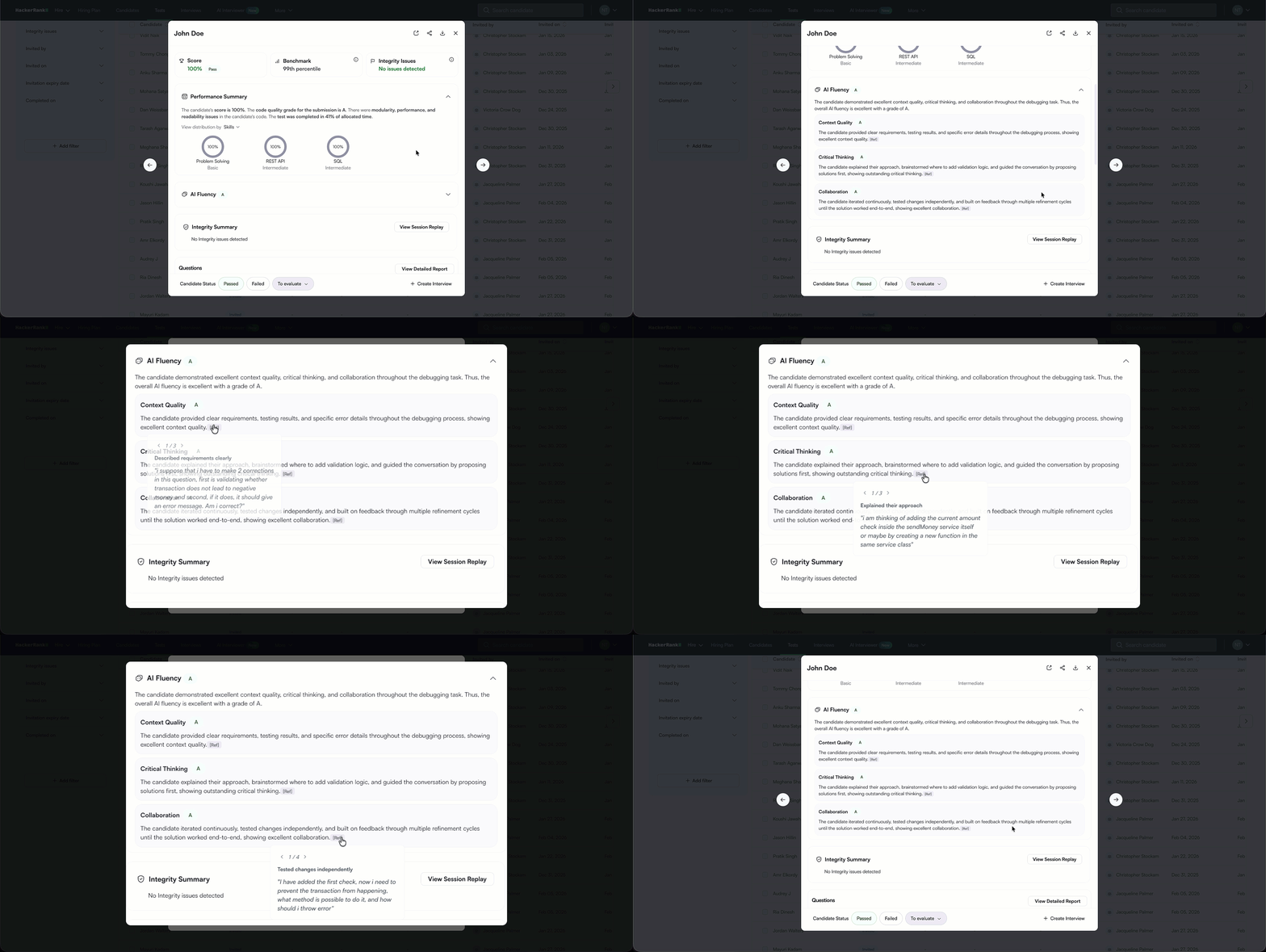
AI Fluency results appear in both the Summary Report and the Detailed Report.
Viewing AI Fluency results in a summary report
To view the AI Fluency results in the summary report:
Log in to your HackerRank for Work account using your credentials.
Go to the Tests tab.
Open the test you want to review.
Go to the Candidates tab.
Click a candidate's name to open the Summary Report.
Scroll to the AI Fluency section to view the following details:
Overall AI Fluency grade (A, B, C, or NA)
Brief explanation of the grade
Breakdown by evaluation dimension
For each dimension, select Ref to view excerpts from the candidate–AI interaction that support the evaluation.
Viewing AI Fluency results in a detailed report
To view AI Fluency evaluation details for a specific question in the detailed report:
Open the candidate’s Summary Report.
Scroll to the relevant Coding or Projects question.
Click the question to open the Detailed Report.
Go to the Candidate Evaluation tab and locate the AI Fluency section to view the following details:
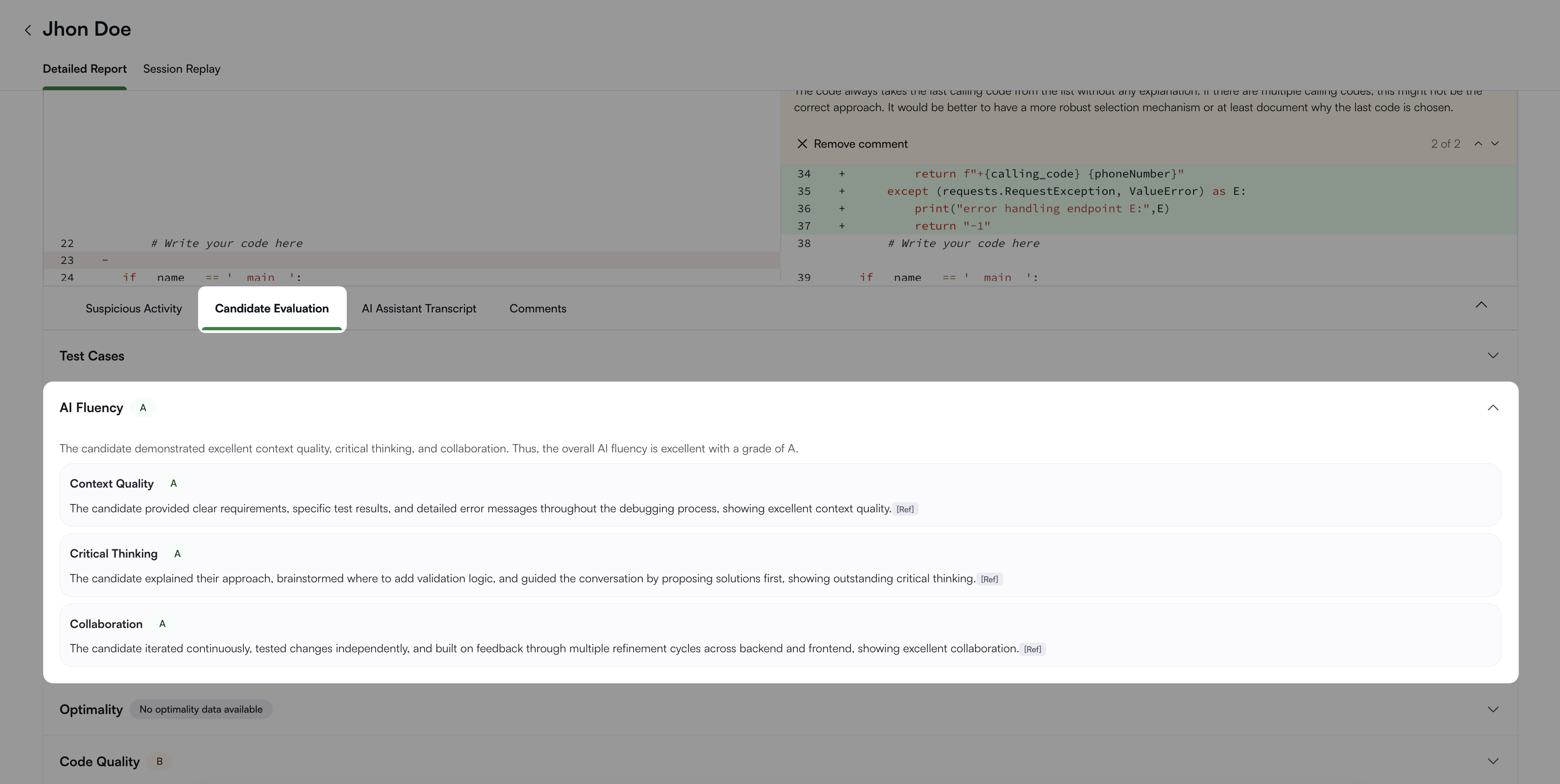
Overall AI Fluency grade (A, B, C, or NA)
Brief explanation of the grade
Breakdown by evaluation dimension
For each dimension, select Ref to view excerpts from the candidate AI interaction and IDE activity that support the evaluation.
Note:
AI Fluency complements your evaluation. Review it alongside other assessment metrics.
The scoring methodology considers question difficulty and type to ensure a fair assessment across problems and complexity levels.
Frequently Asked Question (FAQ)
Is AI Fluency available for every test?
No. AI Fluency is available only when Advanced Evaluation and Proctor Mode are enabled for the test.