Workday - HackerRank Interviews User Guide
Last updated: December 30, 2025
HackerRank Interviews integrates with Workday to schedule Interviews to assess candidates' coding skills for different job requisitions without leaving the Workday platform. Once done, their score and performance data are automatically available in Workday for further evaluation.
This article describes the integration steps to schedule HackerRank Interviews with candidates from Workday, publish results from HackerRank Interviews to Workday, and Frequently Asked Questions.
Prerequisites
In HackerRank for Work | In Workday |
|
|
Schedule Interviews on Workday
Schedule the Interview:
Launch the Workday application and select the candidate you want to Interview with.
The candidate page is displayed that contains all its job applications about the candidate.
Click the Actions drop-down and select Move Candidate.
Click Move Forward on the Move Candidate page and select Interview/Additional Interview.
Click OK. The Schedule window is displayed.
Click Schedule to schedule the Interview with the Candidate.


Sign In to the HackerRank Account:
Before you generate the Interview link, ensure that you are signed in to the HackerRank account.
Click Sign In.
Generate the Interview Link:
Select the Include Web Conference Link check box. Note that this option will be available only if you sign in to Workday with your Recruiter account.
Select the other fields required for your setup, and click Next.
The Schedule Interview page is displayed with the Interviewer's information.
Review the time by clicking on the Interviewer information.
Click Schedule. The Schedule Interview dialogue is displayed.
Click OK.
Once the timings are updated, click Next. The Proposed Interview Schedule page is displayed to confirm the Interview details.
Click Confirm.
The Interview link is generated as the Web Conference Link.
After verifying the Email body message and other details, click Submit.
The Interview is scheduled for the candidate.


View the Interview Scorecard in Workday
After an interview ends, you can sync the interview scorecard from HackerRank to Workday and review the feedback in Workday.
Step 1: Sync the scorecard from HackerRank
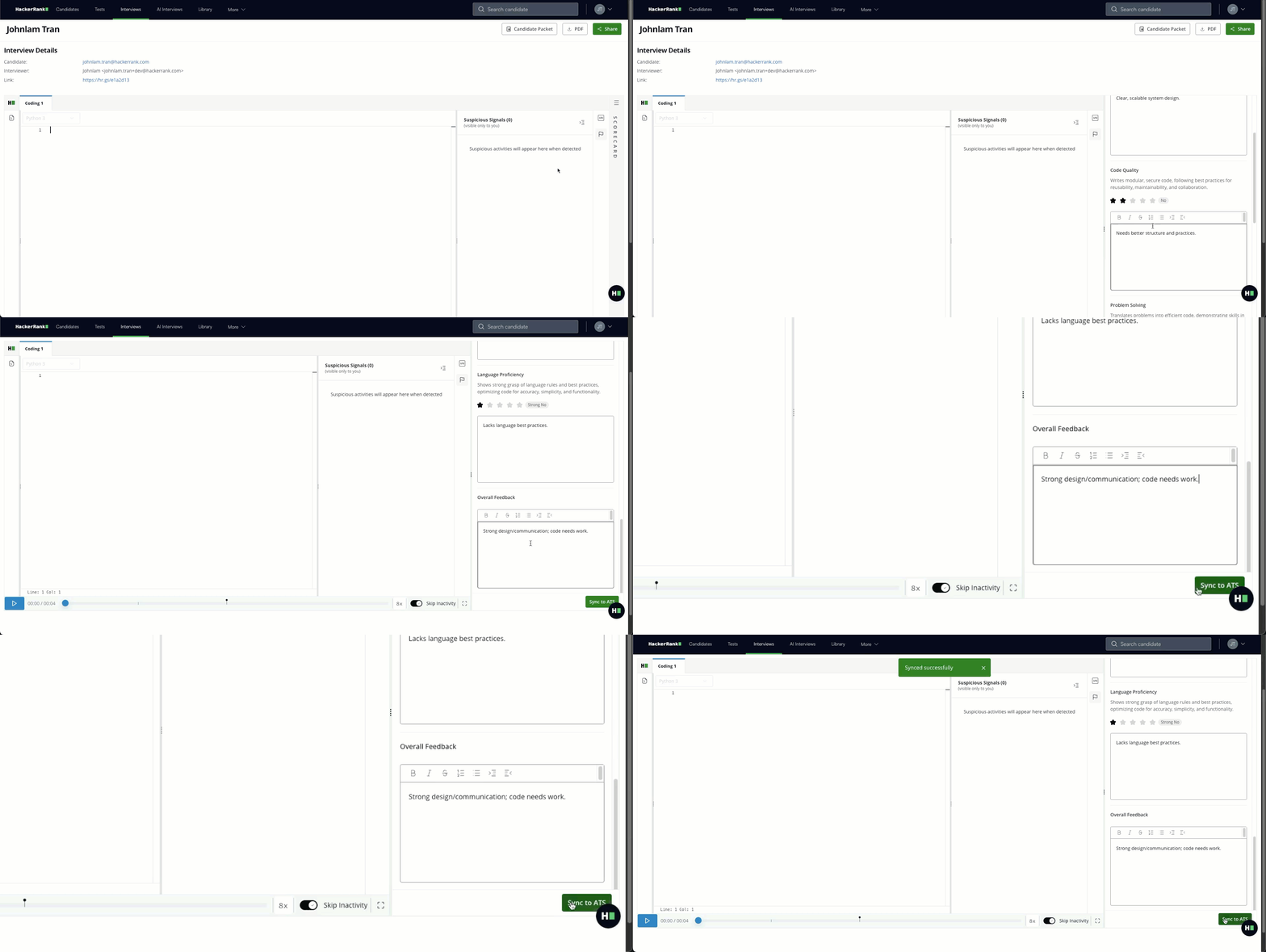
Complete the candidate scorecard on the HackerRank platform. For more information, see Using the scorecard during an interview.
Click Sync to Workday to sync the scorecard to Workday. A success message appears when the sync completes.
Note: If multiple interviewers participate, each interviewer submits their scorecard in HackerRank. Sync the scorecard to Workday after each interviewer submits their scorecard.
Step 2: View the scorecard in Workday
Open the candidate profile in Workday.
Go to the Interview tab.
Review the interview details and scorecard to decide whether to move the candidate forward in the hiring process.
Note: If the scorecard has not synced yet, the status shows Pending.