Email Notifications
Last updated: December 26, 2024
You can adjust email notification preferences for your HackerRank account by following these steps:
Accessing Email Notification Settings
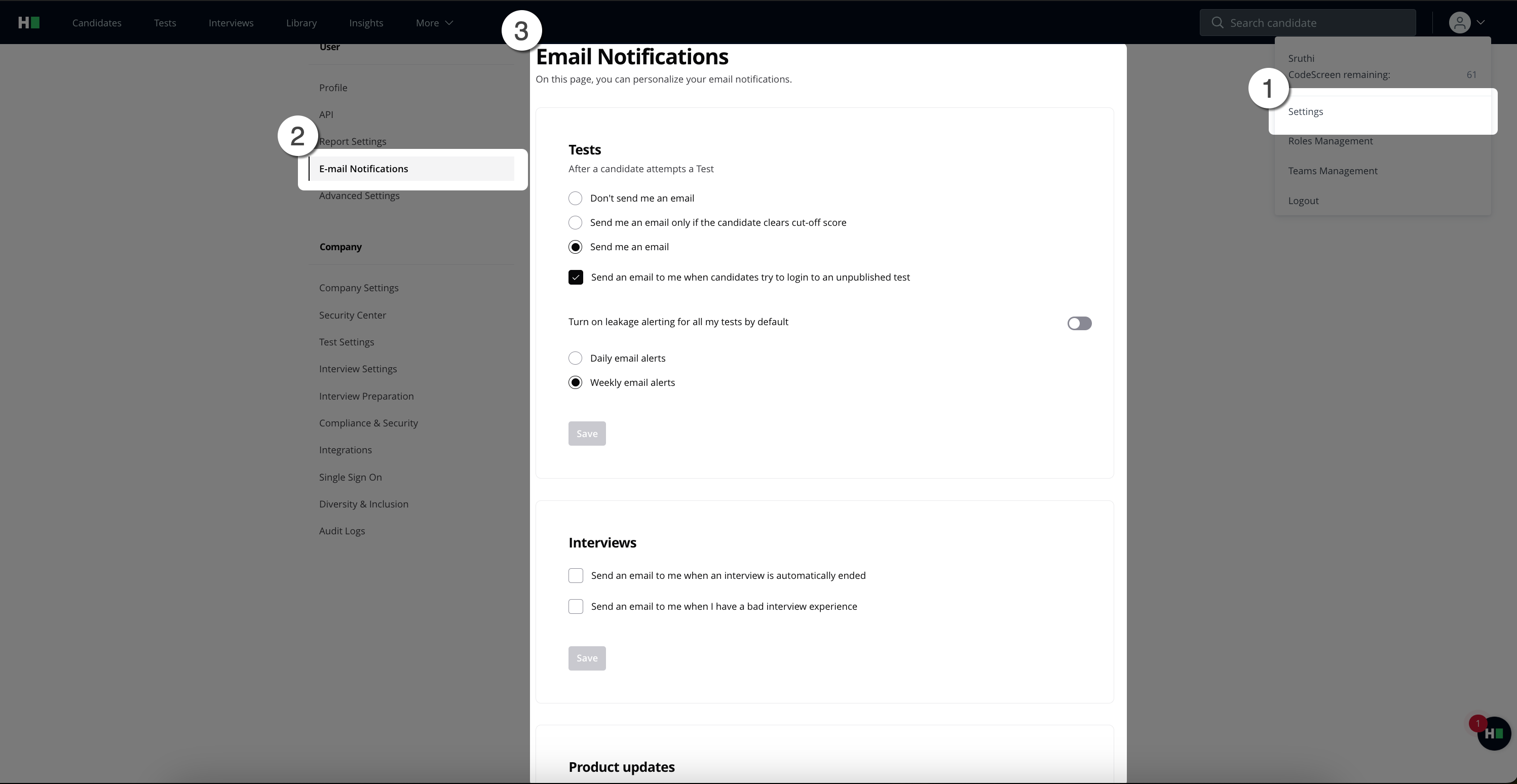
Click the arrow next to the user icon in the top-right corner of the home page.
From the drop-down menu, select Settings, and then choose Email Notifications in the left navigation pane.
Configuring Test Notifications
Default Setting: You will receive an email notification after a candidate completes a test.
Custom Options:
Disable notifications for test completions.
Enable notifications only if a candidate's score exceeds the cutoff score.
Tip: Specify the cutoff score in a test's Advanced Setting. For details, refer to the Modifying Score Settings for Tests article.
Configuring Interview Notifications
Enable or disable the option to send an email when an interview ends automatically.
Default: Disabled.Enable or disable the option to send an email if you provide feedback indicating a poor interview experience.
Default: Enabled. This email helps collect additional details to improve your experience.
Configuring Product Update Notifications
Enable or disable the option to receive product update emails.
Default: Enabled.
Finalizing Your Changes
Click Save to apply your preferences.