Configure Single Sign-On (SSO) for SkillUp
Last updated: November 5, 2025
SSO allows members of your organization to securely access SkillUp using their existing corporate credentials, eliminating the need for separate login details.
Prerequisites
You must have Company Admin access in your HackerRank for Work account.
Your organization must use a SAML 2.0-compliant Identity Provider (IdP), such as Okta, Azure AD, or OneLogin.
Configuring SSO for SkillUp
SkillUp uses the same SSO configuration as HackerRank for Work. To enable SSO for SkillUp, you must first configure it in your HackerRank for Work account.
Note: If your organization already uses SSO for HackerRank for Work, skip Step 1 and proceed to Step 2: Provision users for SkillUp.
To configure SSO for SkillUp:
Step 1: Configure SSO in HackerRank for Work
To configure SSO in HackerRank for Work:
Follow the Getting Started with Single Sign-On (HackerRank for Work) article to complete the initial configuration.
Follow the appropriate SSO setup article based on your organization’s IdP:
Once you complete the SSO configuration, all users under the same verified domain automatically authenticate to SkillUp using SSO.
Step 2: Provision users for SkillUp
You can provision users for SkillUp in two ways:
Manual provisioning
Admins can manually invite users directly from the SkillUp Admin Panel. For more information, see 📄 User Management.
Automated provisioning with SCIM
You can automate user provisioning in SkillUp using the System for Cross-domain Identity Management (SCIM) protocol. SCIM automatically creates, updates, and deactivates SkillUp user accounts based on changes in your organization’s directory.
This method is recommended for organizations that use SCIM 2.0 compliant IdPs such as Okta, Azure AD, or OneLogin.
To set up SCIM, use one of the following options based on your organization’s configuration:
First-time setup: If you are setting up SCIM with HackerRank for the first time, follow the Setting Up SCIM Provisioning for SkillUp article.
Existing SCIM setup for HackerRank for Work: If your organization already uses SCIM for HackerRank for Work, you can reuse the same SCIM endpoint and authentication token for SkillUp.This setup automatically synchronizes both platforms.
If your existing SCIM configuration uses Okta, follow the instructions in the Extend SCIM Provisioning with Okta to SkillUp article to ensure the correct functioning of SCIM for SkillUp.
Step 3: Access SkillUp
Users can access SkillUp either via their IDP tool or by visiting hackerrank.com/skillup/home and logging in.
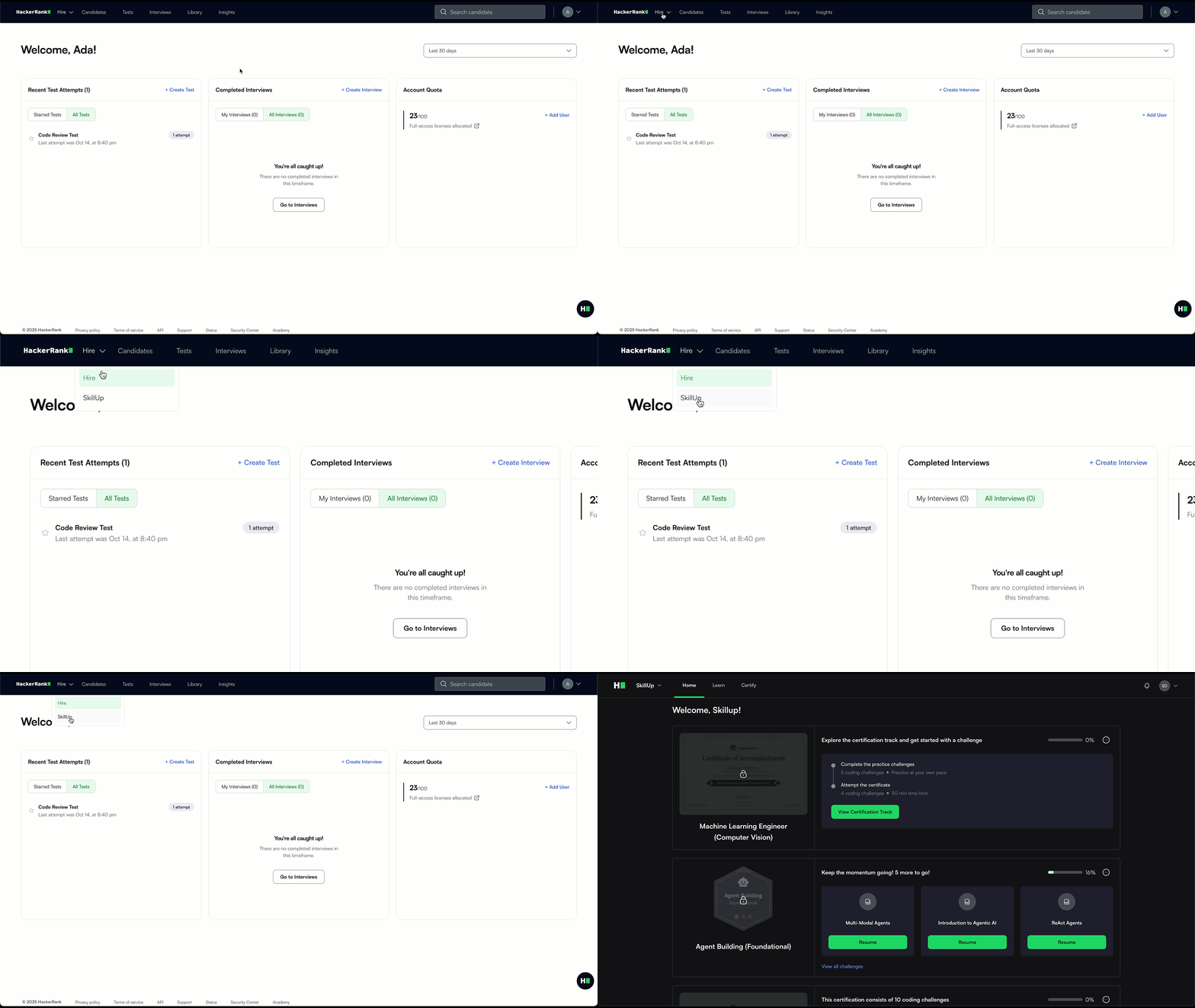
If a user has access to both SkillUp and HackerRank for Work, logging in through the IdP redirects them to the HackerRank for Work home page. They can access SkillUp from the App Switcher in the top navigation bar.
Note: Users may temporarily lose access for up to 2 hours during the transition from regular login to SSO.
For assistance in configuring SSO, contact your HackerRank Account Manager or email skillup-support@hackerrank.com.