Reporting APIs
Last updated: October 14, 2025
SkillUp’s Reporting APIs allow you to programmatically extract skill signals, badges, and certification data from your organization. These APIs enable you to integrate learning insights with HR systems, build customized reports, and connect learning outcomes to business impact.
Note: Only administrators can generate credentials to access these APIs.
Available endpoints
Endpoint | Description |
Credentials API | Returns a list of all available badges and certifications in SkillUp. |
Users API | Returns user data, including learning progress, badges, and certifications achieved. |
Configuring reporting APIs
SkillUp APIs use the OAuth 2.0 Client Credentials flow for secure access. Only authorized systems can request and retrieve reporting information.
To configure reporting APIs:
Step 1: Generate OAuth Credentials
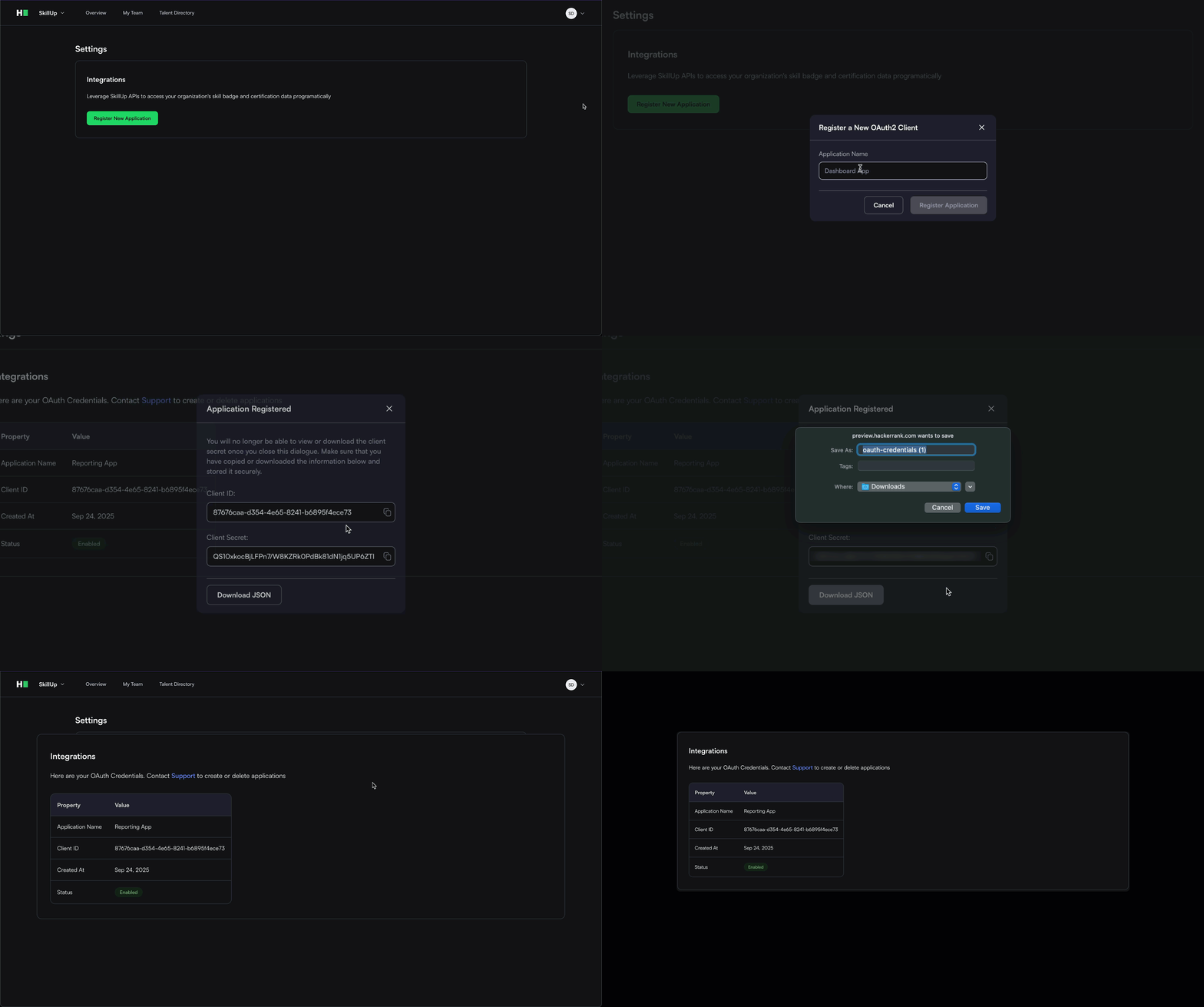
Log in to SkillUp using an administrator account.
Click your profile icon in the upper-right corner and select Settings.
Click Register New Application.
Enter a name for your application.
Click Register Application.
Copy the Client ID and Client Secret to the clipboard or click Download JSON to save the credentials as a file.
Important Note: The client secret is displayed only once during generation. You must store it securely before closing the dialog because you cannot retrieve it again.
Your application is now successfully registered, and you can start making API requests.
Step 2: Request Access Token
As a security measure, you must first obtain an access token by making a POST request to the /v1/oauth2/token endpoint.
The Authorization header must include your client credentials encoded in Base64 format.
Combine your client ID and client secret using a colon (:).
Example:client_id:client_secretEncode the string using Base64.
Add the prefix
Basicto the encoded string to create the Authorization header.
Example:Basic <base64_encoded_string>.
Note: The access token (JWT) is valid for 10 minutes. When it expires, repeat these steps to request a new token.
Example
If client_id = "abc123" and client_secret = "def456"
Combined: “abc123:def456”

Base64 encoded:”YWJjMTIzOmRlZjQ1Ng==”

Final header:”Basic YWJjMTIzOmRlZjQ1Ng==”
Request
curl -X POST https://www.hackerrank.com/skillup/api/v1/oauth2/token \
-H "Authorization: Basic <base64_encoded_credentials>" \
-H "Content-Type: application/x-www-form-urlencoded" \
-d "grant_type=client_credentials"
Headers
Header | Required | Value |
Authorization | Yes | Basic |
Content-Type | Yes | application/x-www-form-urlencoded |
Body parameters
Parameter | Required | Value |
grant_type | Yes | client_credentials |
Response
{
  "access_token": "eyJhbGciOiJIUzI1NiIsInR5cCI6IkpXVCJ9...",
  "expires_in": 600
}
Field | Type | Description |
access_token | string | The access token for API authentication |
expires_in | integer | Token validity period in seconds (600 seconds) |
Step 3: Access SkillUp APIs
After you obtain a valid access token, use it to call the SkillUp Reporting APIs.
Include the token in the Authorization header of your request.
Example Request
curl -X GET https://www.hackerrank.com/skillup/api/v2/credentials \
-H "Authorization: Bearer <access_token>"
Error handling
Status Code | Error | Description |
400 | Bad Request | Missing or invalid parameters |
401 | Unauthorized | Access token is invalid or expired |
403 | Forbidden | Token lacks required permissions |
429 | Too Many Requests | Too many requests made in a short time |
Best practices
Store credentials securely. Never expose client credentials in client-side code.
Tokens remain valid for 10 minutes. Cache and reuse access tokens instead of generating new ones for every request
Request a new token before the current one expires.
Rate limits
Request Type | Limit |
Token requests | 1 request per second |
API requests | 1 request per second |
For more information, contact skillup-support@hackerrank.com.