Flexible User Roles
Last updated: March 5, 2026
HackerRank for Work enables administrators to manage user-level access using the Flexible User Roles feature. This feature provides granular control, allowing administrators to customize user entitlements based on organizational requirements. Flexible user roles help organizations improve productivity and efficiency while maintaining secure administrative oversight.
Key features
The flexible user roles offer the following features:
Align user roles with workflows: Customize user roles to match specific responsibilities and processes, ensuring each user has the appropriate level of access and capabilities.
Granular access control: Manage user permissions precisely to protect sensitive data and maintain compliance with security policies.
Adapt to change: Adjust user entitlements easily as business processes evolve, allowing your organization to accommodate new requirements or role changes without operational disruption.
Entitlements
Entitlements define the actions that users can perform within the platform. They control activities such as viewing, creating, updating, and deleting tests, interviews, and questions.
Note: HackerRank offers four types of user roles. For more information about these roles and their default entitlements, see Types of User Roles.
Accessing flexible roles
To access flexible roles:
Log in to HackerRank for Work using your credentials.
Select your profile icon in the upper-right corner.
Select Team Management from the drop-down menu.
Go to the User Roles tab.

Customizing user roles
To customize a user role:
Select the role you want to customize.
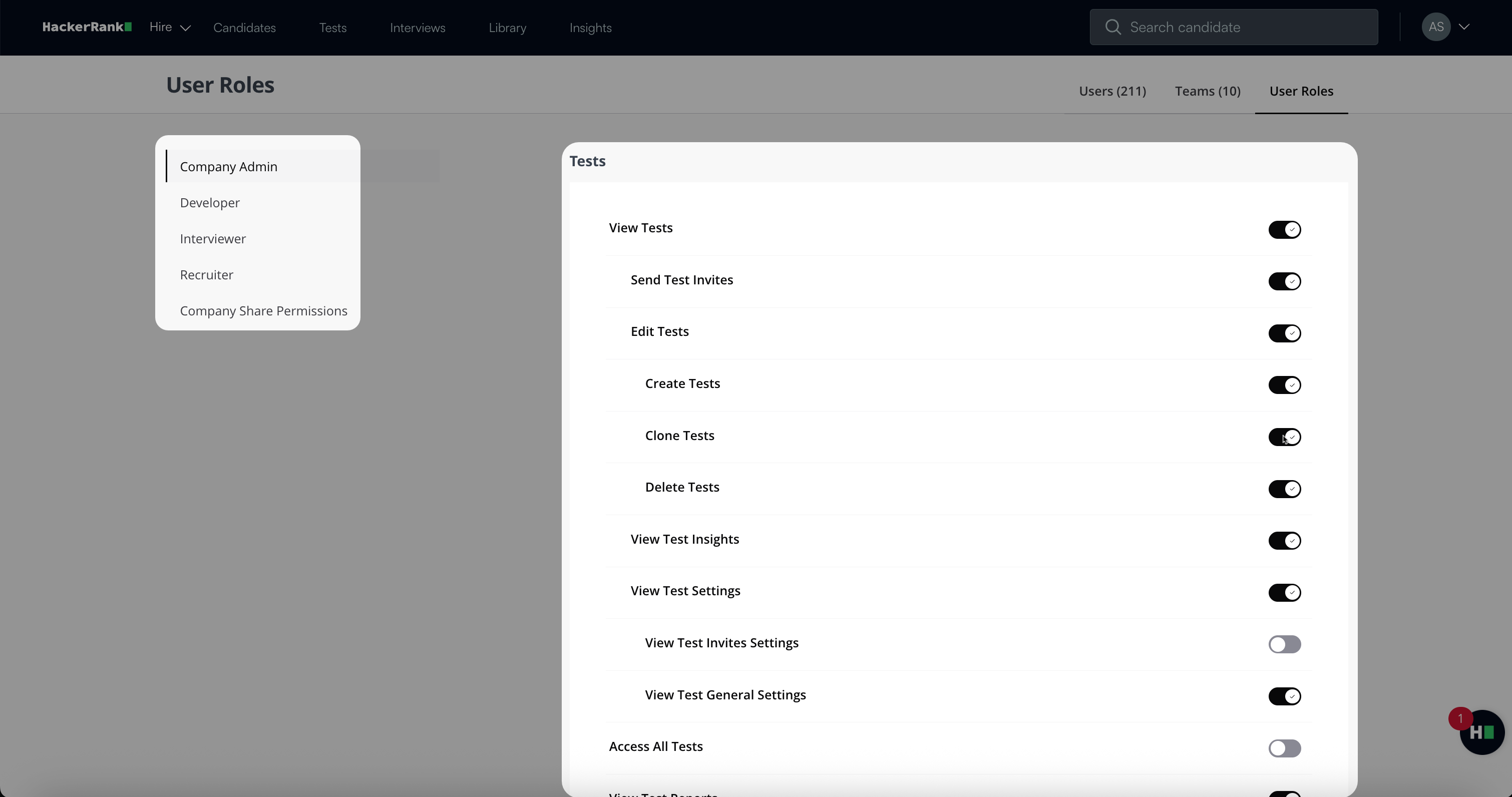
Turn on or off each entitlement using the toggle switch next to it.
Scroll to the bottom of the page and click Save Changes.
Customizing entitlements for individual users
To customize entitlements for an individual user:
Log in to HackerRank for Work using your credentials.
Select your profile icon in the upper-right corner.
Select Team Management from the drop-down menu.
Go to the Users tab.
Select the individual user whose entitlements you want to customize. The user's entitlement details side panel opens.
Turn on or off each entitlement using the toggle switch next to it.


Note: A user's entitlements are restricted by the maximum entitlements granted to their assigned user role. Users cannot exceed the limitations set for their role.
Available entitlements
The table below lists the entitlements available in HackerRank for Work, regardless of the user role.
Category | Entitlement | Definition |
Tests | View Tests | View a test and all associated questions. |
Tests | Send Test Invites | Send invitations to candidates for a test. |
Tests | Edit Tests | Edit and share a test. Add or replace questions only if you also have the View Question Library entitlement. |
Tests | Create Tests | Create a test. Add or replace questions only if you also have the View Question Library entitlement. |
Tests | Clone Tests | Create a clone of an existing test. |
Tests | Delete Tests | Delete an existing test. |
Tests | View Test Insights | View the Test Insights page. |
Tests | View Test Settings | View the settings configured for a test. |
Tests | View Test Invites Settings | View the invite configuration for a test, including invite expiry and public and private URLs. |
Tests | View Test General Settings | View the general configuration for a test, including role, work experience, test label, language, and test expiration time. |
Tests | View Test Access | View the test access details from within the test settings. |
Tests | Access All Tests | Perform any action on any test in the account. |
Tests | View Test Reports | View detailed test reports. View candidate details from the Tests tab if you also have the View and Edit Candidates entitlement. |
Interviews | View Interviews | View interview details, including the report, excluding scorecards. |
Interviews | Create and Edit Interviews | Create an interview and add interviewers, tags, and candidates. Add templates only if you also have the View Interview Templates entitlement. |
Interviews | Delete Interviews | Delete interviews that are shared with you. |
Interviews | Conduct Interviews | Join an interview if you are added as an assigned interviewer. View assigned templates only if you also have the View Interview Templates entitlement. |
Interviews | Leave Feedback on Interviews | Add or edit your feedback for interviews you conducted. View only your own scorecard in the report. |
Interviews | Add and Remove Questions Outside Assigned Template | Add or remove questions not included in the assigned template. If disabled, use only questions from the template. |
Interviews | View Full Interview Reports | View the complete report, including feedback from all interviewers. |
Interviews | Access All Interviews | Perform any action on any interview in the account. |
Questions | View Question Library | View all questions in the HackerRank and Company Library. |
Questions | Edit Company Questions | Edit and share company questions. |
Questions | Create Company Questions | Create company questions. |
Questions | View Question Insights | View the Question Insights page for company and HackerRank Library questions. |
Questions | Access All Company Questions | Perform any action on any company question in the account. |
Interview Templates | View Interview Templates | View interview templates and all associated questions. Add templates to interviews only if you also have the Create and Edit Interviews entitlement. |
Interview Templates | Create and Edit Interview Templates | Create, edit, and share templates. Add or replace questions only if you also have the View Question Library entitlement. |
Interview Templates | Access All Interview Templates | Perform any action on any template in the account. |
Interview Scorecards | View Interview Scorecards | View interview scorecards that are shared with you. |
Interview Scorecards | Assign Scorecard to Interviews | Assign scorecards to interviews. Assign scorecards to templates only if you also have the Create and Edit Interview Templates entitlement. |
Interview Scorecards | Create and Edit Interview Scorecards | Create and edit interview scorecards. |
Interview Scorecards | Set Default Scorecard for All Interviews | Edit and set the company-wide default scorecard. |
Interview Scorecards | Access All Interview Scorecards | View, edit, assign, and manage all interview scorecards created by any team member. |
Candidates | View and Edit Candidates | View candidates on the Candidates page and within Tests, including their candidate packet. |
Candidates | Delete Test Candidates | Delete a candidate from a test where you have Edit Test access. |
Candidates | View and Edit All Candidates | View and update the status of all candidates at the account level. |
Candidates | Delete Any Candidate | Delete any candidate information across the account. |
Company | Create and Edit Teams | Create, edit, or delete teams; manage members; set team admins; toggle library access; and set user allocation limits. |
Company | Modify Users | Lock users, change user roles, override entitlements, and view quota limits. Add or unlock users only if you also have the Create and Edit Teams entitlement. |
Company | Modify User Role Entitlements | Toggle the entitlements of any user role. |
Company | Modify Company Settings | View and edit all company settings, including audit logs and integrations. Create, duplicate, and archive job roles. |
Company | View Company Insights | View all company-level Insights dashboards. |
Exports | Allow Bulk Exports | Export the data of multiple users. Requires the View or Edit entitlement for the relevant functional area and base-level access to the object being exported. |