AI Plagiarism Detection
Last updated: July 22, 2026
Plagiarism in the hiring process compromises the integrity of evaluations, making it difficult to assess a candidate’s abilities accurately. Plagiarism detection tools help maintain fairness, creating a level playing field that leads to better hiring decisions.
Types of Code Plagiarism
We encounter three types of code plagiarism:
Use of AI tools when explicitly prohibited.
Plagiarism from other external sources like the internet.
Copying code from someone else who took the same test.
Types of Plagiarism Detection Models
Standard plagiarism detection
Standard plagiarism detection is enabled by default for all tests. It uses Moss (Measure of Software Similarity) to compare a candidate’s code against others in our database. The system uses language-specific thresholds that account for differences in code length across programming languages. This method effectively identifies plagiarism from external sources or copied test cases (as mentioned above under types of code plagiarism).
Advanced AI plagiarism detection
To address all three types of code plagiarism, including AI-aided malpractice, we have developed an advanced Machine Learning (ML) model. This model analyzes multiple factors, such as:
Code writing patterns
Time taken to solve the problem
Copy-paste activity
Tab-switching behavior
The ML model predicts suspicious behavior and classifies candidate attempts in a test as either "High" or "Medium." This detection is especially useful for identifying the use of AI tools like ChatGPT when their usage is restricted.
The flagged attempts are highlighted in candidate reports, allowing hiring teams to review the reasons and make informed decisions. Human oversight remains crucial, as the ML model currently has an overall precision of 85%, meaning flagged sessions are correct 85% of the time.
Note: The AI Plagiarism Detection feature currently supports only Coding questions.
Limitations
AI plagiarism detection is limited when evaluating questions requiring minimal effort to achieve a full score or when solutions consist of very few lines of code. These scenarios often lack enough data points for accurate detection. However, the system will still flag the response for potential plagiarism if significant external content is copy-pasted.
Note: Given that it’s a Machine Learning model, we comply with the audit requirements mentioned in the AEDT / NYC AI law.
Enabling Advanced Plagiarism Detection for a Test
This feature can be enabled from Test Settings.
Steps
Click on Settings within a test and select Test Integrity under the Test Administration section.
Scroll down to Plagiarism and turn on the AI Plagiarism toggle.
Click on Agree & Enable from the following popup.

Candidate Consent
When AI plagiarism detection is enabled, candidates must consent before starting the test.

Signals Used for Detection
A non-exhaustive list of factors considered:
Copy-Pasting: Significant portions of code copied from external sources.
Coding Patterns: Structural similarities in code and distinct coding styles.
Iterations: Multiple iterations in the code while tackling layered tasks.
Tab-Switching: Switching away from the active test tab during execution.
Viewing Flagged Plagiarism Attempts
When a candidate's test attempt is flagged for plagiarism, it is categorized as "High" or "Medium" based on the confidence level of the model’s prediction. Follow the steps below to view these flagged attempts.
Steps
Navigate to the Candidate List and choose the candidate whose test attempt has been flagged.
You can view the suspicious activity under the Performance tab in the Candidate Summary report.
To review more details on the plagiarism signals, click on the question that has been flagged.
In the question details, the Keystroke Codeplayer lets you quickly understand why a candidate was flagged for plagiarism. You can navigate to the relevant portions of their coding journey where potential suspicious activity may have occurred.
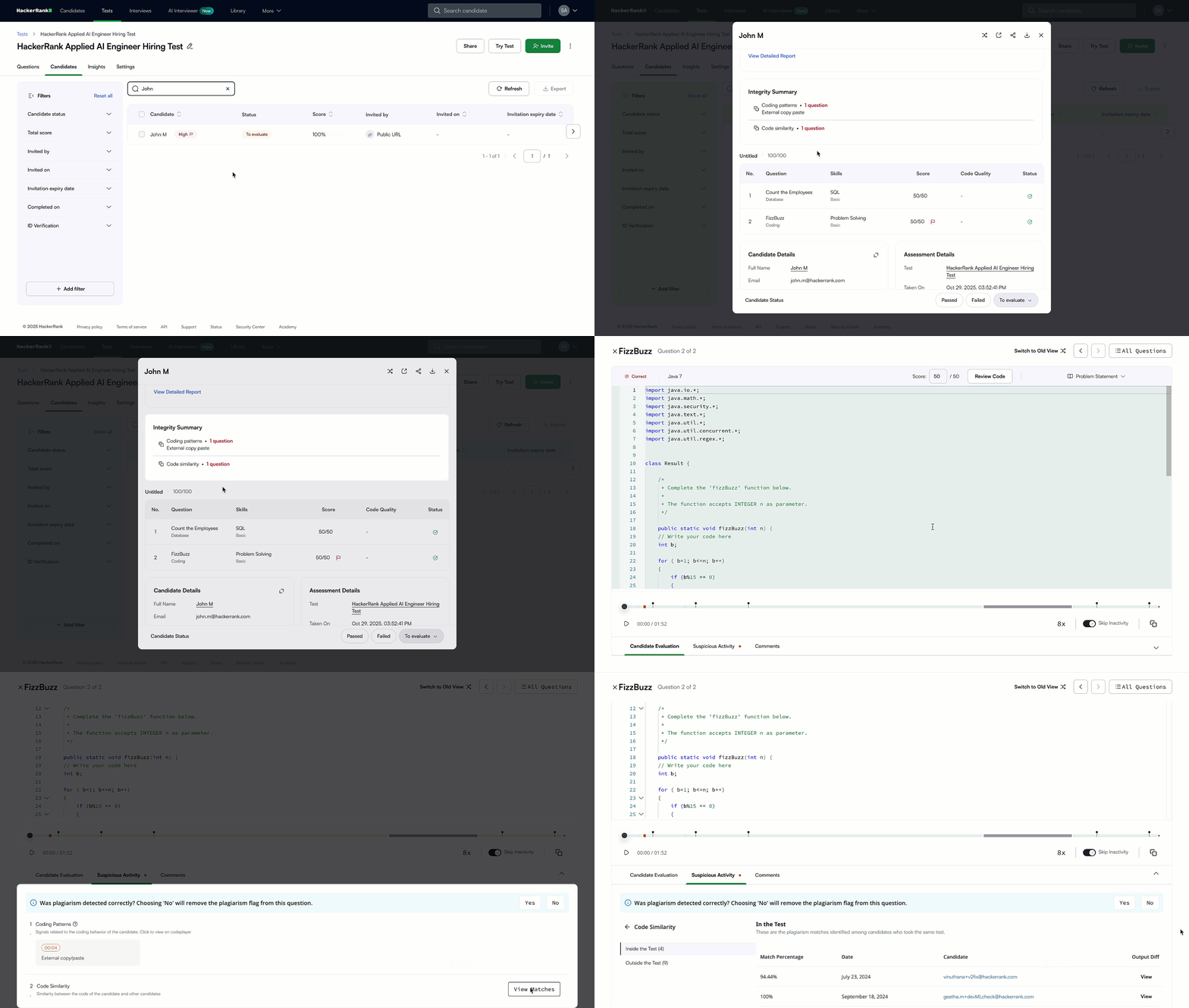
Understanding the Reasons for Flagging
There are two main categories under which a candidate’s attempt can be flagged:
Code Similarity: The candidate’s code is similar to one or more candidates' submissions, indicating potential plagiarism.
Coding Patterns: Unusual behavior was detected through the candidate’s keystroke patterns during the test. This may involve:
Code iterations
Writing patterns or
Tab switch instances
Sub-Patterns in Coding Behavior: The following sub-patterns are commonly detected when coding patterns raise concerns about the candidate’s behavior:
Suspicious Code Resetting: A large section of previously written code is deleted and replaced, accompanied by irregular typing or cursor movements.
External Copy-Paste: Significant portions of code are copied directly from an external source.
Continuous Model Improvement
HackerRank’s dedicated ML team continuously improves the plagiarism detection model by learning from emerging patterns of code plagiarism and misclassifications. When a statistically significant improvement is made, new updates to the model are deployed automatically.
FAQs
Will coding in an external IDE instead of the HackerRank platform trigger a potential cheating flag?
If candidates use Projects, which support an offline workflow (coding in their own IDE and pushing the code to the HackerRank platform), no cheating flag is triggered.
However, if candidates solve a standard coding question in an external IDE and copy and paste their code into the HackerRank platform, the system is likely to flag this behavior as suspicious activity.