January 2026 Release Notes
Last updated: March 2, 2026
Modern software development is defined by how effectively developers orchestrate AI across the software development lifecycle, while applying judgement and demonstrating strong fundamentals. As these workflows become standard, hiring and upskilling must evolve to assess not just outcomes, but how developers arrive at them.
HackerRank’s January release strengthens how you assess real-world, AI-assisted development while protecting that signal at scale. Candidates now experience a consistent, modern environment across all question types with the new candidate site fully rolled out, and faster Code Repo assessments through quicker installs and builds.
Integrity is central to this release. New detection signals, including object detection in webcam feeds and deleted code analysis, help identify potential policy violations without penalizing legitimate workflows. Clear, interpretable flags and reports highlight suspicious activity with supporting evidence, while override controls ensure human judgment remains part of the evaluation process, keeping assessments fair, auditable, and trustworthy.
Alongside integrity, improvements to AI-assisted evaluation, code quality grading, and reporting provide deeper insight into how candidates structure solutions and iterate over time. To support teams beyond hiring, SkillUp expands guided learning with an AI Engineer Certification and a weekly Prompt Engineering Challenge, helping developers build modern skills with confidence.
Screen
Test Variant Updates
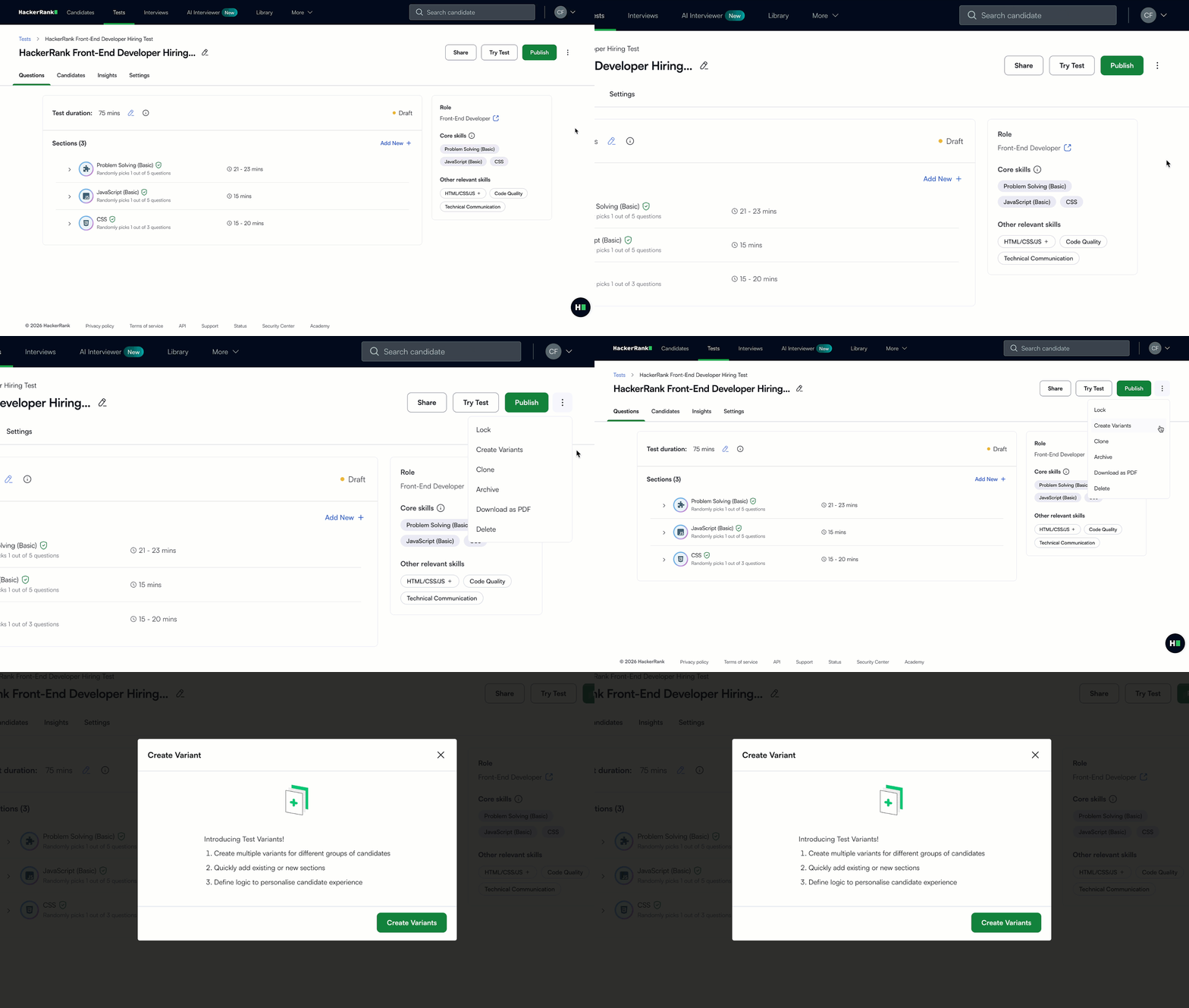
Test Variant Overview
When you create a variant of an existing test, you now see a clear overview that explains how test variants work. This helps you get oriented before setup, whether you are new to variants or need a quick refresher.
Add Time to Candidate Attempts
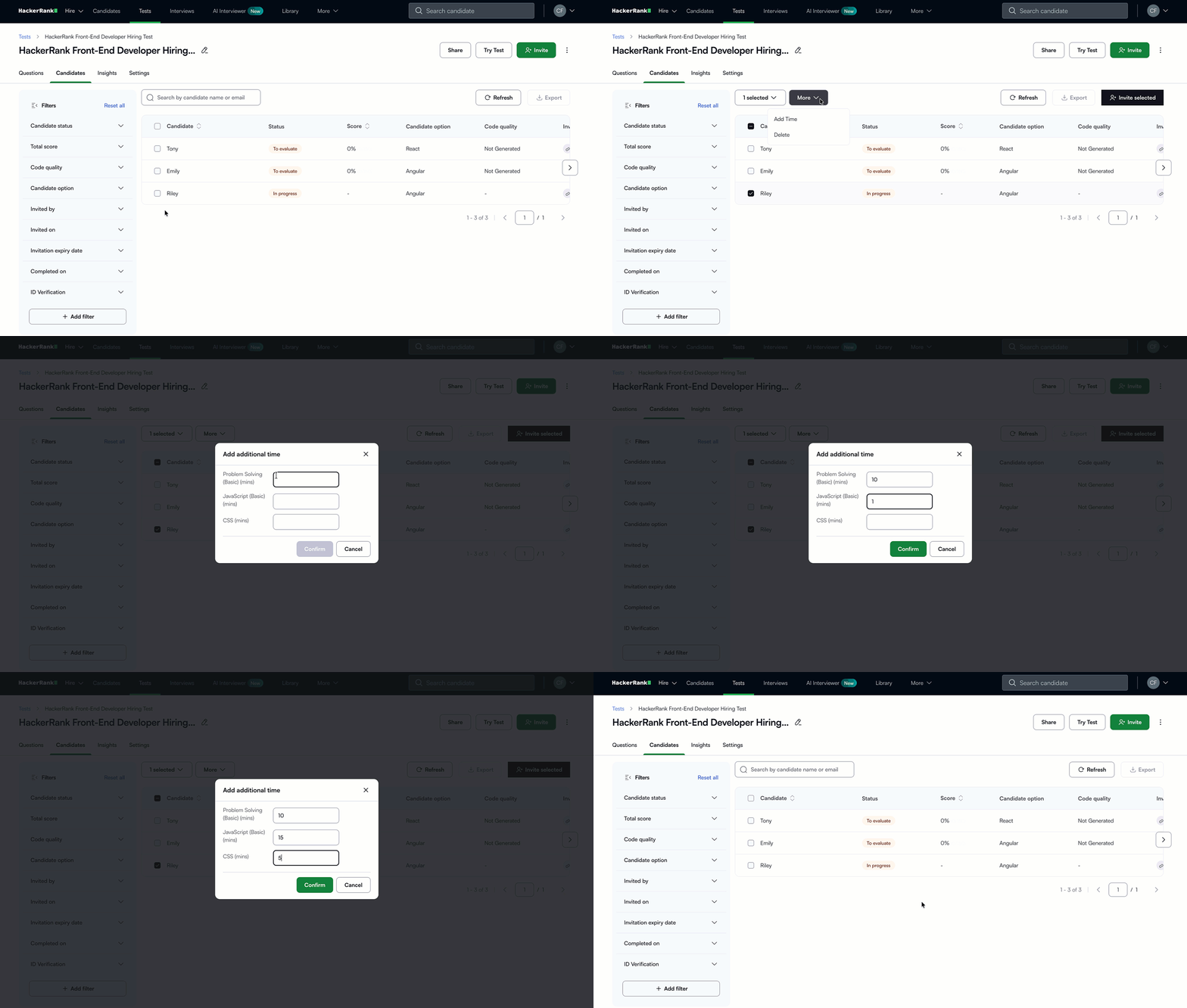
You can now grant time accommodations to candidates taking variant-based tests. Time adjustments can be applied at the section level for each candidate.
For bulk updates, select multiple candidates from the same test variant. The relevant test sections will be displayed, allowing you to add time where applicable.
Time adjustments can only be applied when all selected candidates belong to the same variant. If candidates from different variants are selected, the Add time option is disabled and you’ll be prompted to filter your selection to a single variant before proceeding.
Simplified Test Variant Logic Creation
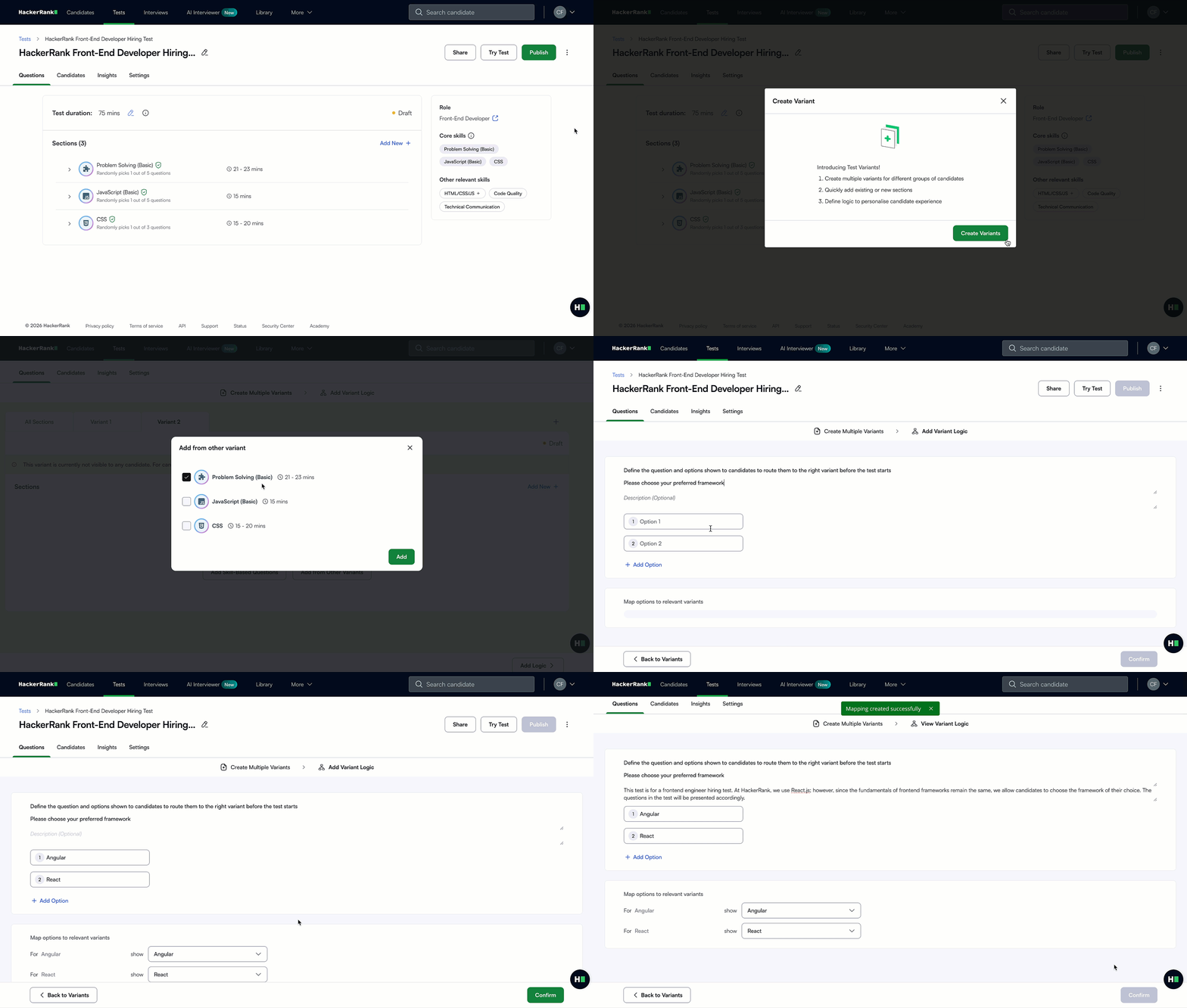
Creating test variant criteria is now more intuitive. The redesigned Add Variant Logic workflow lets you route candidates to different test variants based on their answers to a qualifying question.
For more information, see Adding extra time in variant-based tests, 📄 Create Test Variants.
Improved Navigation in Detailed Reports
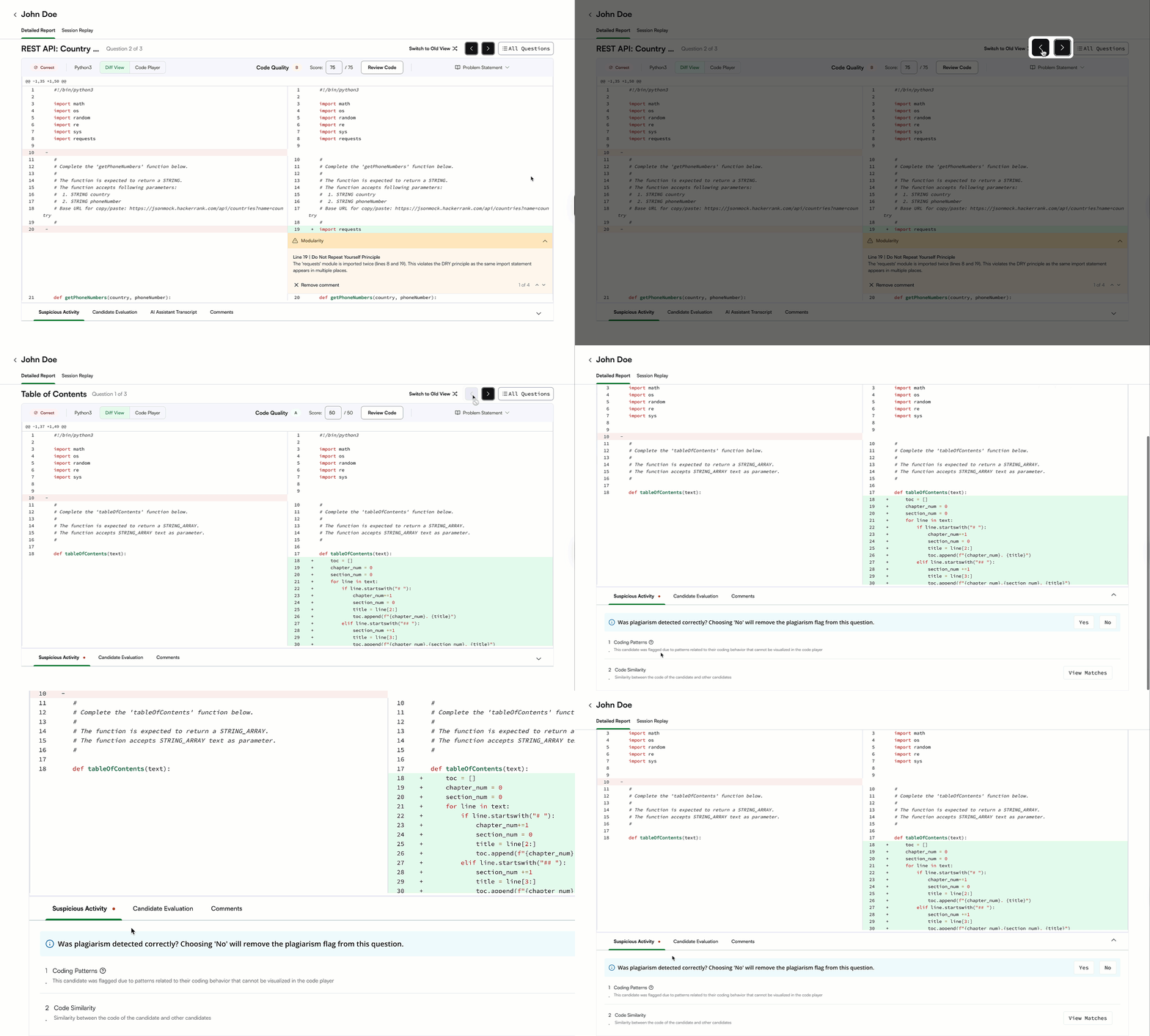
Detailed reports are now easier to navigate, making it faster to move between questions. The Next and Previous buttons are more prominent, so you can review responses without losing context.
The Suspicious Activity tab is now easier to find, helping you access and review integrity insights more quickly.
For more information, see 📄 Viewing a Candidate's Detailed Test Report.
Emoji Support in Emails
You can now include emojis in key emails, including test reports, leakage alerts, reminders, invites, and confirmations. This helps add emphasis and personality where it fits your brand, helping important messages stand out.
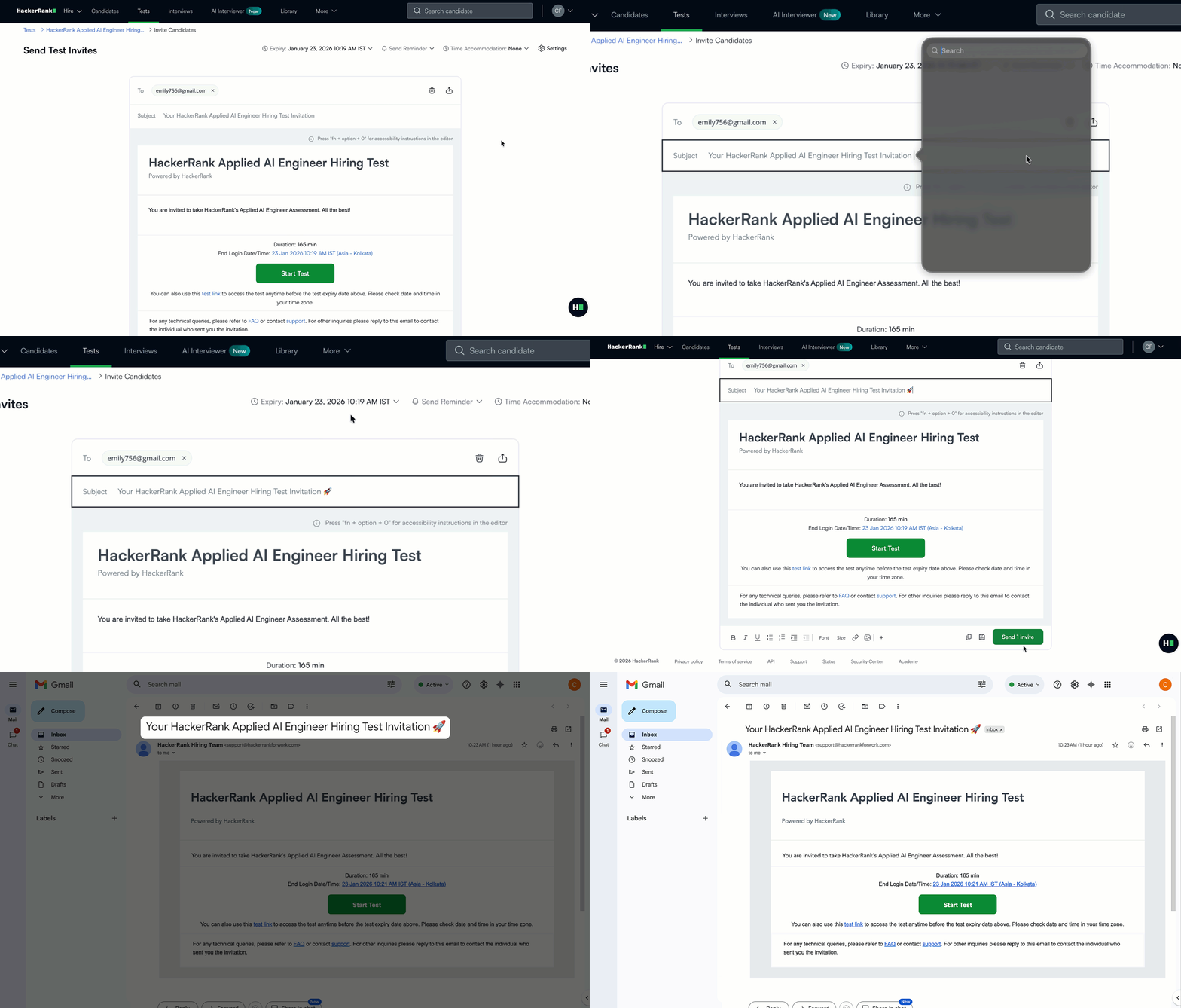
For more information, see 📄 Manage Email Templates, 📄 Invite Candidates to a Test.
Leakage Indicator and Filter on Test Listing Page
You can now identify tests with one or more leaked questions directly from the test listing page. An indicator appears next to affected tests, and you can hover over it to see the number of leaked questions. As part of this update, the Leaked tab under Library has been removed.
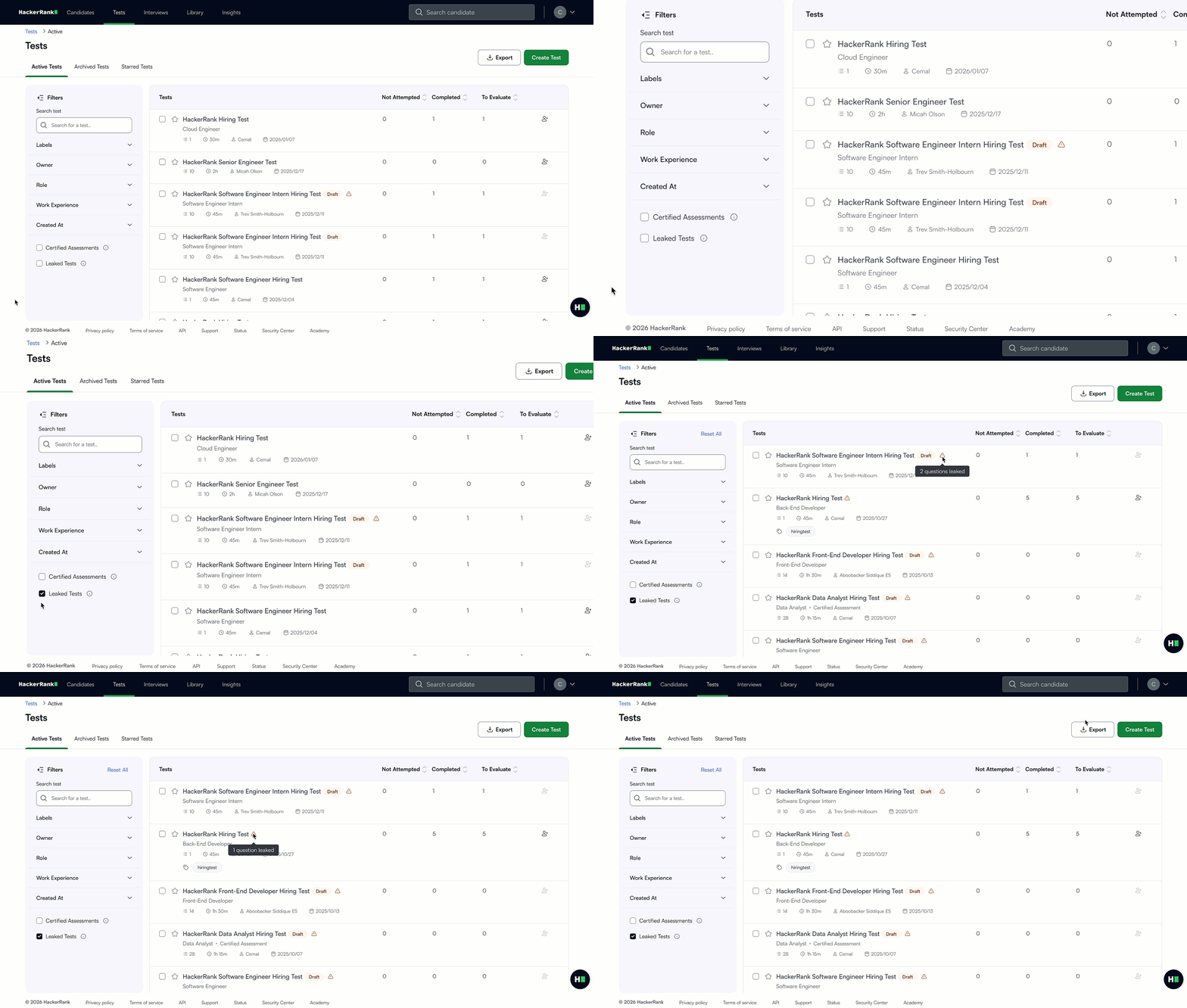
For more information, see Viewing tests with leaked questions.
See Predefined Fields During Candidate Details Setup
You can now view a complete list of predefined HackerRank candidate fields directly in the Candidate Details setup flow, making it easier to see what’s already available before adding your own. Predefined fields retain their standard field types, while custom fields can be fully tailored to your unique requirements. This ensures a consistent structure for candidate data with the flexibility to customize where needed.
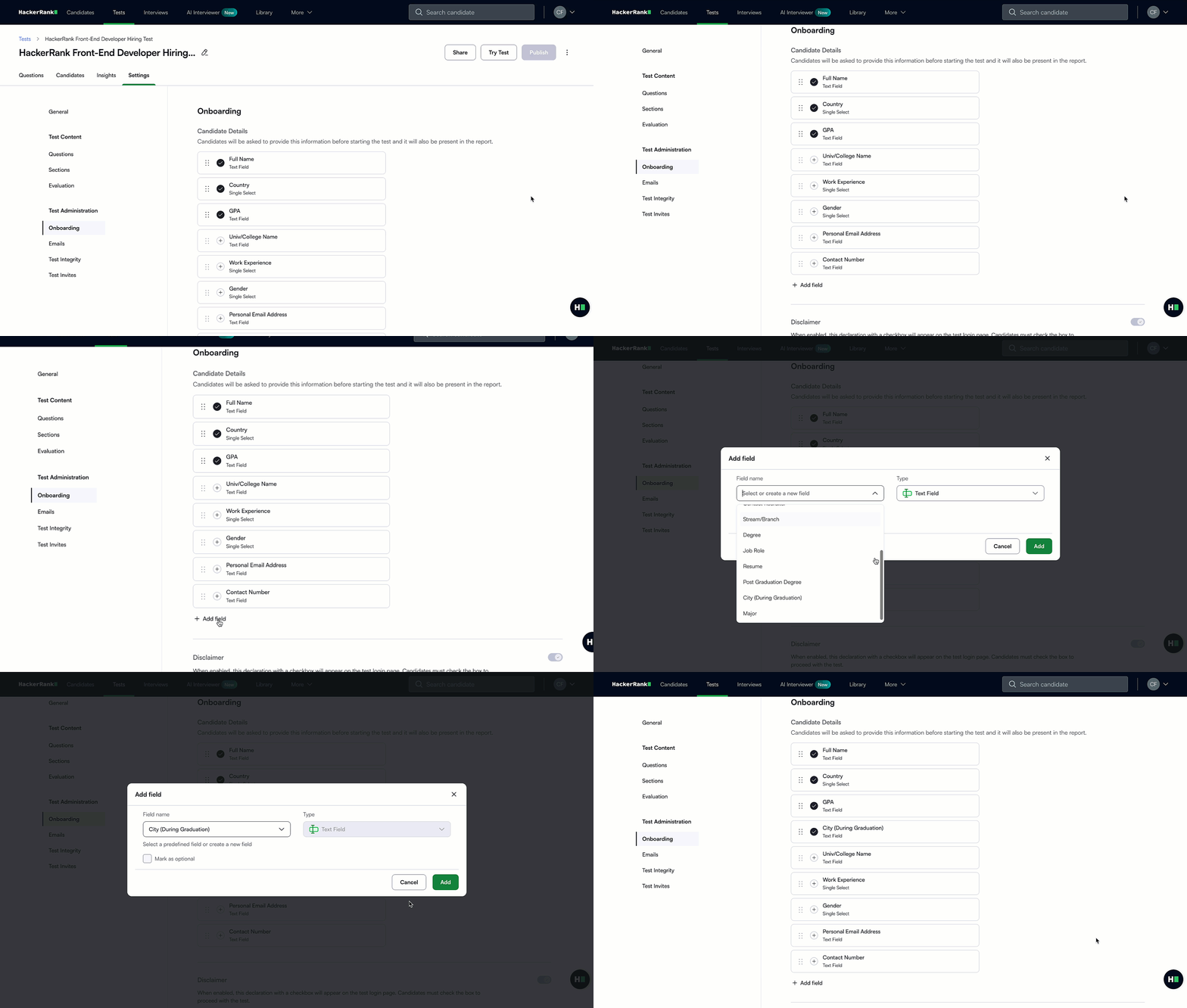
For more information, see 📄 Configure Onboarding Settings for Tests.
Expanded Attempt-Level Insights in the Summary Report
The upgraded Summary Report gives you a more complete view of each attempt, with improved data visibility, faster access, and easier next steps:
Benchmark calculations include data from 2025 attempts, so comparisons reflect the most recent performance trends.
Integrity details are shown at the attempt level, rather than the test level, to reflect the proctoring settings used for each session.
Candidate ratings, feedback, and all other collected test data are available directly within the Summary Report.
Interviews can be created directly from the new Summary Report.
For new attempts, links to Detailed Reports in CSV exports now open up to four times faster.
You can now evaluate how candidates leverage AI in solving real-world challenges with a new AI Fluency grade. This is shown in the ‘Performance Summary’ section of the Summary Report for tests taken with the AI Assistant.
You can also view more details on question-level AI fluency in the ‘Candidate Evaluation’ tab of the Detailed Report.
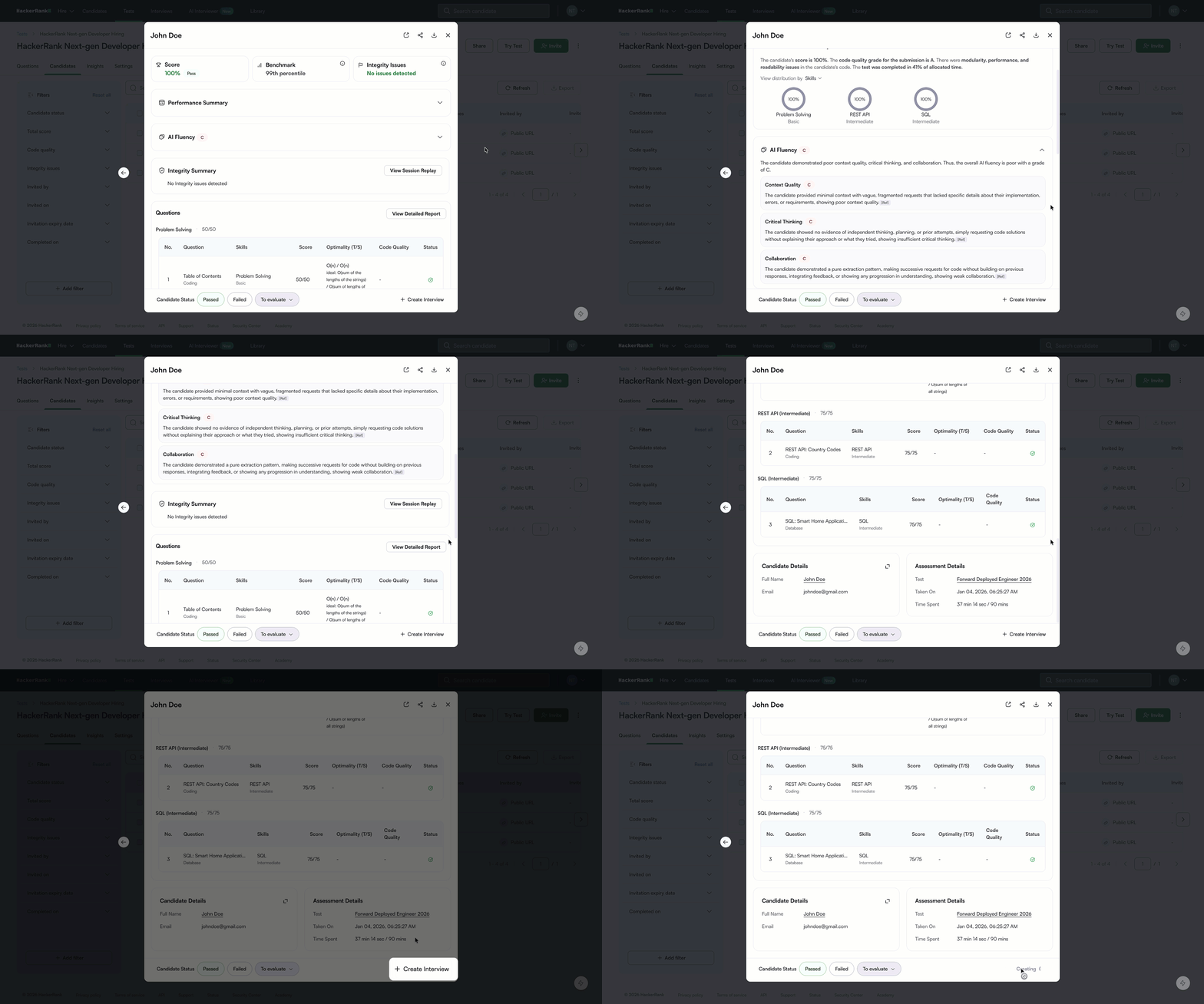
For more information, see 📄 View Candidate Test Summary Report, 📄 Candidate Benchmark, 📄 AI Fluency.
Clear and Neutral Candidate Performance Signals
You can assess candidates more fairly and consistently with updated performance signals designed to reduce bias and improve clarity.
Scores below the cut-off are no longer shown in red, helping you assess results more objectively.
Colors tied to benchmark percentiles have been removed to reduce visual bias when evaluating candidates.
Scores and code quality signals are now highlighted in the performance summary for easier review.
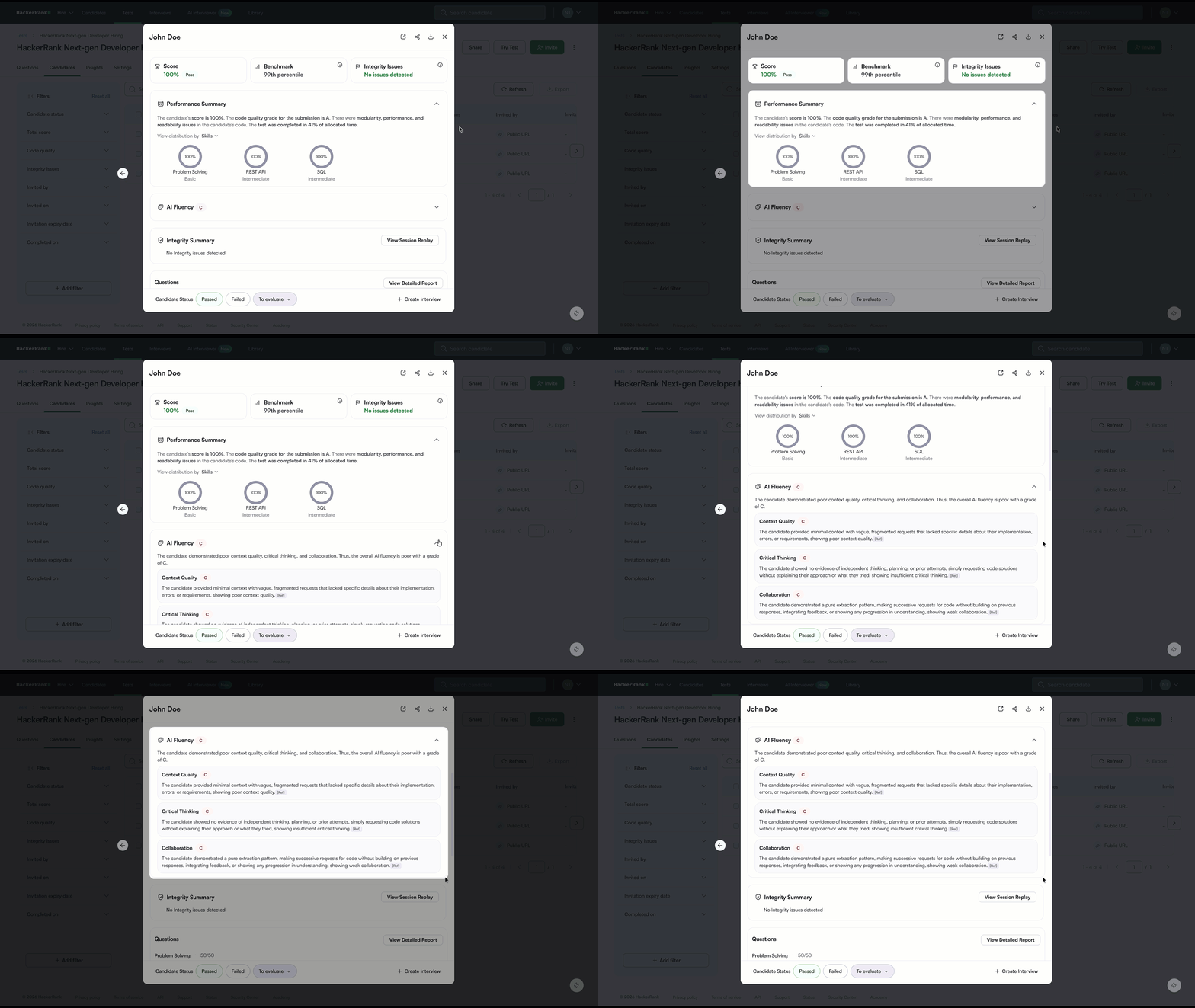
For more information, see 📄 View Candidate Test Summary Report.
Updated Test Access Permissions
Starring a test is now independent of your user role, so you can mark important tests regardless of your permissions.
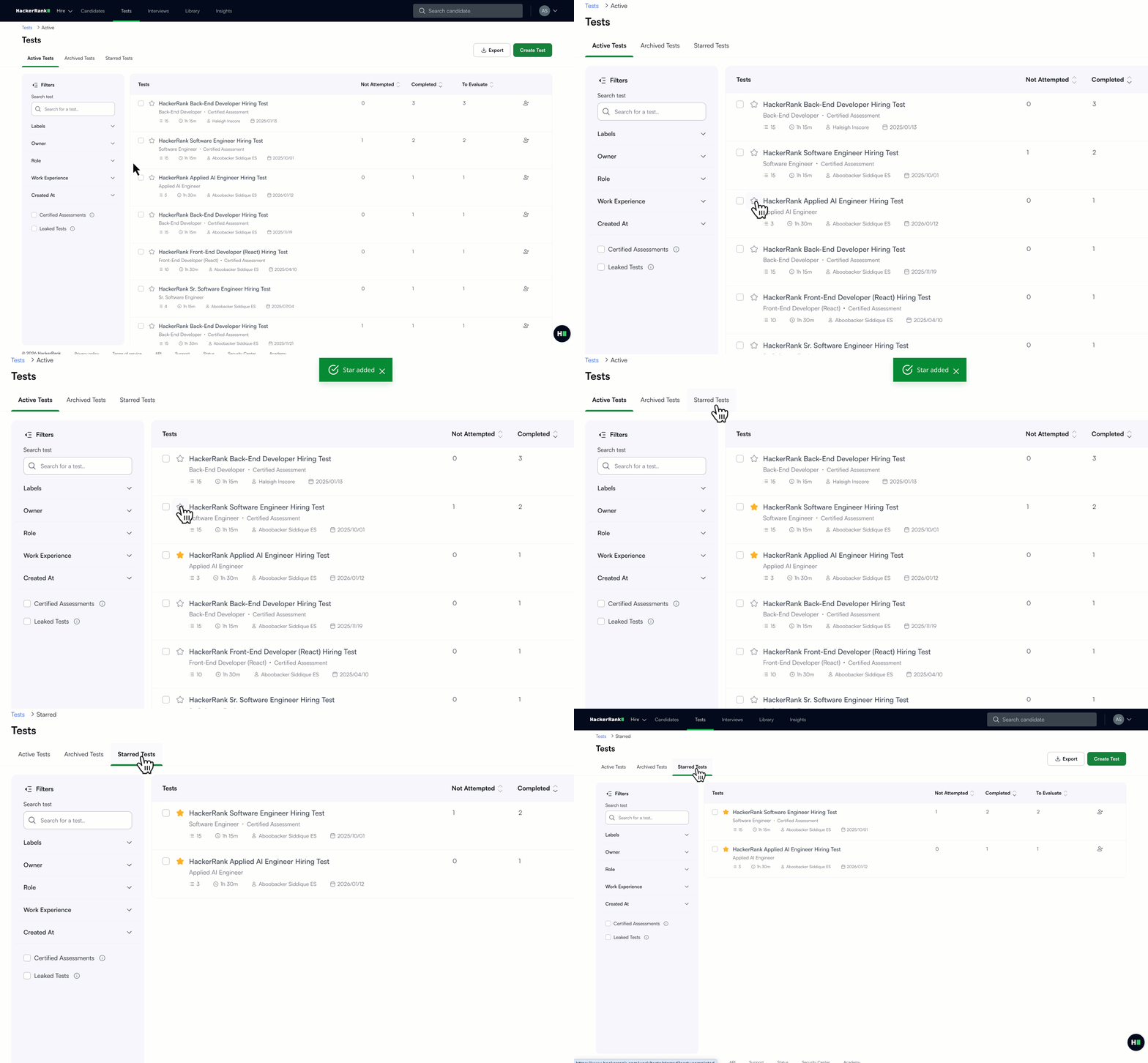
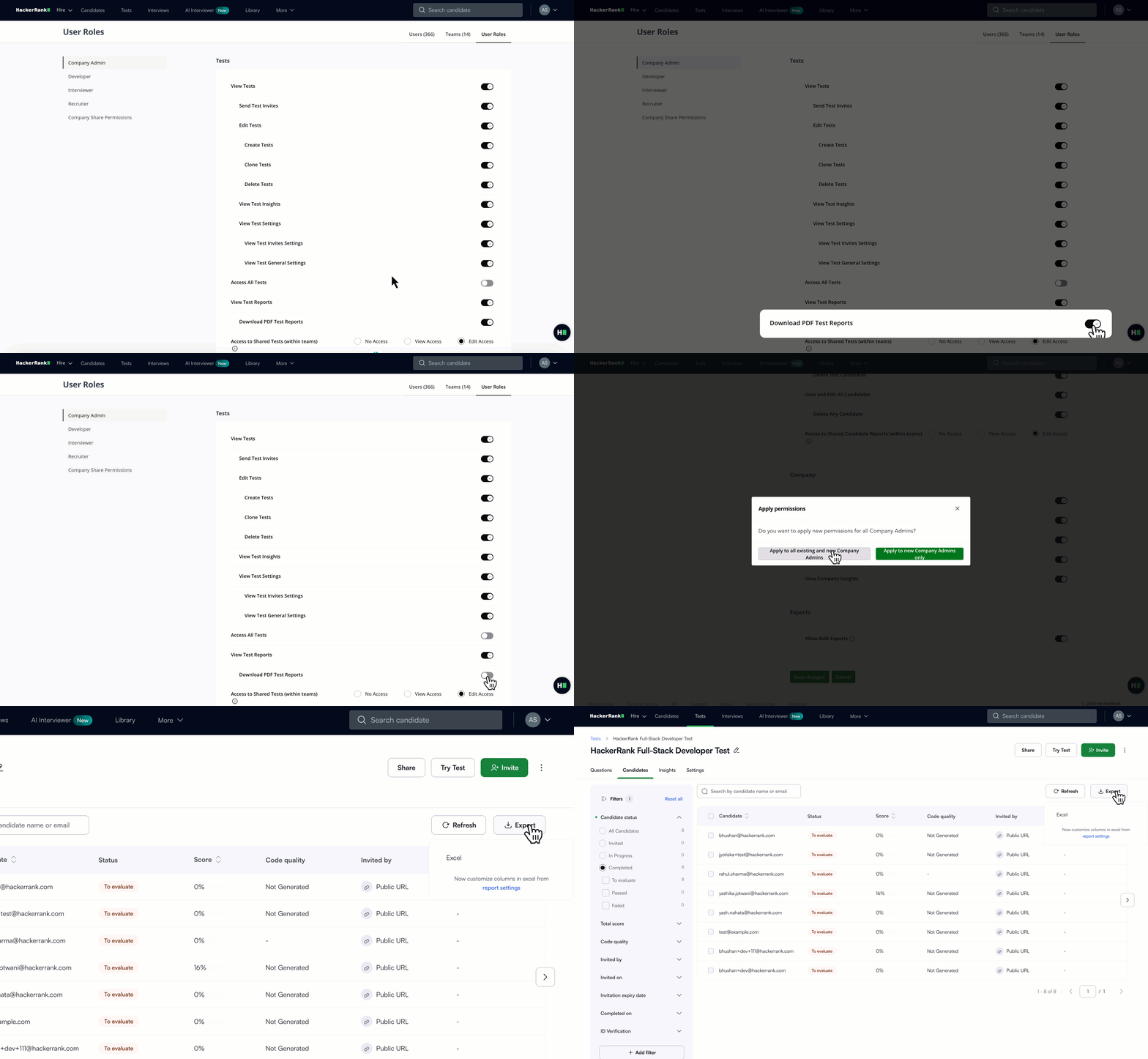
A new entitlement lets admins prevent PDF report downloads for certain roles or users.
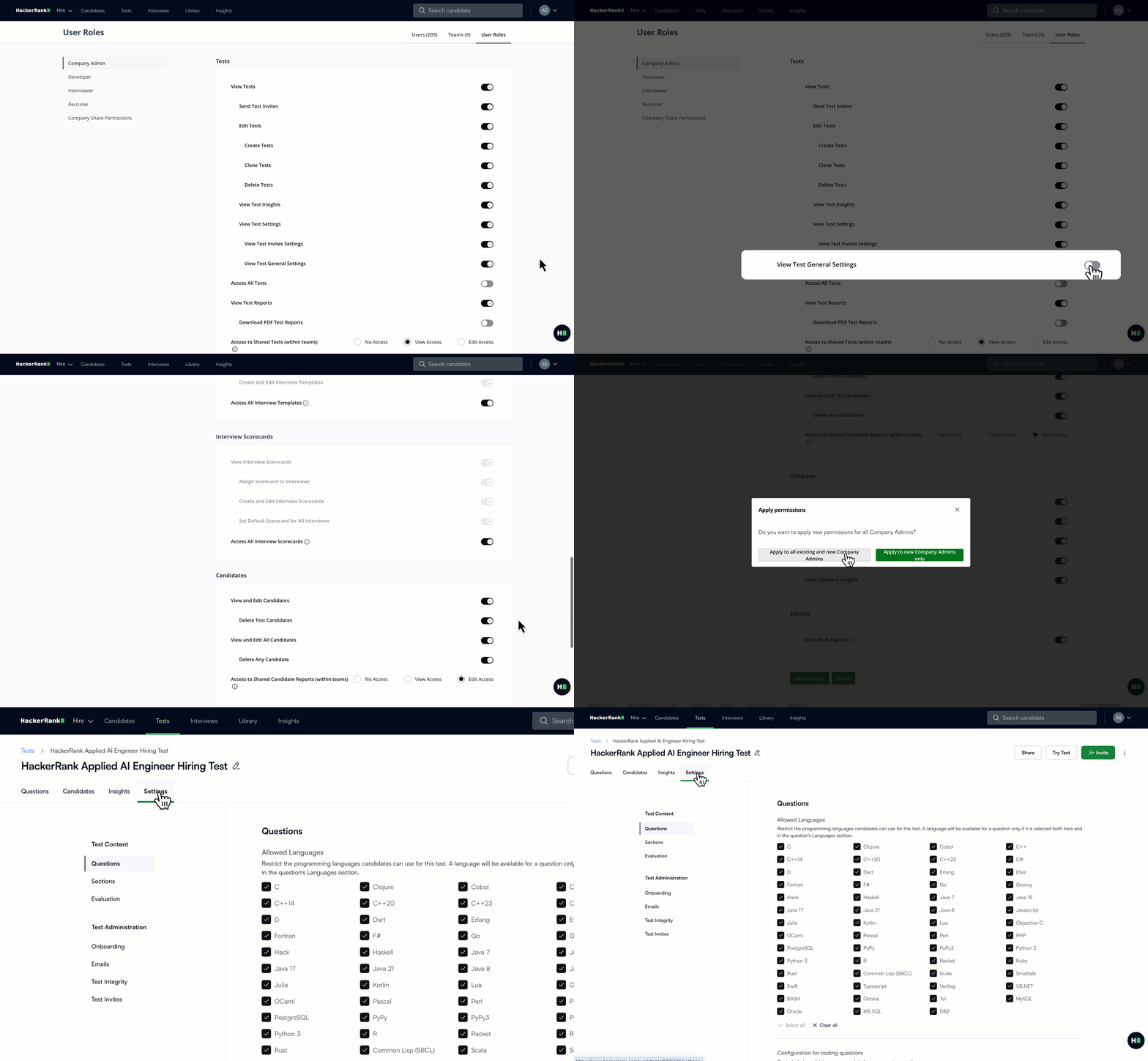
A new entitlement lets admins hide General Settings within a test, so users can’t view or change test settings that are managed at the company level.
For more information, see 📄 Modify Entitlements for Recruiters, 📄 Modify Entitlements for Developers.
Code Quality Grading Improvements
Code quality grading now excludes variable naming, helping you focus on more meaningful indicators like code structure, logical soundness, readability, and long-term maintainability. Reports also process faster, so you get insights sooner and can make more informed evaluations using a clear, reliable skill signal.
V3 API Updates
The Show Candidate API now returns additional attempt-level data, making it easier to analyze candidate performance programmatically. You can now access:
Attempt-level performance summaries to quickly assess overall results
Question-level code quality grades for deeper insight into coding proficiency
These enhancements help you build richer, more data-driven evaluations directly into your systems.
AI-Assisted Question Creation for Code Repos (AI Add-on)
You can now create Code Repository questions with built-in AI guidance, making creation fast and self-serve. This update is designed to support custom code repositories, allowing you to generate realistic feature or bug-fix challenges directly from uploaded repositories or markdown projects. The AI analyzes the codebase to suggest relevant skills, difficulty level, and tech stack. You can then review, validate, and publish tasks directly to your content library.
Note: This feature is available to a limited set of users. Please contact your account manager or reach out to support@hackerrank.com to request access.
Skills Platform
Library Improvements
The HackerRank Library continued to expand, with a strong focus on code repo questions, modern frameworks, and higher-quality candidate experiences. This release marks significant advancements in content depth, scale, and real-world relevance.
Here’s what’s new:
86 new coding questions added across Problem Solving and language skills (Java, Python, JavaScript).
105 new project questions introduced across backend, frontend, mobile, and automation technologies, including Spring Boot, .NET, React, Angular, React Native, Playwright, Cypress, and Selenium.
Expanded code repository assessments with real-world workflows, including full-stack MERN repositories and blog platform repositories built with Node.js, Django, and Spring Boot.
Over 500 existing project questions were upgraded to modern stacks, enhancing reliability, performance, and the candidate experience.
Existing projects have been modernized, with better code quality and more stable test coverage.
Over 200 coding problems were rephrased for clearer requirements, reduced ambiguity, and more reliable evaluation.
New skills launched in the HackerRank Library and Skill Directory - Playwright (Basic & Intermediate) and Cypress (Basic & Intermediate).
Content additions across the following high-demand job families and skills:
Job Family | Skill | Question Type | No. of Questions Newly Added |
Software Engineering | Problem Solving | Coding | 25 |
Software Engineering | Java | Coding | 11 |
Software Engineering | Python | Coding | 15 |
Software Engineering | JavaScript | Coding | 10 |
Web Development | .NET | Projects | 26 |
Web Development | Angular | Projects | 10 |
Web Development | React | Projects | 11 |
Web Development | SpringBoot | Projects | 29 |
Web Development | React Native | Projects | 14 |
Web Development | Golang | Projects | 4 |
Web Development | iOS | Projects | 1 |
Web Development | Java | Projects | 5 |
Web Development | Playwright | Projects | 5 |
Web Development | Cypress | Projects | 5 |
Web Development | Selenium | Projects | 5 |
Web Development | MERN, React+Django, React+SpringBoot | Code Repo | 3 |
Developer Experience
Completed Rollout of New Candidate Site
In April 2025, HackerRank launched a new candidate site designed to deliver a more modern test-taking experience. Developers have responded positively to the refreshed design, cleaner interface, and simpler onboarding.
With this update, the new candidate site is now fully rolled out across all question types, providing a unified experience from start to finish, along with the ability to review instructions both before login and during the test.
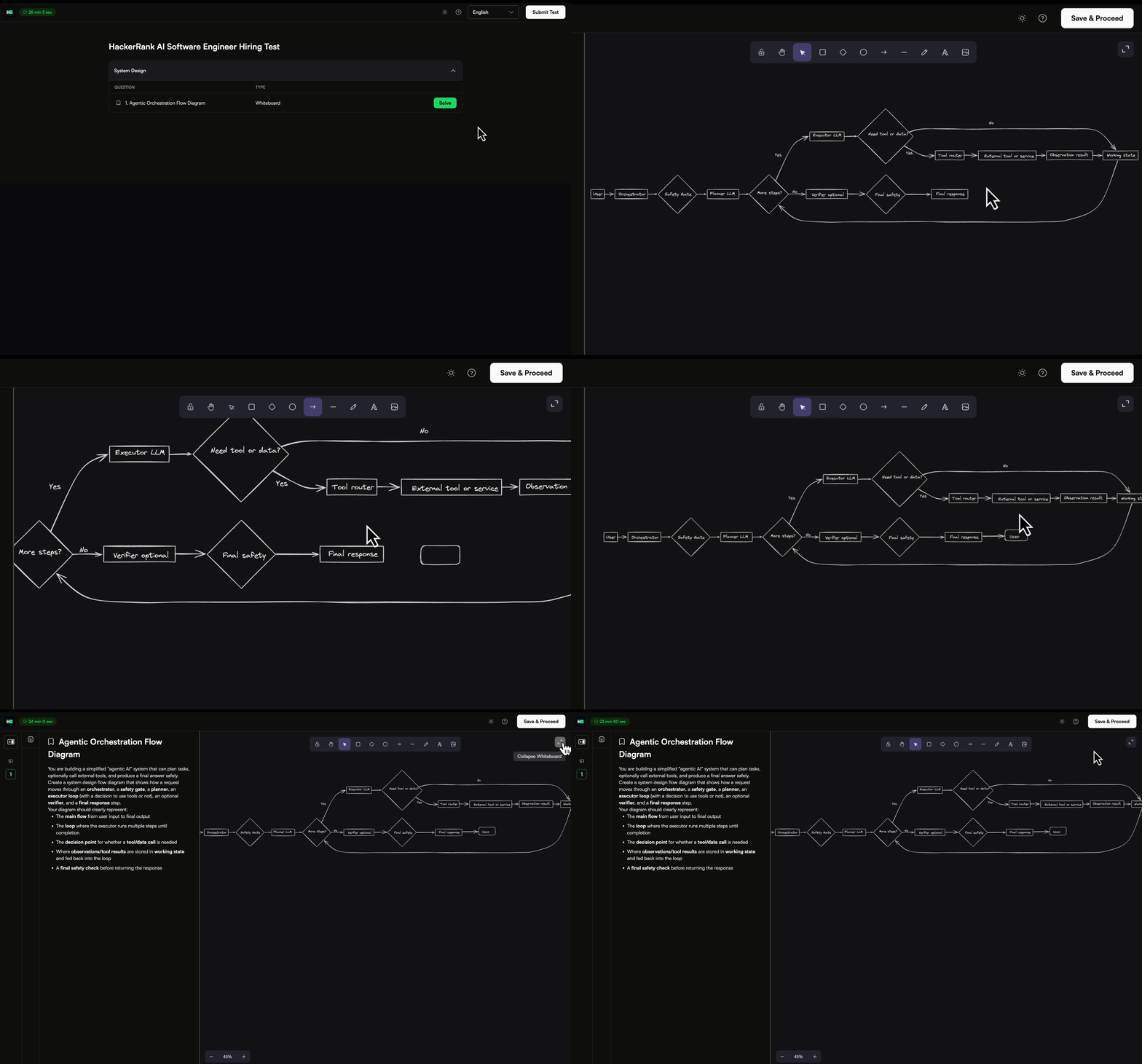
For more information, see Answer Front-end, Back-end, Full-stack, Mobile Developer, and Generative AI Assessments, Answer Whiteboard Question, Answer Cloud Questions.
Faster Project Setup for Code Repo Questions (AI Add-on)
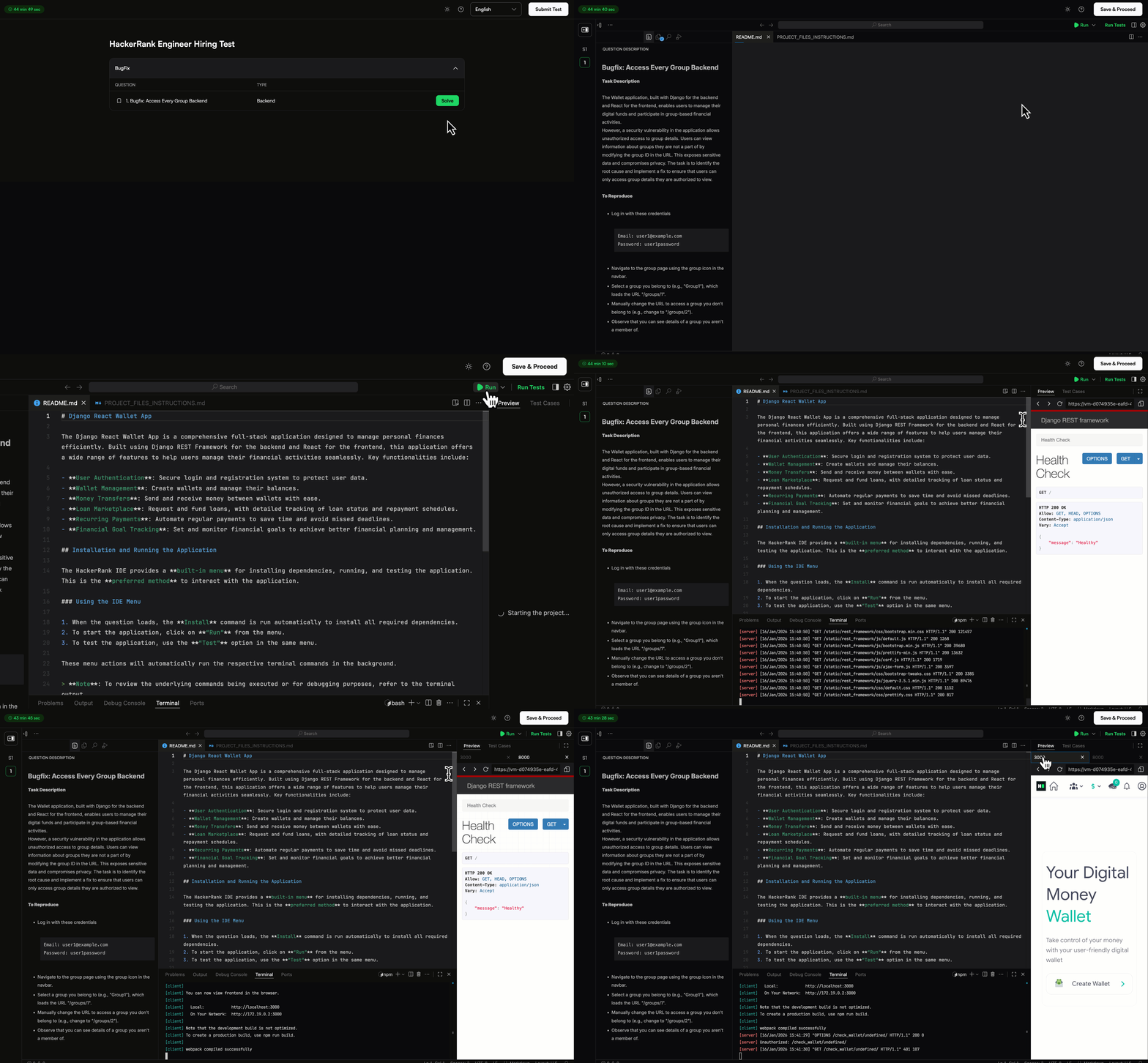
Code repository installs and builds are now significantly faster across stacks in assesments, reducing setup time so candidates can start solving sooner. Dependency installation and caching have been optimized, cutting setup time by about 70%.
VS Code IDE for Data Science
Data science assessments will now run on the VS Code IDE, replacing JupyterLab and aligning the experience with front-end, back-end, and full-stack roles. This update includes full notebook support within VS Code and AI guidance to help candidates explore data, debug issues, and review code more effectively.
This feature will be available as part of a phased rollout.
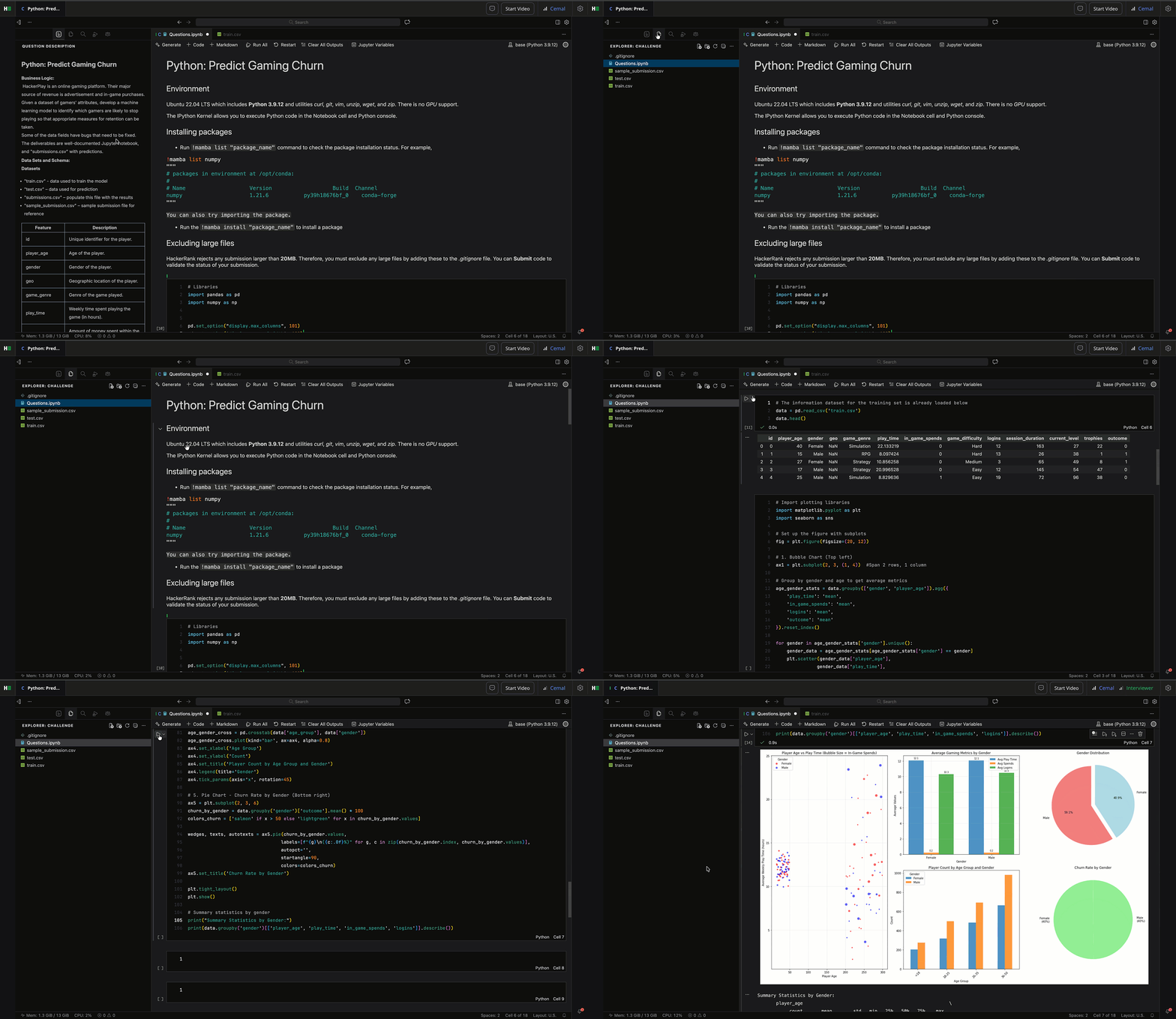
For more information, see Answer Data Science Questions.
Sample Tests for Code Repos (AI Add-on)
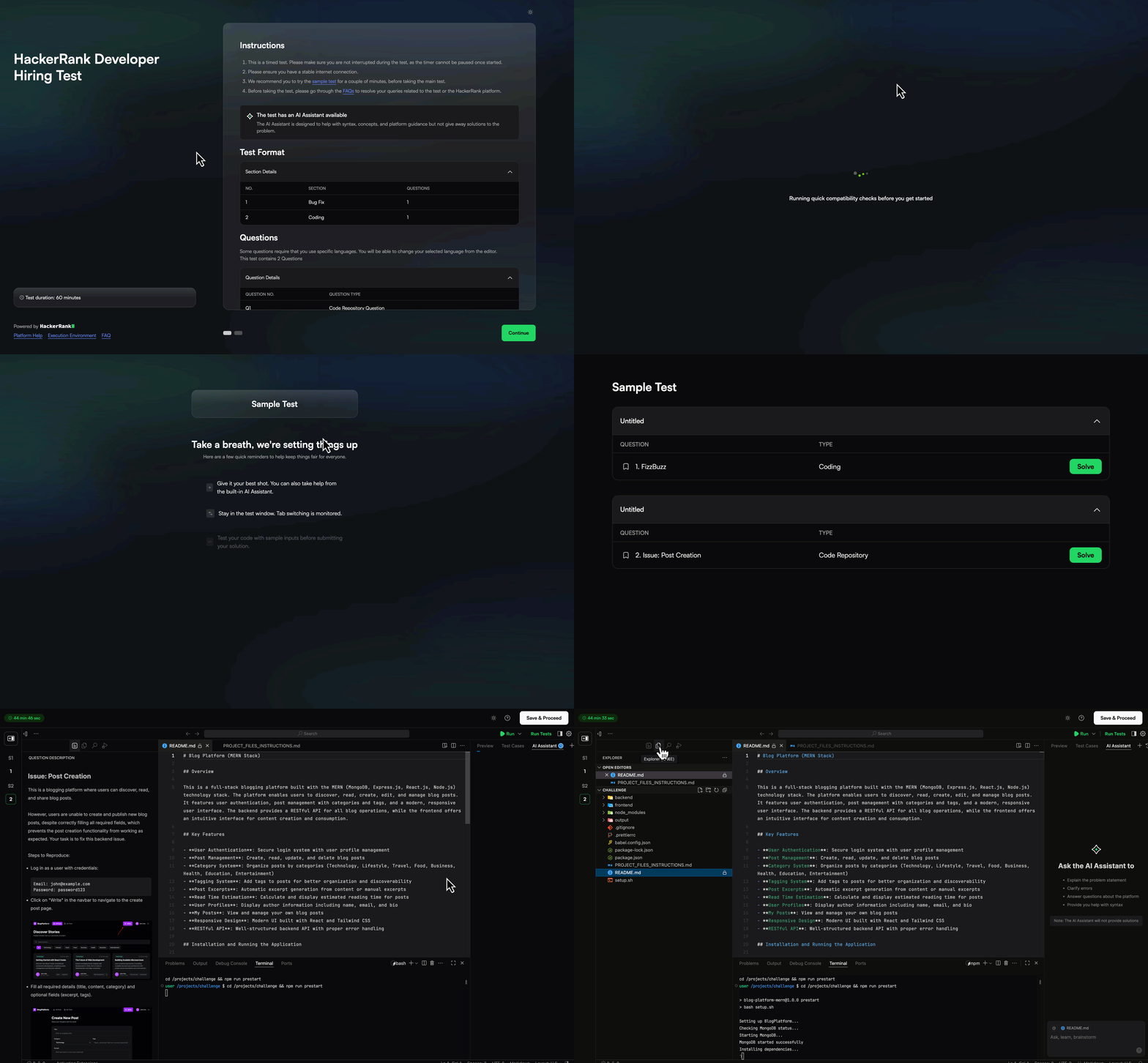
Every test that includes a Code Repo question now includes a paired sample project, giving candidates a chance to practice before the live assessment. Each test includes a framework-specific sample repository (such as MERN, Django, or .NET), helping candidates get familiar with the environment and build confidence before they begin.
AI-Assisted IDE Enhancements (AI Add-on)
You’ll see an improved AI Assistant experience across tests and interviews, with several key enhancements:
Faster load times so you can start using the assistant sooner.
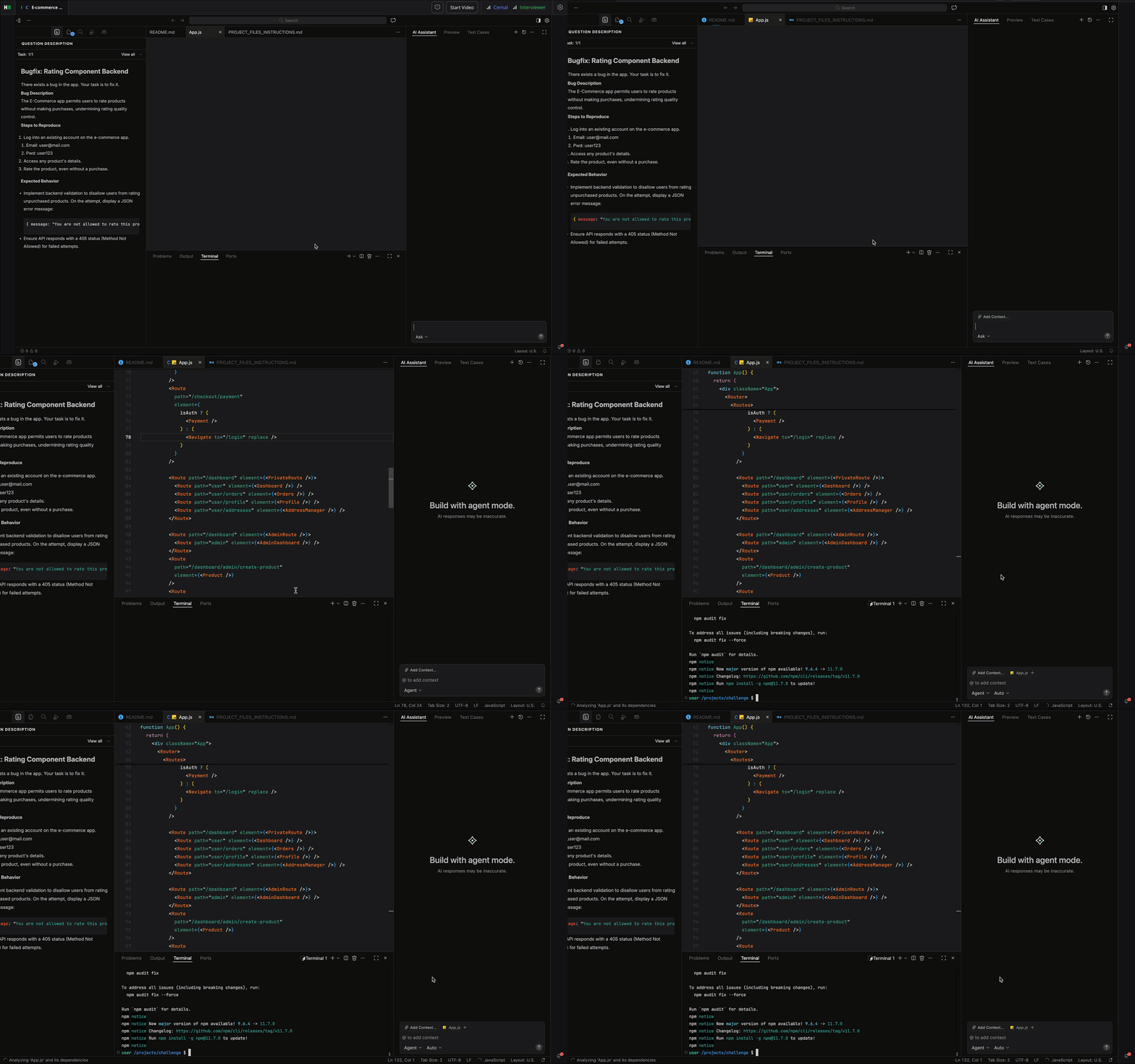
The AI Assistant no longer receives the problem statement by default during the interview. Candidates can explicitly share it by tagging
@problemStatementwhen they choose. This allows you to assess how well a candidate understands the task and how effectively they leverage the AI Assistant to plan their implementation, while enabling the assistant to use that context throughout the interview.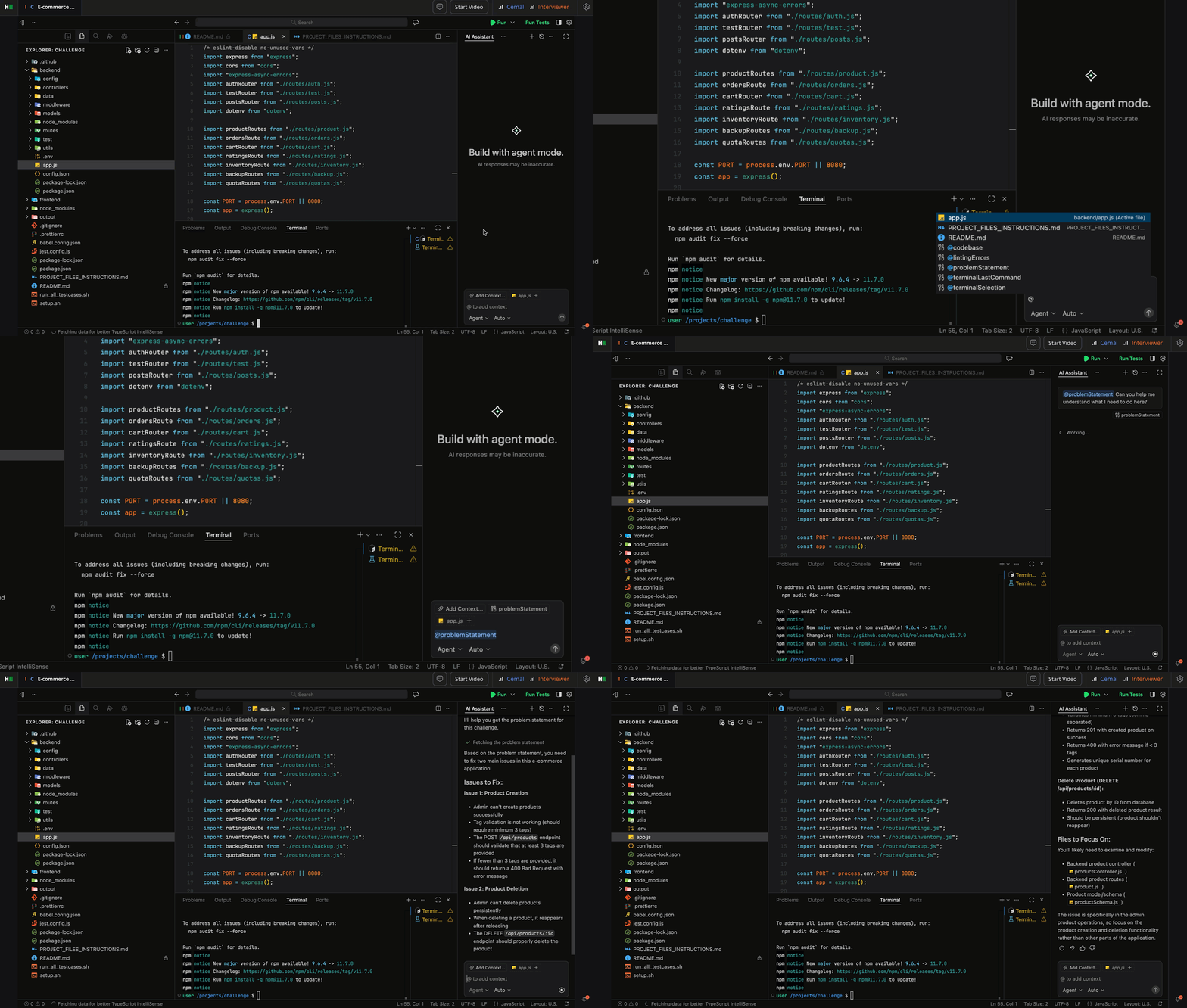
Smoother checkpoint restore to quickly return to a previous state when needed.
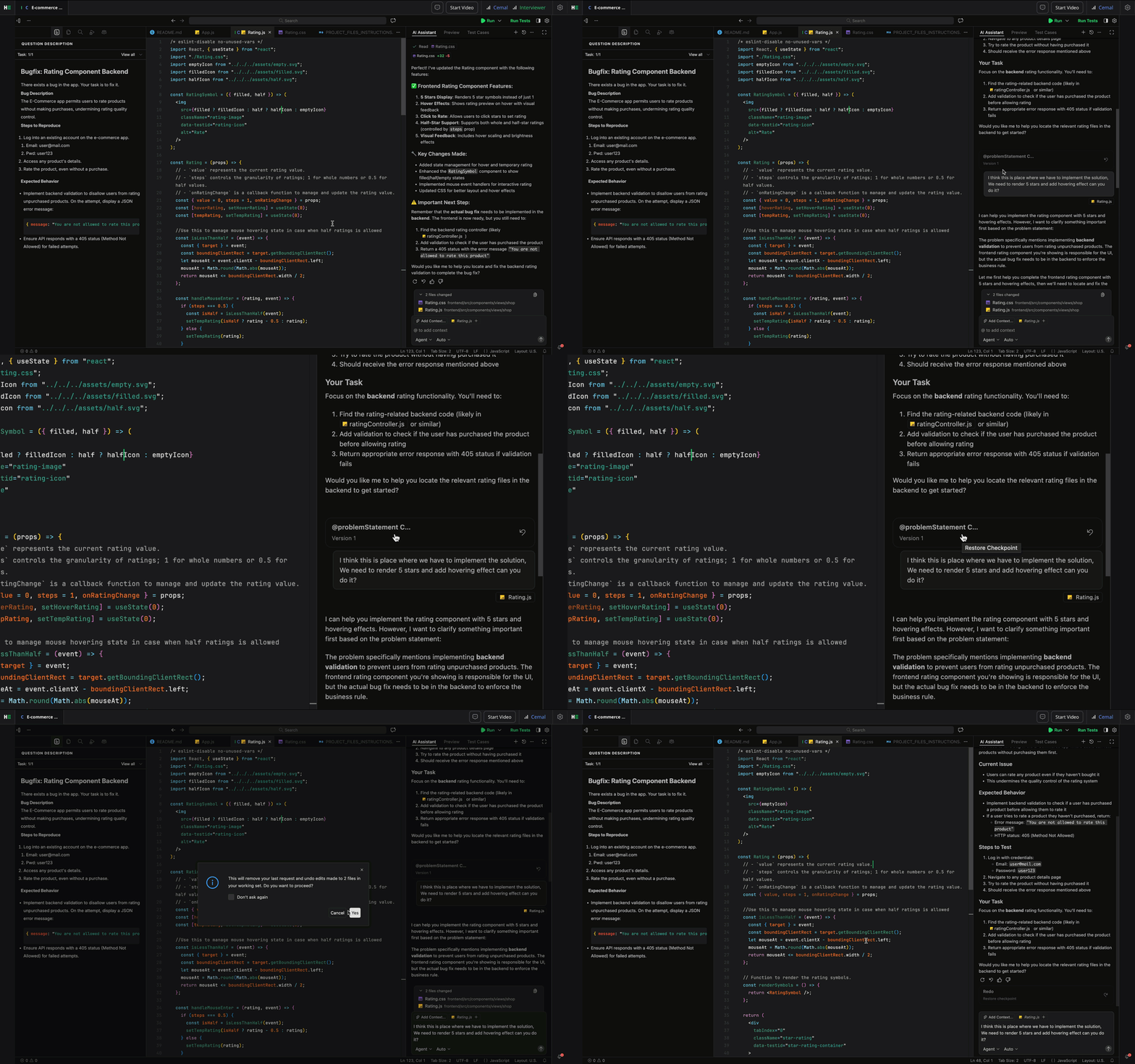
Observation Mode now syncs and shows live agent edits and provides a shared diff view between the interviewer and candidate. This keeps everyone aligned in real time, so you stay on the same page throughout the interview.
For more information, see 📄 AI-Assisted Tests, 📄 AI-Assisted Interviews, AI Assistant in Tests, AI Assistant in Interviews.
Integrity
Object Detection in Webcam Feed (AI Add-on)
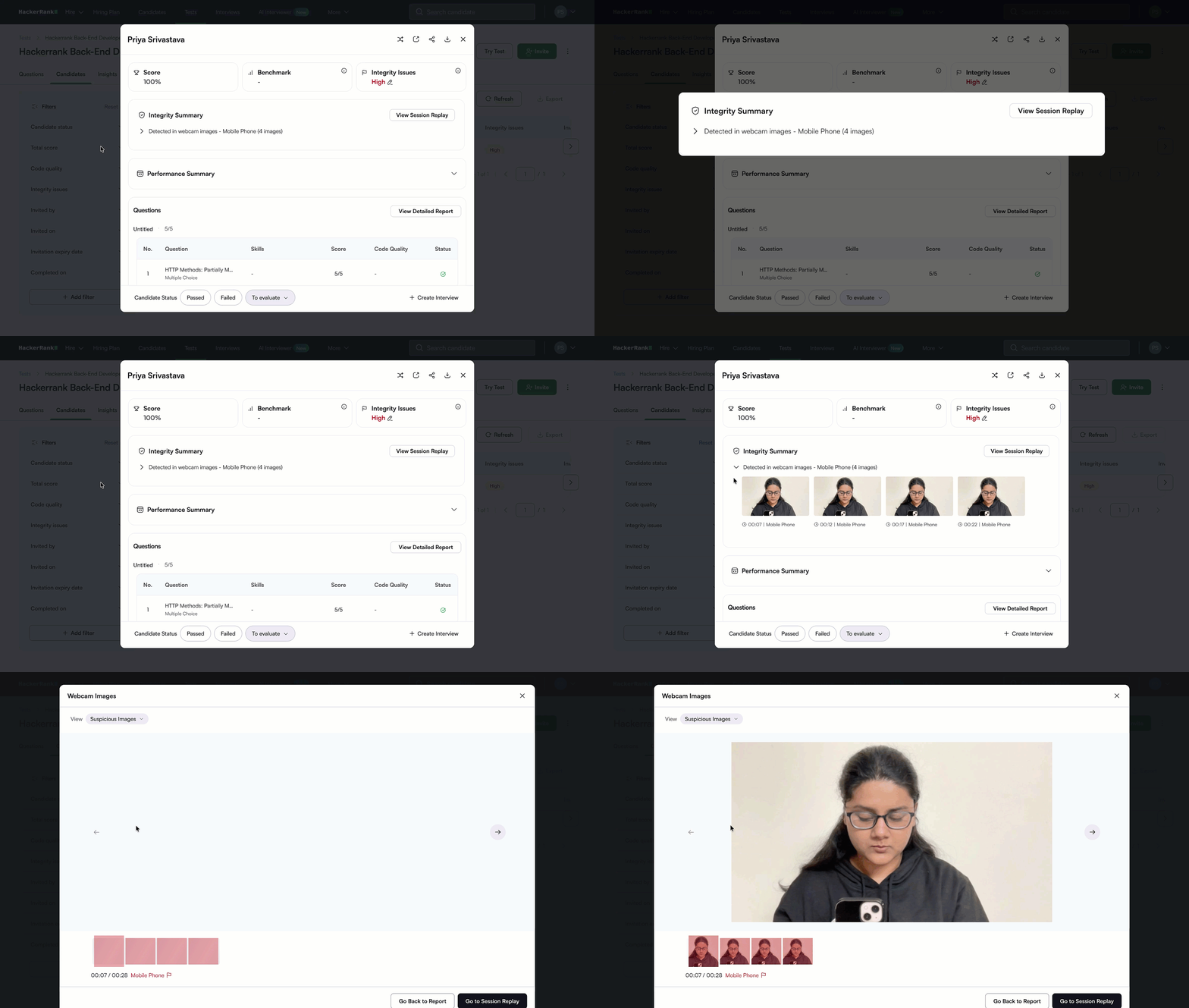
During tests with Proctor Mode enabled, the system automatically detects and flags suspicious objects in a candidate’s webcam feed, including devices like mobile phones and tablets. This helps you identify potential interactions with unauthorized objects and review them alongside other integrity signals.
This feature will roll out in February as part of a phased release.
Deleted Code Analysis (AI Add-on)
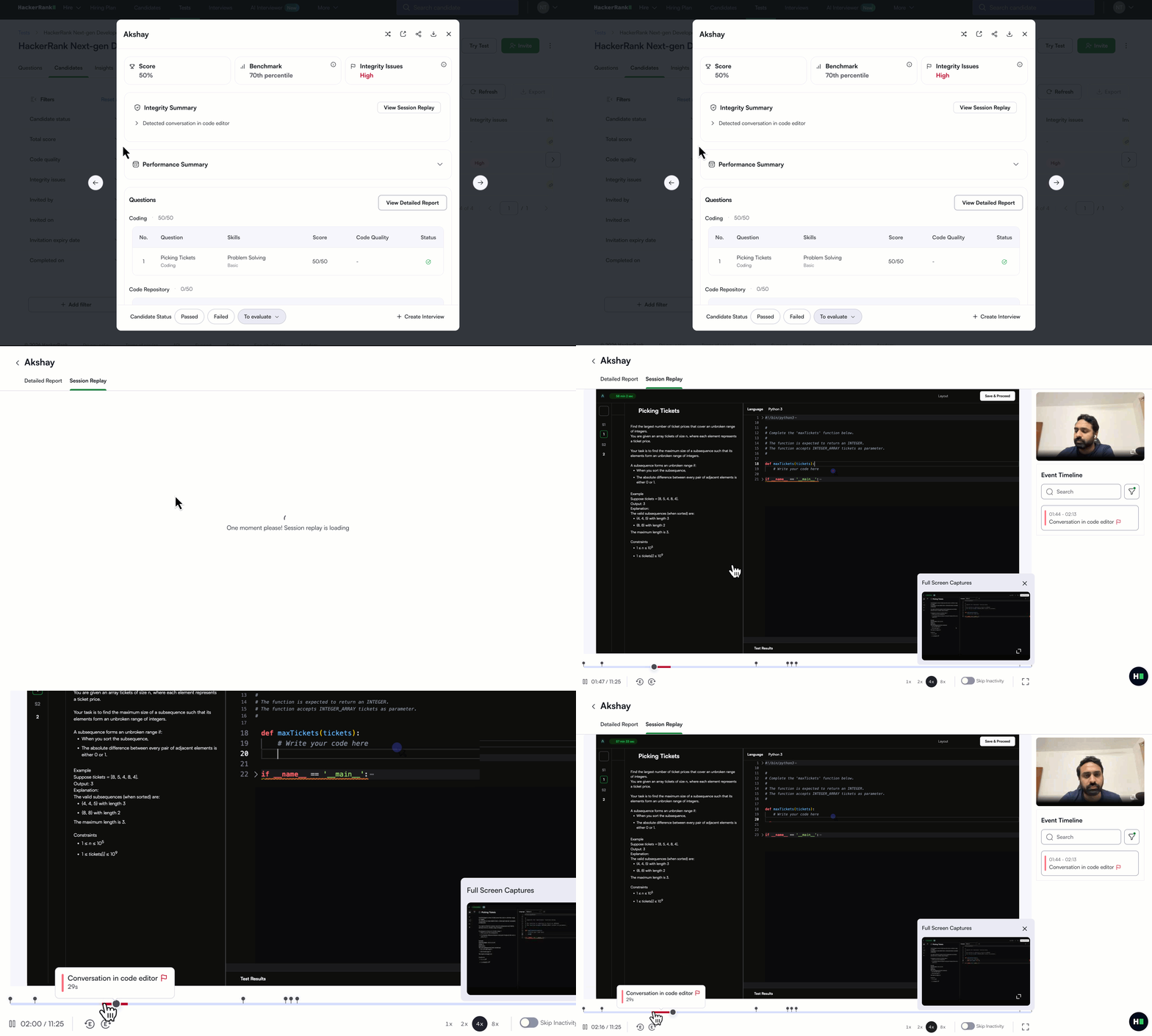
Deleted code is now analyzed during assessments to identify chat-like activity. This detects suspicious activity patterns where candidates type and delete messages, which can indicate the use of screen-sharing or other tools to receive remote assistance during a test. Such activity is flagged for review to help maintain assessment integrity.
This feature will roll out in February as part of a phased release.
Company-Level Image Retention Policy
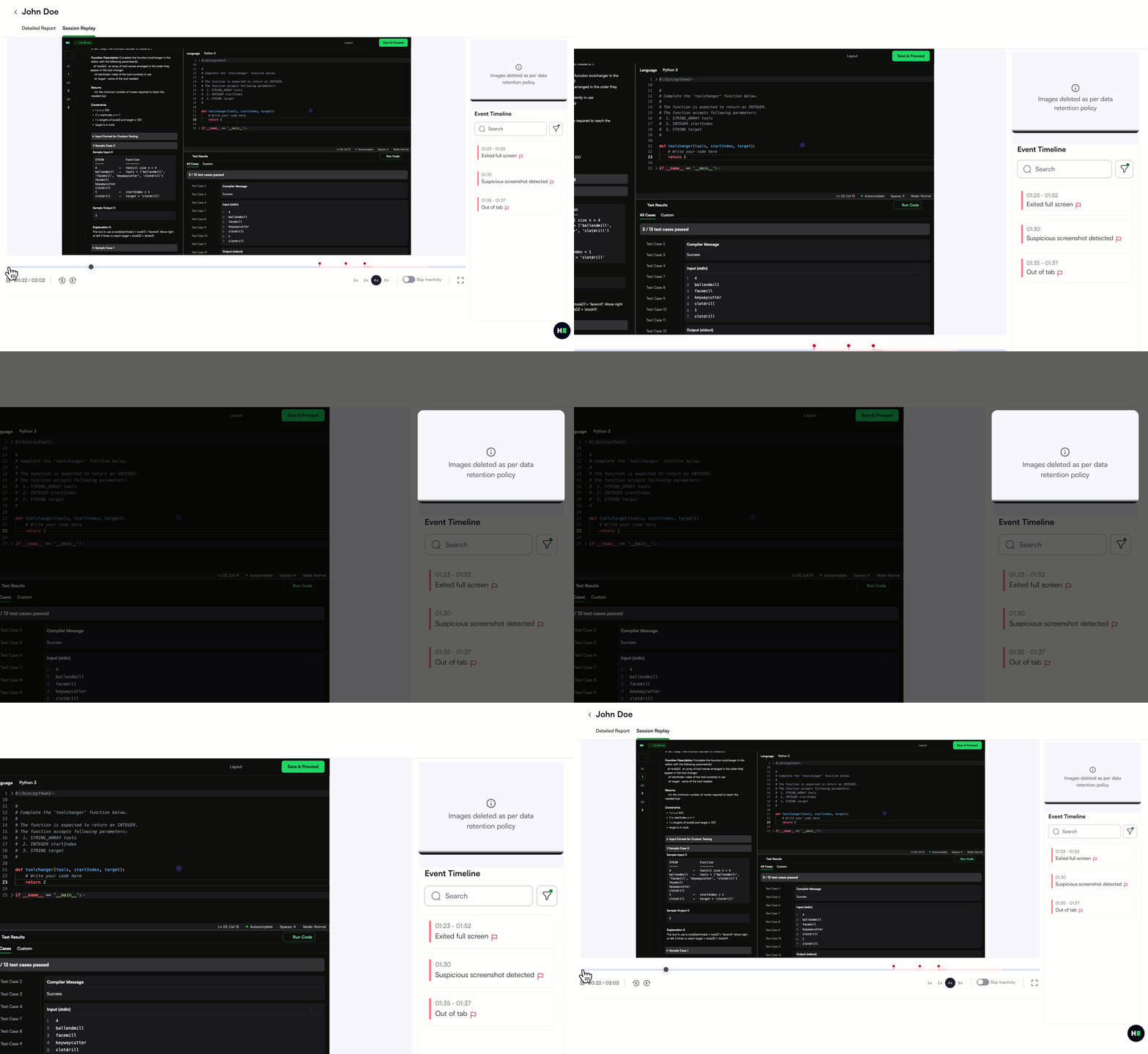
You can now specify how long candidate images are stored in your account to help meet privacy and compliance requirements. To set a company-level image retention period of 30, 45, or 90 days, please contact your HackerRank account manager.
Once enabled, images older than the selected timeframe are automatically deleted each day, with confirmation emails sent and reports updated to reflect the removals.
Override Integrity Flags in Reports
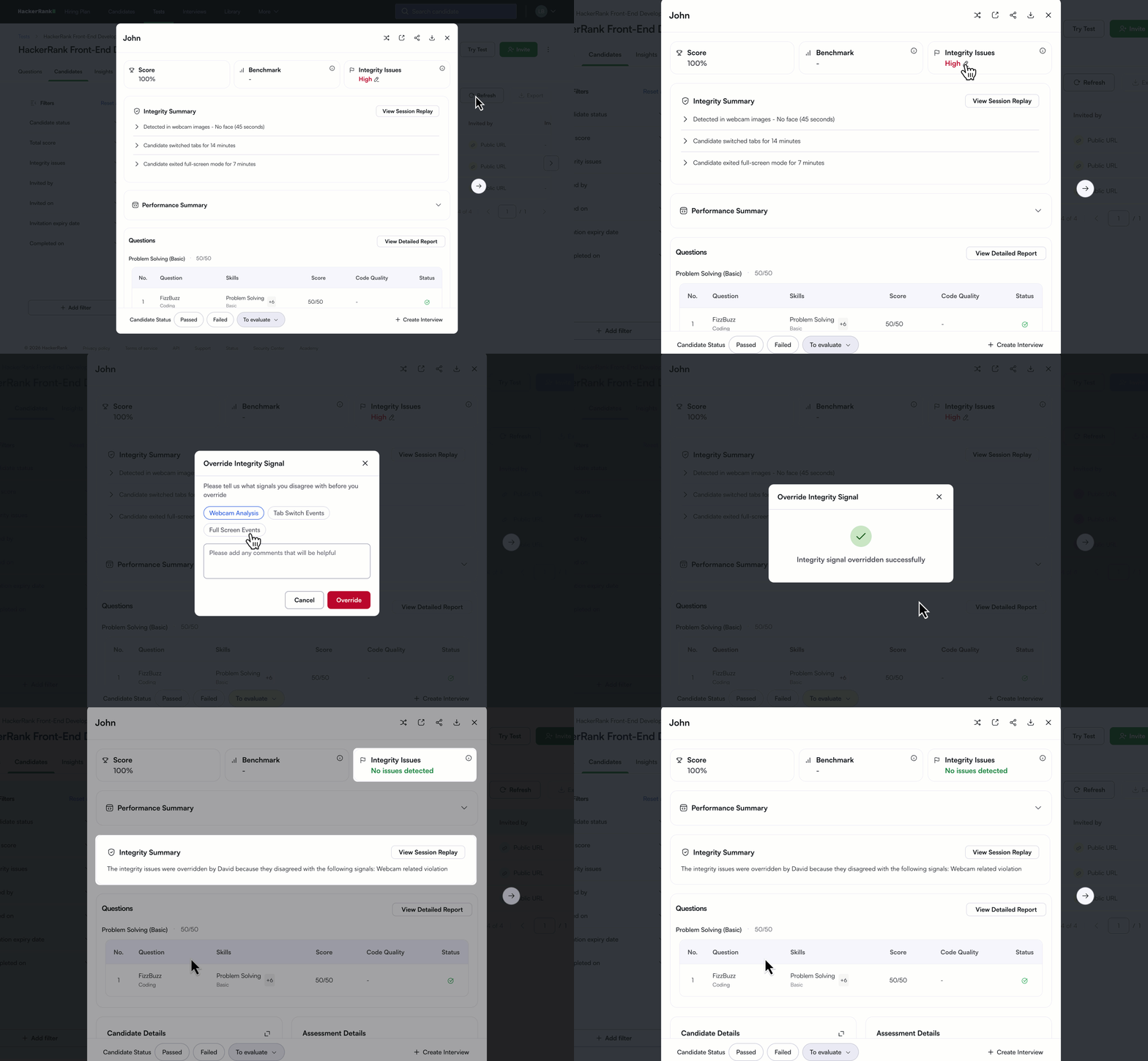
You can now manually override an integrity flag from the Summary report if you decide a flag isn’t warranted. Click the edit icon next to the “Integrity Issues” field and provide a reason for the override to add context to your decision.
Once the flag is overridden, the Integrity Issues field updates to “No Issues Detected”, and the Integrity Summary indicates that "integrity issues were overridden" along with details of who performed the override and why.
For more information, see Override integrity flags in summary reports.
Plagiarism Detection Signals Refinement
Plagiarism detection no longer includes the “Potential Reference Taking” signal, which flagged periods of inactivity followed by sudden or unusual typing patterns. Removing this signal improves interpretability and avoids assumptions about behavior during inactivity, so you can focus on more reliable indicators of suspicious behavior.
Improved Interpretability of Integrity Signals on Reports
Integrity signals in the Summary Report are now easier to understand and validate. You can clearly see why a flag was raised and review the supporting evidence, making it easier to assess each case with confidence.
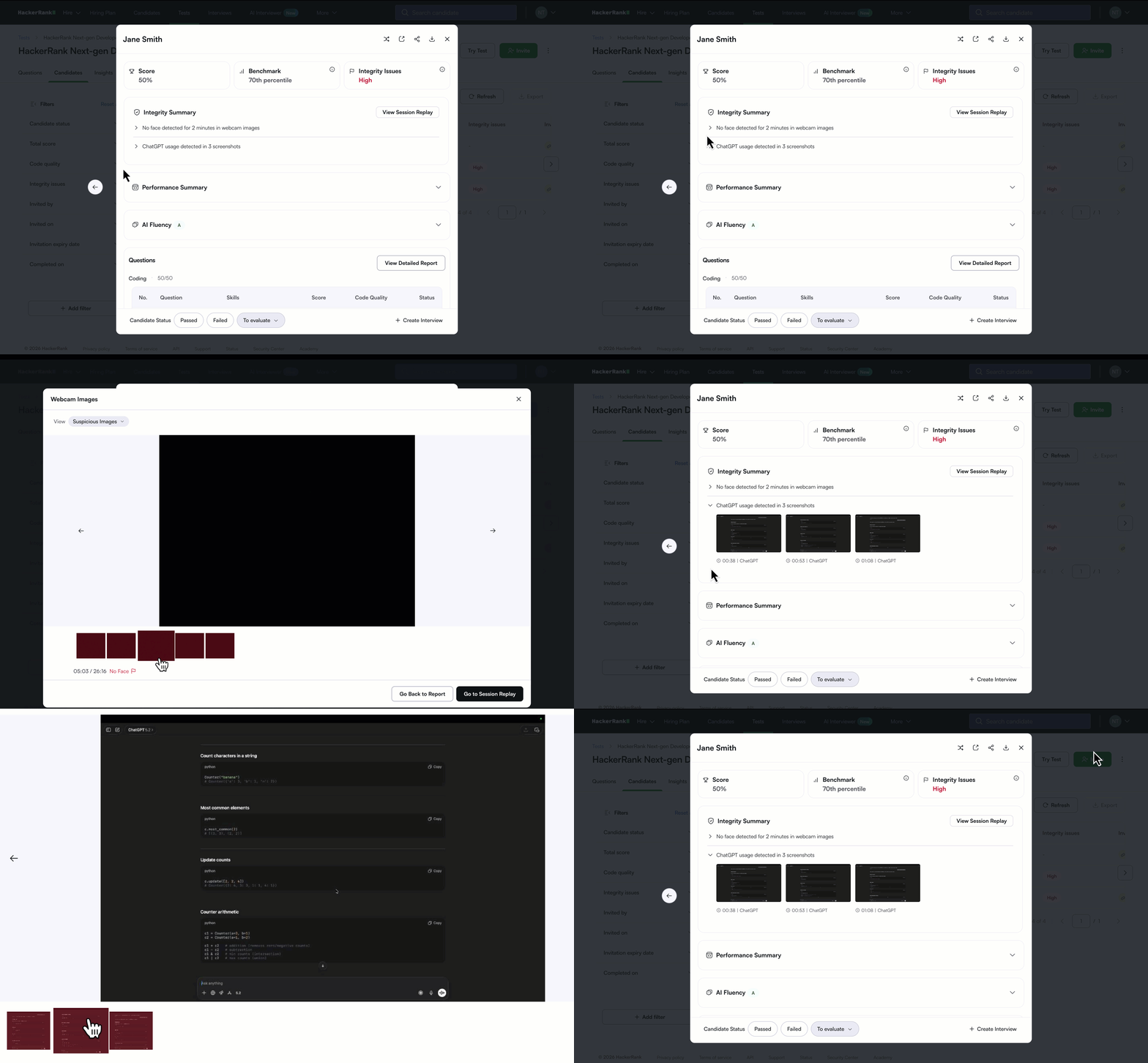
Under Integrity Summary, you can now preview all integrity violations, including:
Screenshot Analysis and Image Analysis: View previews of flagged screenshots and images, with the option to view the full set for deeper review.
Tab switches and fullscreen exits: See exact timestamps and durations showing when a candidate was outside the active tab or window.
Code similarity: Preview and compare the most similar code instance for each question.
Session replay: The “View Session Replay" button is now easier to find, so you can explore any integrity signal in more detail.
For more information, see 📄 Proctor Mode, 📄 HackerRank Desktop App Mode, 📄 Review Integrity Issues in Proctor Mode.
Code Playback Reliability Improvements
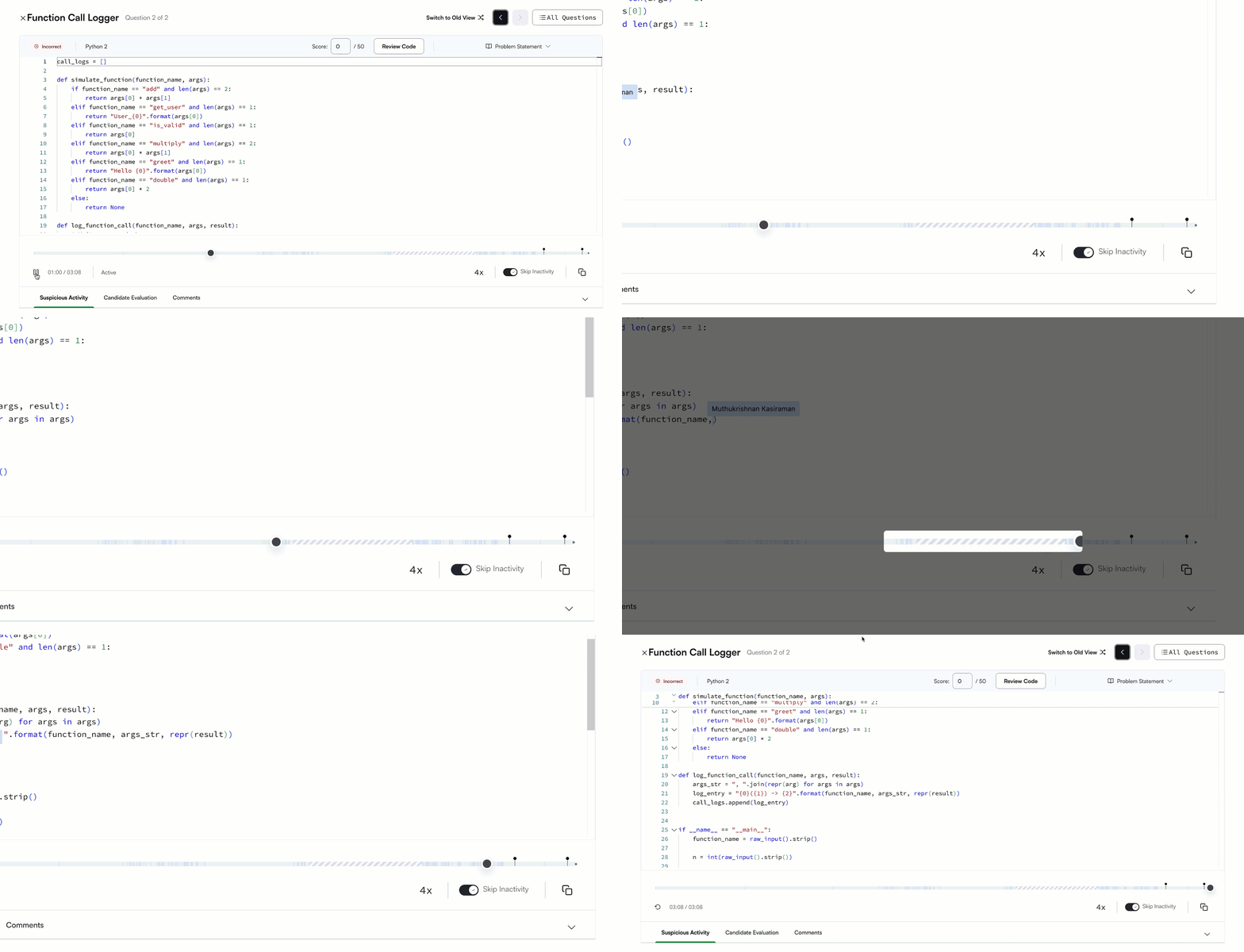
Code playback captures candidate activity more accurately, even if the session is interrupted, giving you a complete and reliable record of each session.
Reliability enhancements: It continues to work through intermittent network issues, page refreshes, and even accidental tab closures so fewer sessions are lost.
Fewer broken or incomplete playbacks: Corruption fixes and automatic recovery help ensure candidate activity is captured consistently from start to finish.
Better support in restricted networks: Playbacks no longer go missing due to candidate’s firewalls, improving coverage for users with strict network policies.
Clearer visibility: If any portion is impacted, it’s surfaced in the UI, and we now actively monitor playback health to catch issues early.
Flexible Mode Switching for Proctored Tests (AI Add-on)
AI Add-on customers can now switch between Secure Mode and Proctor Mode on any test, even those with existing candidate attempts. Once updated, new attempts will follow the selected mode, giving you flexibility to change your proctoring strategy without disrupting existing data. Both modes are compatible with Chrome and Edge, so there's no change to browser requirements for candidates.
Interview
Sample Interview Link for Code Repo Questions
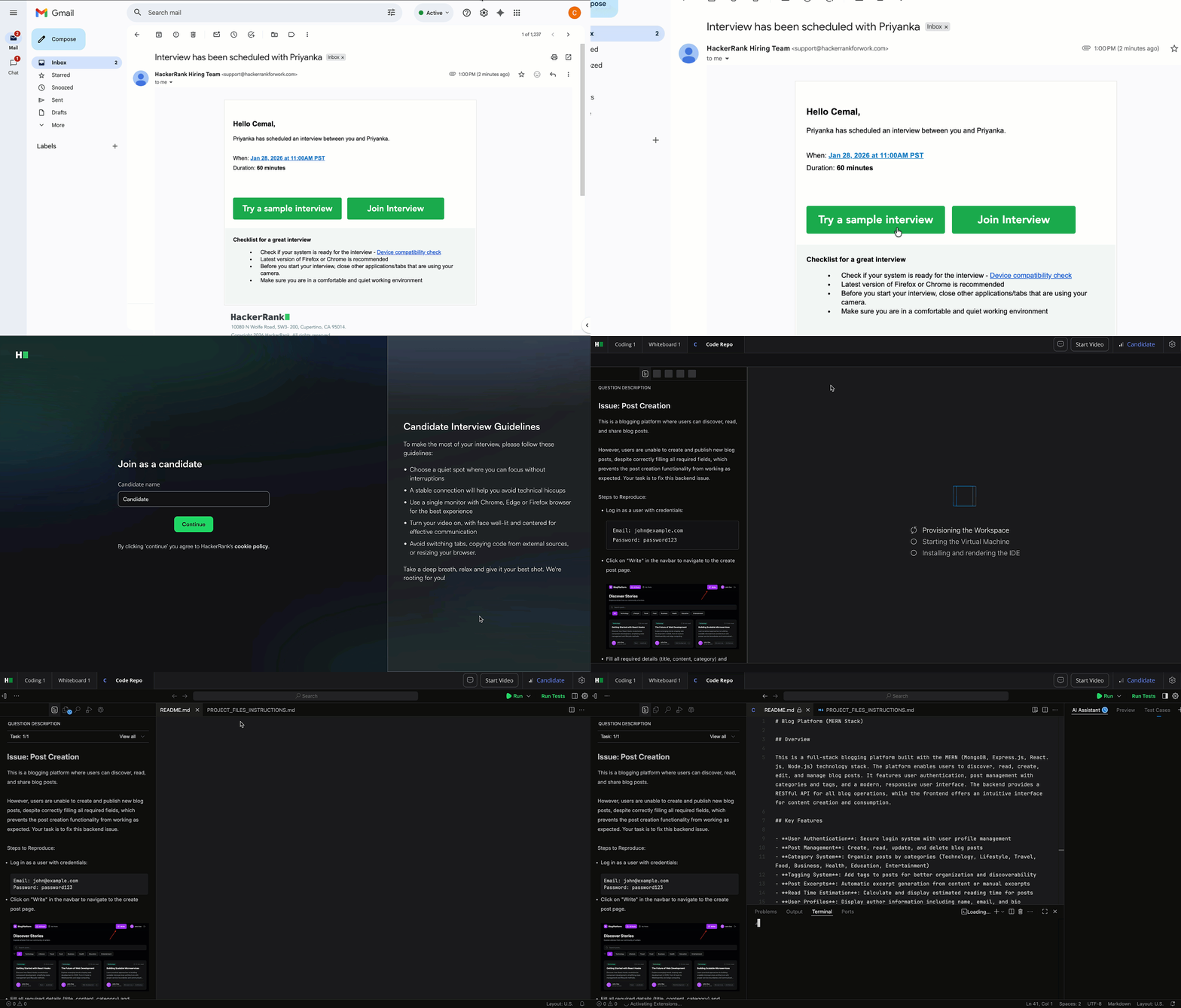
A sample interview experience is now available for Code Repo questions, aligned with the existing sample interview flow for coding and whiteboard interviews. This experience supports multiple Code Repo tasks from the same repository, giving candidates a more realistic preview of how Code Repo–based interviews work.
For more information, see 📄 Create an Interview.
AI Assistant for Coding Questions in Interviews (AI Add-on)
The AI assistant in Interviews now supports coding questions, in addition to Project and Code Repo question types. It helps candidates demonstrate real-world collaboration with AI by answering clarifying questions and offering contextual hints, while revealing how they reason and problem-solve.
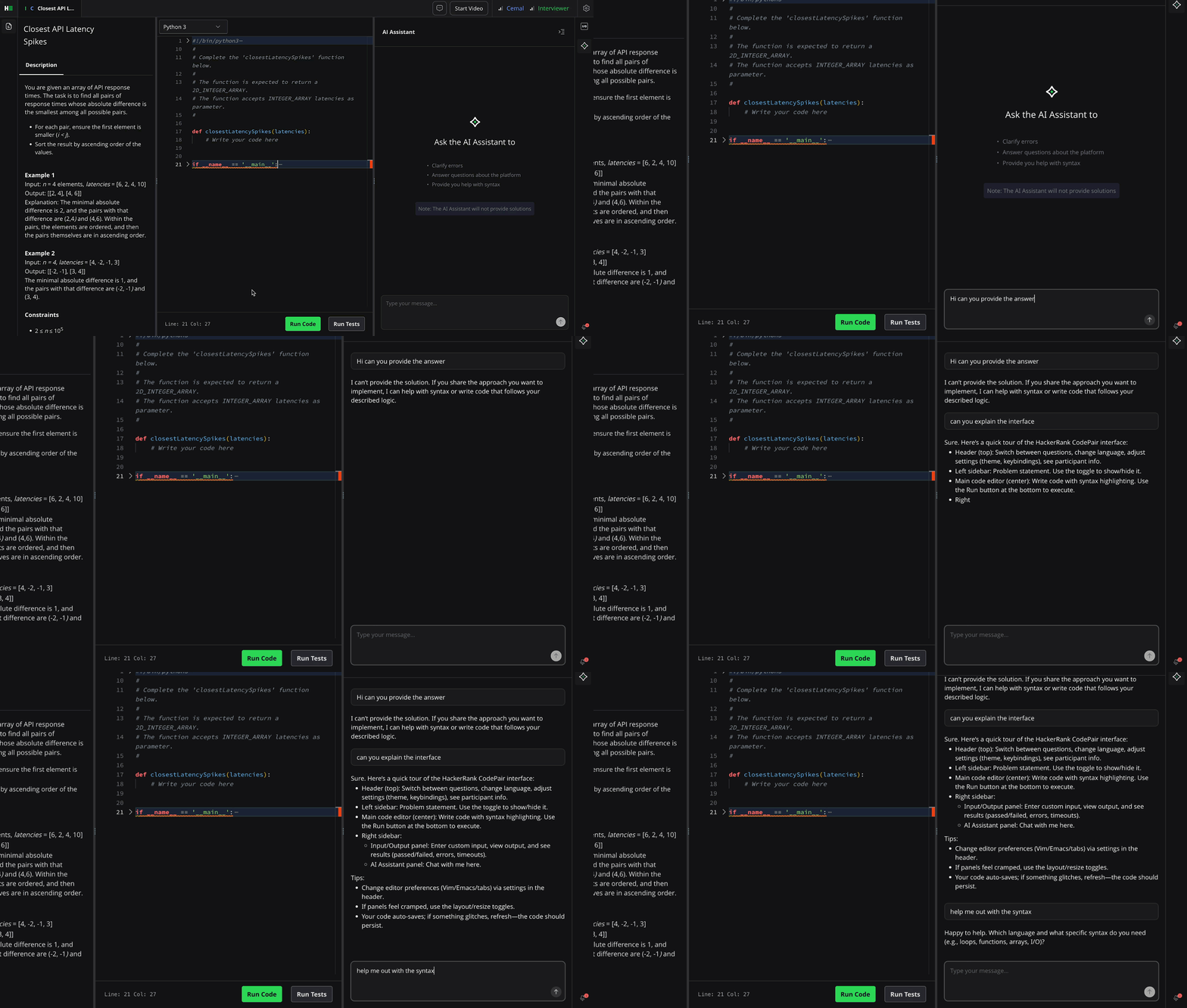
For more information, see 📄 AI-Assisted Interviews, AI Assistant in Interviews.
Improved AI Assistant Experience for Interviewers (AI Add-on)
Interviewers can use Observation Mode to see all AI assistant interactions in real time. Live assistant edits and shared diff views stay synced between the interviewer and candidate, making it easy to understand what changed, why it changed, and how the candidate responded. This gives interviewers clearer insight into a candidate’s thinking, iteration, and use of AI during the interview.
For more information, see 📄 AI-Assisted Interviews.
Scorecard Assist for Projects and Code Repos (AI Add-on)
Scorecard Assist is now available for Project and Code Repository questions. You’ll see AI-generated summaries and suggestions directly in the scorecard, making it easier to review feedback quickly while reducing manual note-taking and maintaining consistency across interviews.
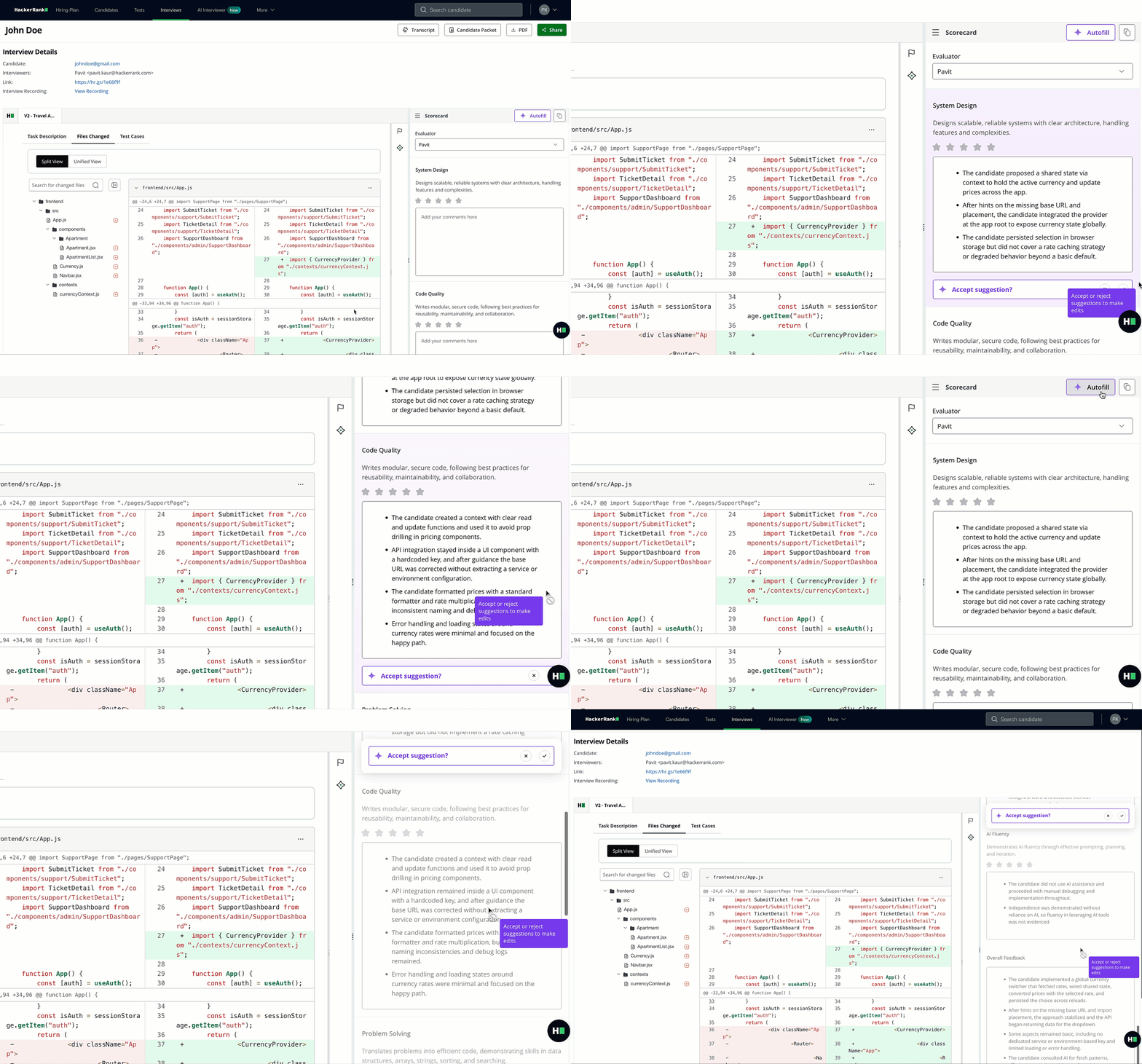
For more information, see 📄 Scorecard Assist.
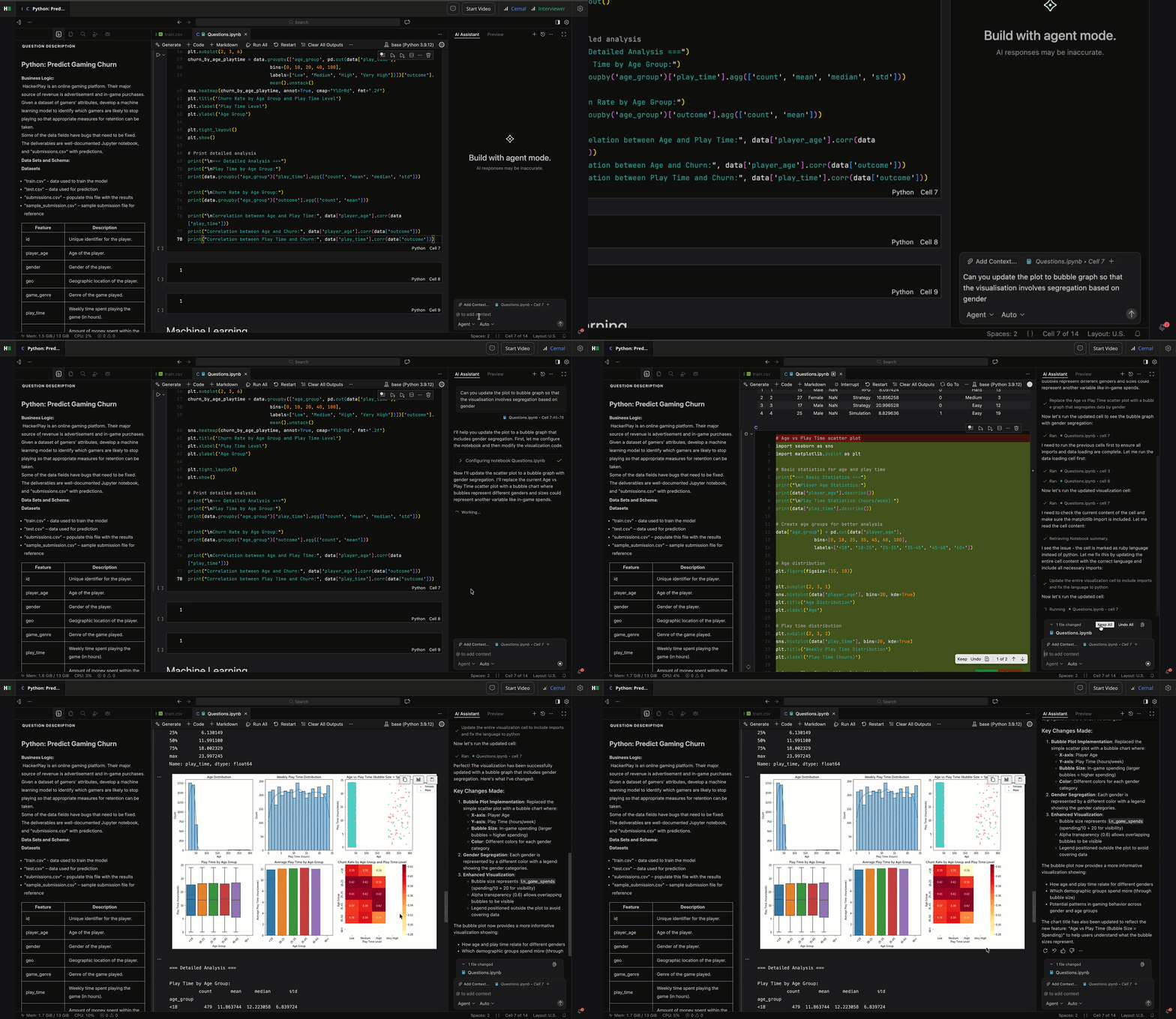
AI Assistance for Data Science IDE (AI Add-on)
AI Assistant capabilities are now available for data science questions in VS Code, bringing the same experience used for software engineering roles.
The AI Assistant supports chat mode to analyze the notebook and explain code, and agent mode to make direct updates such as adding cells, fixing errors, rewriting functions, or building complete workflows. It can also execute selected parts of the notebook on demand, turning the notebook into an interactive, AI-augmented workspace.
This feature will be available as part of a phased rollout.
For more information 📄 AI-Assisted Interviews, AI Assistant in Interviews.
Data and Insights
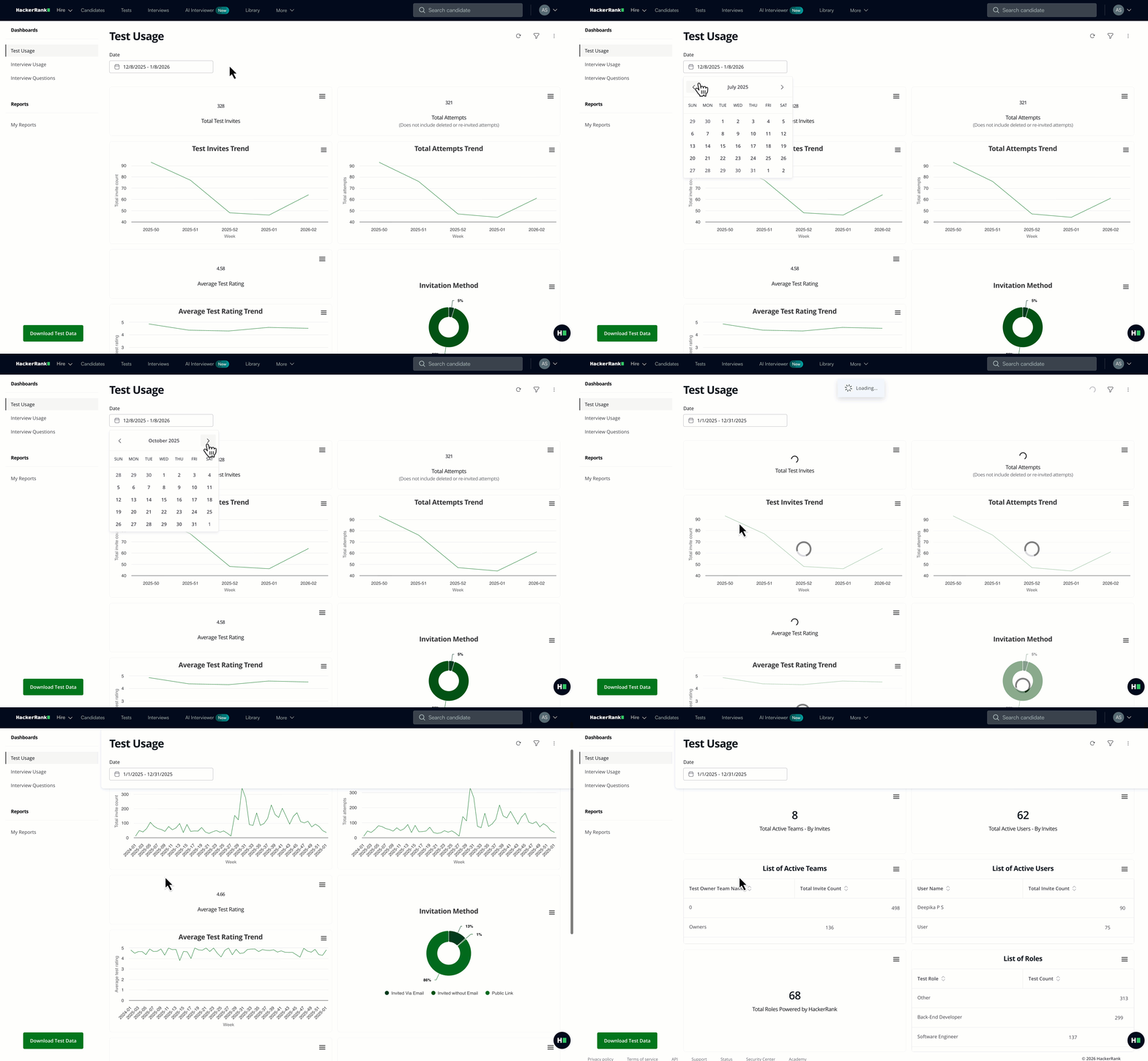
Performance Improvements to Insights Dashboards and Exports
Insights across the platform are now available faster than ever. Exports and dashboards that once took 15+ seconds now load in as little as 3 seconds, making it easier to explore data and spend less time on routine reporting.
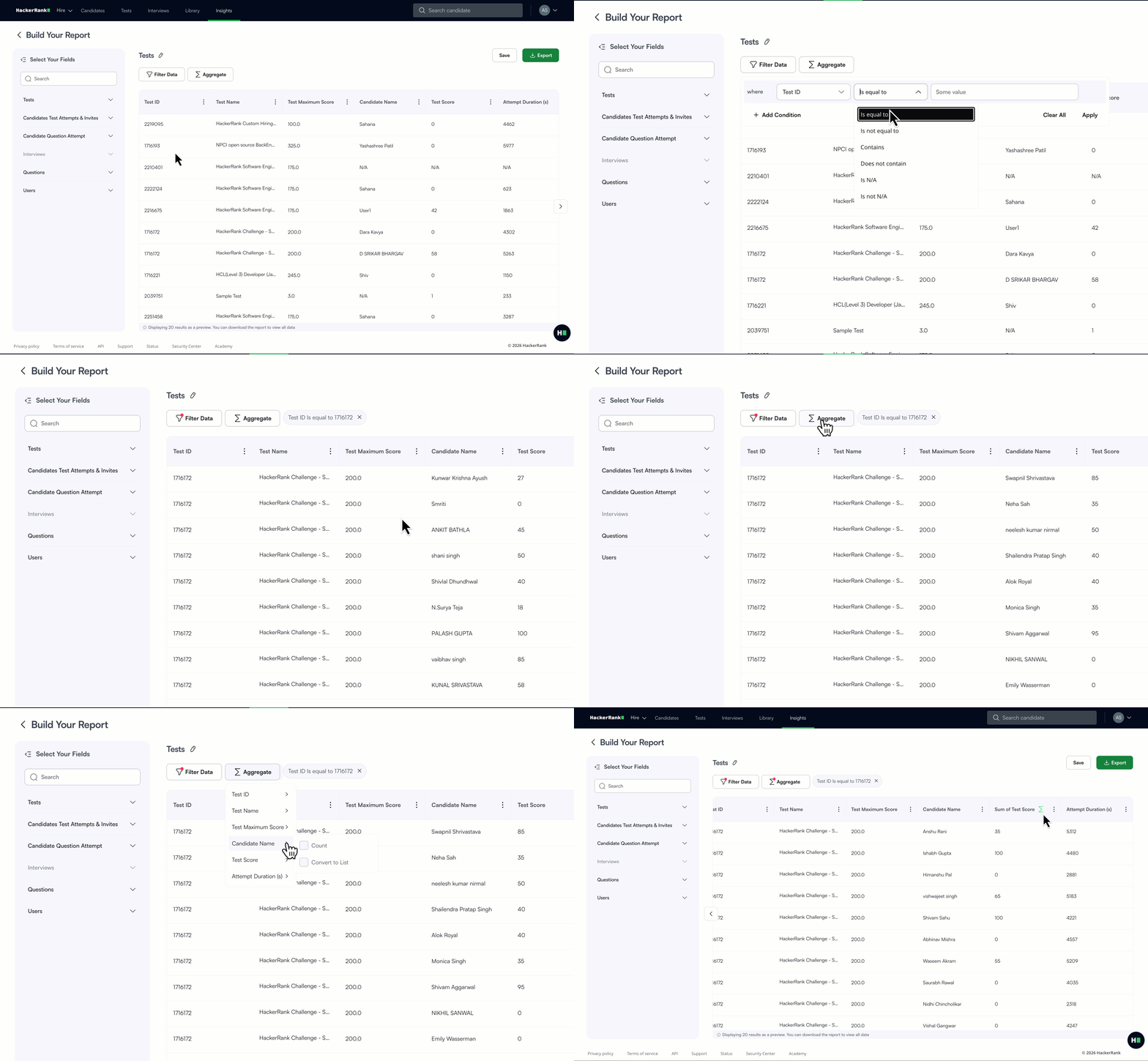
Advanced Filtering and Slicing for Custom Reports
Custom Reports provide a powerful way to access, analyze, and share your HackerRank data on demand, giving you full control to build tailored reports across key data objects. Custom Reports are now enhanced with advanced filtering and slicing capabilities, making it easier to explore reports in detail and focus on the exact data you need.
For more information, see 📄 Custom Reports.
Integrations
Integration with Zapier
You can now connect HackerRank to tools like Slack, Google Sheets, and Notion using Zapier, with no engineering effort required. This no-code integration lets you automate workflows such as notifications or data syncing using triggers like test completions or interview feedback, all managed securely from the Integrations page.

For more information, see 📄 Zapier - HackerRank Integration Guide, 📄 Zapier - HackerRank Integration Test User Guide, 📄 Zapier - HackerRank Integration Interview User Guide.
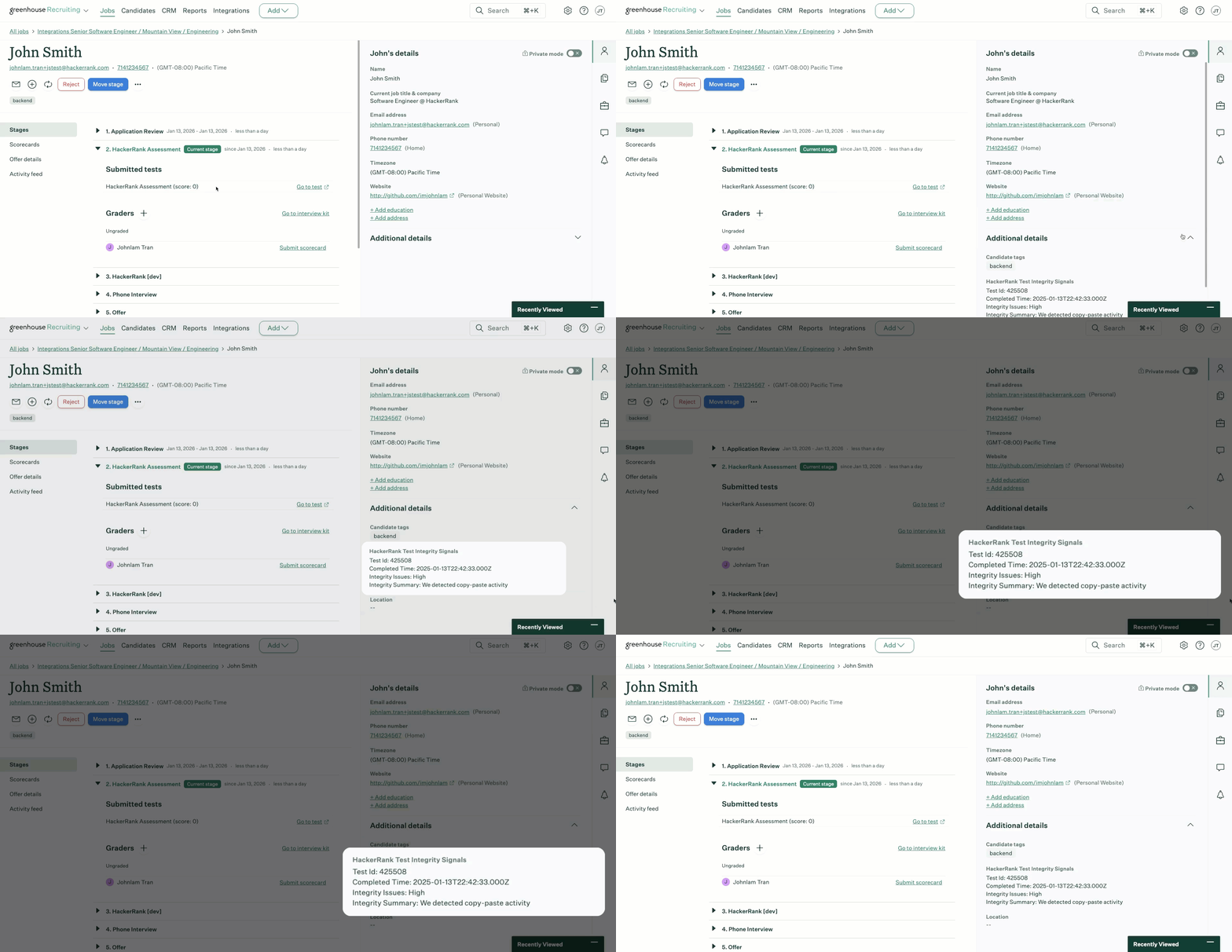
View Integrity Signals in Greenhouse, iCIMS, and Workday Integrations
Assessment results in Greenhouse, iCIMs, and Workday now include more accurate and up-to-date integrity signals, delivered through a standardized data schema.
These signals provide you with a quick, consistent snapshot of candidate integrity directly in the ATS, including an Integrity Status (None, Medium, or High) and an Integrity Summary that highlights which suspicious activities (such as copy/paste behavior) were triggered.
Deeper analysis and full integrity context remain available in the HackerRank assessment report.
SkillUp
Weekly Prompt Engineering Challenge
Prompting is at the heart of getting high-quality outputs from LLMs. SkillUp’s new Prompt Engineering Challenge helps developers build this skill through competitive, hands-on practice. Developers must prompt an LLM to solve real problem statements and earn a spot on an org-wide leaderboard.
The challenge resets weekly, keeping teams engaged between courses while fostering continuous learning and friendly competition.
For more information, see 📄 Weekly Challenges.
Audit Logs
Admins can now request access to audit logs via Customer Support. These logs support compliance and internal reviews, strengthening oversight across learning programs.
For more information, see 📄 Audit Logs in SkillUp.
AI Engineer Certification
The AI Engineer Certification is a guided pathway with lessons and challenges designed to help you build expertise in creating AI-powered applications and showcase your skills as a next-generation developer. The complete certification with all modules is now available.

For more information, see 📄 Roles and Skills in SkillUp.
Deprecations and Experience Changes
The following changes will be effective January 28th, 2026.
Screen
Legacy Content Library Experience
All remaining users will be migrated to the new Library experience. The updated Library includes natural language search, 15+ filters, advanced sorting, and question summaries to help you find questions faster.
Legacy Detailed Test Report
All users will be upgraded to the new detailed report experience. The new report makes reviewing candidates easier with:
Code playback
An integrated IDE view
Simpler, more intuitive navigation
Local IDE/Offline Flow
Due to increased integrity risks, the Offline (Local IDE) experience is no longer supported
What this means for you:
Existing tests that use only Offline flow will continue to function as-is
Tests with Offline flow enabled cannot be cloned
All other new and existing tests will require candidates to use the HackerRank IDE
Interview
Twilio-Powered Interviews
We’re deprecating Twilio-powered interviews and transitioning affected accounts to Zoom. Since most HackerRank interviews already run on Zoom audio/video technology, this will provide a consistent experience across all customers that supports key features like background blur and transcripts.
If this change applies to your account, you will have received direct email communication from HackerRank with additional details.
The AI Add-On package includes advanced features that help you assess next-gen skills and maintain test integrity in an AI-native world. It’s built to solve emerging challenges with the right level of depth and control. To enable them, contact your account manager or email support@hackerrank.com.
Thank you for supporting our mission to change the world to value skills over pedigree!