April 2025 Release Notes
Last updated: May 2, 2025
We’re excited to share the latest updates from HackerRank’s April product release!
AI is now at the heart of how software is built—and this release helps you harness it to hire and upskill the next generation of developers. The AI Interviewer captures signals beyond just code correctness, like thought process and judgment, which are critical in the AI-first world, while Proctor Mode brings greater integrity to assessments by ensuring they play by the rules.
With Engage, you can reconnect with past candidates and launch targeted campaigns to quickly build your pipeline. SkillUp streamlines developer growth with structured learning paths, guided by an AI Tutor. And with added support for cutting-edge tech like RAG and iOS, you’re ready to assess for skills that are shaping the future.
These updates will go live by April 23rd. Join our customer webinar on April 22nd to learn more.
Skills Platform
Retrieval-Augmented Generation (RAG)
LLMs are powerful, but only when responses are grounded in the right context. Retrieval-Augmented Generation (RAG) is key to building context-aware AI applications like chatbots and personalized support tools.
You now have access to Library questions to help you identify developers with real-world RAG skills. These run in a native VSCode IDE and include built-in data sources for evaluation. You can also create your own RAG questions using the same setup to match your specific needs.

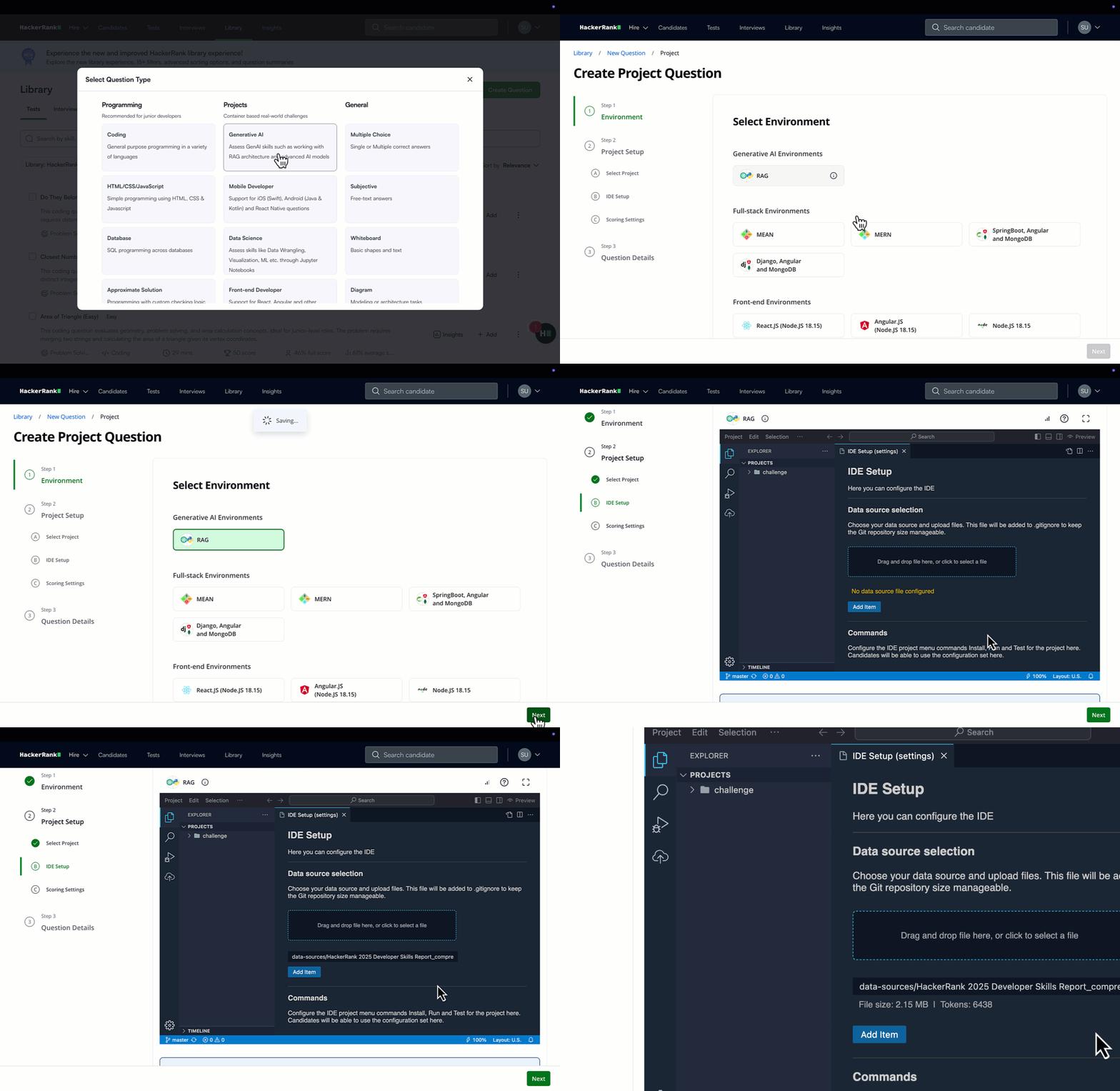
For more information, see Creating a RAG (Retrieval Augmented Generation) Question, Retrieval-Augmented Generation (RAG) Question.
iOS Assessments (Limited Availability in Tests and Interviews)
Evaluate iOS developers in a realistic coding environment with a built-in emulator, multi-file support, and a VS Code IDE featuring Swift syntax highlighting and autocompletion.
Candidates can preview their apps in a real time emulator, so you can assess both functionality and UI. These assessments support key frameworks like SwiftUI and reflect real-world iOS development.
iOS assessments are currently in limited availability with ready-to-use Library questions. To get access, contact your account manager or email support@hackerrank.com.
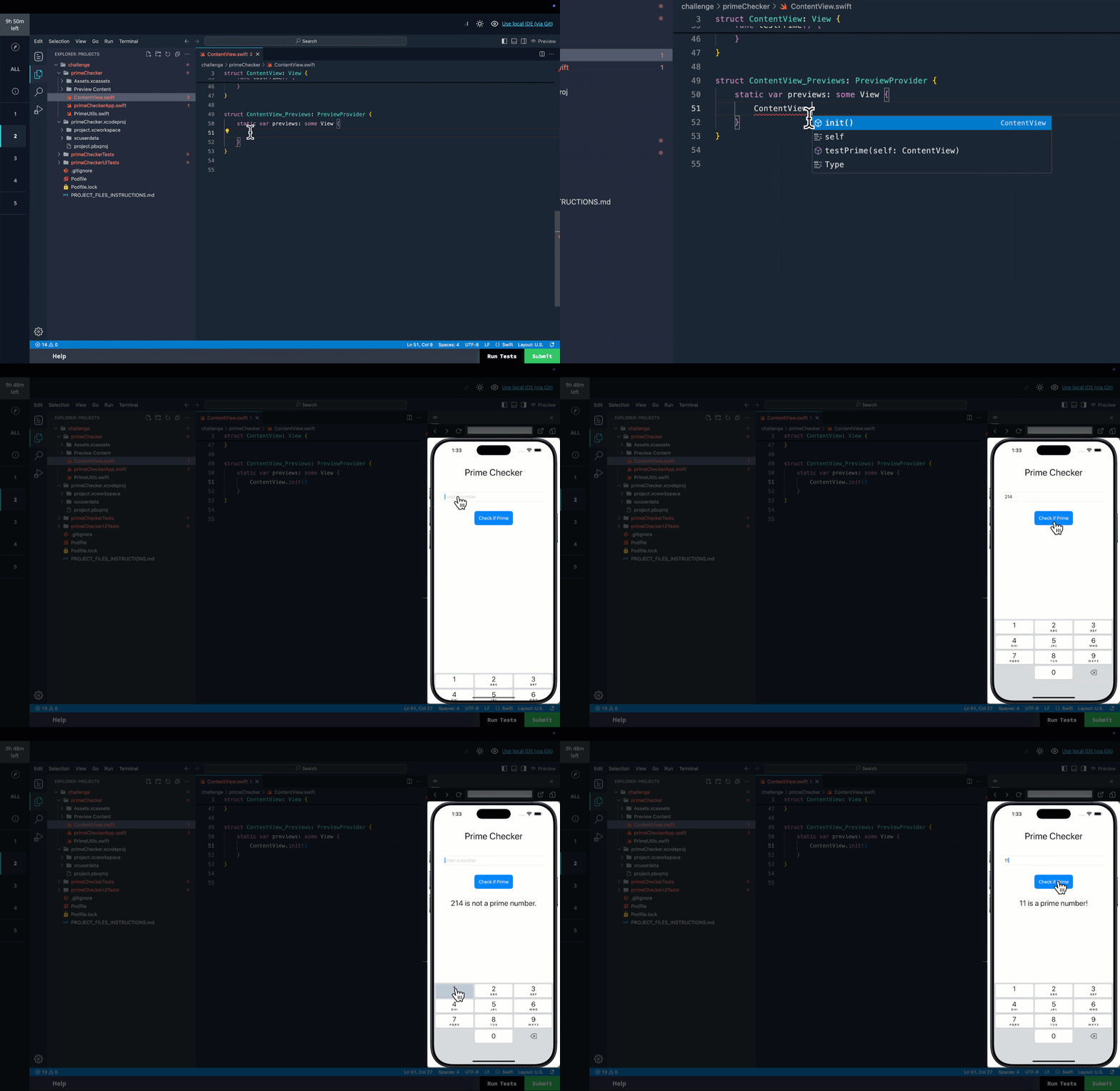
For more information, see Using HackerRank IDE.
QA Skills: Cucumber and Cypress
You can now assess QA and test automation skills in Cucumber for Behavior-driven development(BDD) testing and Cypress for front-end automation. Candidates can write and run tests directly in the platform, with support for scenario-level execution and automatic scoring.

For more informaion, see Execution Environment.
Code Quality Grading (Limited Availability in Tests)
Correctness is just a small part of writing production-ready code. Maintainability, efficiency, and clarity further demonstrate a developer’s expertise. Code Quality Grading helps you assess these qualities with detailed reviewer comments that highlight strengths and areas for improvement.
Code Quality Grading is currently in limited availability for React and Coding questions. Reach out to your account manager or support@hackerrank.com for more information.


Library Improvements
Natural Language Search
Natural Language Search makes finding the right questions in the Library faster and more intuitive. Just type what you’re looking for - like “Evaluate Python skills with tuples, data frames, and numpy” - and get relevant results instantly.

Content Additions
The HackerRank Library is regularly updated with new challenges, enabling you to assess candidates across a wide range of technical skills.
New Content
Coding + Database Tasks: 160 coding challenges designed to assess practical programming skills and algorithmic thinking.
Projects: 90 projects that simulate real-world scenarios, enabling candidates to demonstrate their ability to manage and execute complex tasks.
Content additions across the following high-demand job families:
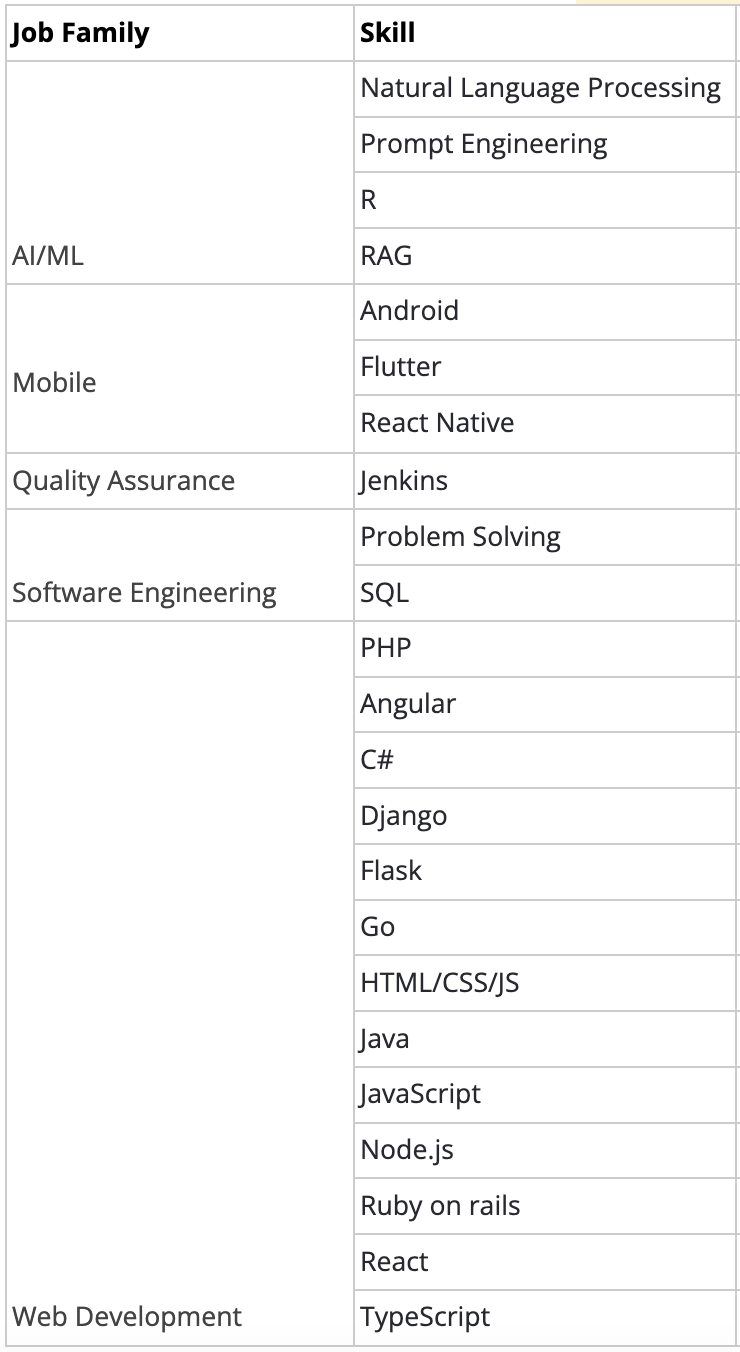
Content Quality Upgrades
Clear, well-structured questions help you fairly and accurately evaluate candidates’ skills and potential. The HackerRank library continues to evolve to support better comprehension and more effective skill assessment.
Project questions: Project questions now go through weekly sanity checks that simulate the full candidate experience - from logging in and launching the IDE to building the project, running tests, and verifying previews.
Over 880 full-stack, frontend, backend, and mobile questions have been reviewed and improved, including optimizations that reduce package installation times and minimize timeout issues. These checks ensure reliable performance and quality for a smooth candidate experience.
Developer Experience
DevOps Assessment Improvements
Candidates can now expect a smoother, more reliable DevOps assessment experience, enabling more accurate evaluation of skills such as infrastructure management and system optimization.
Seamless recovery with reset options: The introduction of reset functionality in DevOps questions allows candidates to start fresh without disrupting their environment to reduce stress and enable them to quickly recover from errors, maintaining their momentum during assessments.
Enhanced scalability: The platform now supports up to 150 logins per minute (up from 20) and handles up to 1,200 concurrent sessions, so high-volume hiring events and assessments run smoothly without delays.

For more information, see Answer DevOps Questions.
New Candidate Site: Coding, MCQ and Database Questions
In response to candidate feedback, the candidate test-taking experience has been redesigned with a cleaner UI, improved layout controls, and a more straightforward onboarding flow.
Modern UI: The interface has been updated for coding, database, and multiple-choice questions. Question names now appear clearly in the sidebar, replacing generic labels like “Question 1.” The “Submit” button has been renamed to “Save and Proceed” to avoid giving candidates the impression that their answers are final.
Flexible layouts: Candidates can expand or collapse the code editor, move panels horizontally for better test case comparison, and toggle settings like autocomplete or syntax highlighting. These changes provide more control over the test environment and help candidates focus.
Simplified onboarding: The test starts with a clear three-step flow—view instructions, enter basic details, and review integrity guidelines. Candidates also have the option to take a sample test before beginning.
Improved test execution: Candidates can now run a single test case instead of executing all at once, making it easier to debug and iterate and saving valuable time during assessments.
These enhancements aim to reduce friction and improve focus without adding complexity. The updated experience will be rolled out in phases starting April 23, with full availability expected by the end of May. It will be available for all tests that include Coding, MCQ, and Database questions, or any combination of these. Tests with other question types will continue on the existing test-taking platform.


For more information, see Answer Coding Questions, Answer Database Programming Questions, Answer Multiple-Choice Questions.
Red Hat Java LSP and Higher CPU for Java
Java Project questions now run on the most popular Red Hat-powered Java LSP, delivering improved code autocomplete and diagnostics. We’ve also doubled the CPU allocation for the virtual machine, ensuring faster performance and a smoother candidate experience.
Platform Upgrades
Updated programming languages, and diagnostic tools like LSPs help candidates navigate tests and interviews with greater efficiency. This upgrade includes the following improvements, ensuring your assessment environment reflects the latest industry standards:
Data Science R (4.4.2): For data science questions, the R language environment has been updated to version 4.4.2 to support the latest packages and libraries.
Swift 6.3.0: The latest version of Swift is now supported for all coding questions.
Golang LSP Support (v1.22.5): We’ve added Language Server Protocol (LSP) support for Go, enabling smarter diagnostics and developer assistance.
WebSocket Connectivity Check
With a new WebSocket connectivity pre-check in place, candidates can enter assessments confidently, minimizing unexpected connection issues that might otherwise prevent the IDE from loading properly.

Screen
Create a Test from a Job Description
You can now speed up test creation by using a job description directly in the process. In the Create Test workflow, simply select “Create Test with Job Description”, paste the job description for the role, and a test focused on the most essential skills will be generated for you.

For more information, see Creating a Test from a Job Description.
External Copy-Paste Prevention in Secure Mode
As an added layer of integrity to Secure Mode - which locks the assessment interface in full-screen mode - candidates will now be unable to copy-paste external text when taking Frontend, Backend, Fullstack, and Coding test questions with Secure Mode enabled. This prevents unauthorized content use, ensuring a fair assessment experience.
This feature is not currently available for the following question types, but will be supported in the future: Subjective, Sentence Completion, DevOps, and Data Science.

For more information, see Secure Mode.
Proctor Mode (Limited Availability in Tests)
Proctor Mode brings AI-powered integrity monitoring to your assessments. While Secure Mode restricts the test environment, Proctor Mode takes things further - offering the rigor of live proctoring without the bias or overhead. During the assessment, the Proctor sets clear expectations, monitors candidate activity in real time (including webcam tracking, tab-switch detection, and periodic screenshots), and delivers a detailed post-test integrity report with session replay, summarized violations, and actionable insights.
Proctor Mode is currently available in limited availability. Reach out to your account manager or support@hackerrank.com for more information.

For more information, see Proctor Mode.
AI Interviewer (Limited Availability in Tests)
AI Interviewer simulates a real technical interview experience by engaging candidates in a dynamic, two-way conversation. It adapts in real time to how candidates think, code, and problem-solve, while continuously monitoring for integrity and providing deep post-interview insights.
Key Highlights:
Conversational interviews: Candidates can clarify questions, receive contextual nudges, and explain their approach just like they would with a real interviewer.
Progressive questioning: The AI follows up with more complex variations based on the candidate’s performance, enabling deeper signal collection.
Integrity monitoring: Real-time detection of tab-switching, pasting, and other suspicious behaviors.
Human-like summaries in report: Automatically generated feedback on candidate performance, code quality, problem-solving depth, and behavioral patterns.
Session replay: Full playback of the interview with screen captures, webcam images and event timeline.
Supported Skills (Initial Launch):
Problem Solving
Coming Soon: SQL, System Design, React — and more.
AI Interviewer is currently available in limited availability. Reach out to your account manager or support@hackerrank.com for more information.

Interview
Observation Mode for Projects
Observation Mode now supports Frontend, Backend and Fullstack questions, enhancing the interview experience for both candidates and interviewers. This feature allows interviewers to follow along in real time as candidates engage with the IDE in a multi-file environment.

For more information, see Observation Mode in Interviews.
Candidate Guidelines for Interviews
Interview guidelines now appear for all candidates at the start of their interview sessions, regardless of whether the Interview Integrity signals feature is enabled. These guidelines provide clear expectations and technical recommendations to help candidates optimize their setup and understand best practices before getting started.

Ashby Integration for Interview Scheduling
Ashby ATS users can now automatically attach HackerRank Interview links when scheduling interviews. When scheduling an interview or creating a scheduled interview activity, simply toggle on the “Attach a HackerRank Interview” option in the Communications tab. The live interview link will be included in both candidate and interviewer invitations, allowing you to coordinate interviews without manual steps.
Note: The Ashby user’s email must match an active HackerRank account to use this feature.
Settings Update: Enforce Interview Integrity Signals at Company Level
Previously, enabling Interview Integrity Signals required toggles at both the company and individual interviewer levels. Now, visibility is controlled exclusively through company settings for a more streamlined configuration.
The secondary, interviewer-level toggle has been deprecated, giving company admins full control to enforce organizational standards for monitoring suspicious activity during live interviews.

For more information, see Interview Integrity Signals.
Data and Insights
Custom Reports
Custom Reports offer a powerful new way to access, analyze, and share your HackerRank data on demand. This feature gives you full control to build tailored reports across key data objects.
Select the required fields from the following functional areas to build your reports:
Tests
Test Invites and Attempts
Test Question Attempts
Questions
Users
Interviews
You can merge data from multiple entities, apply filters, preview results in real time, and export the report as an Excel file. Saved reports are accessible to all admins and can be duplicated or shared via email for easy collaboration.
Custom Reports are available to company admin users with access to the Insights tab.

For more information, see Create Custom Reports.
Admin
New User Entitlements
You now have access to a host of new entitlements that help you fine-tune user permissions and ensure the right level of access to match your internal policies—all while keeping candidate and assessment data secure.
You’ll find these new entitlements in Teams Management under the User Roles tab, as well as in individual user entitlements within the Users tab.
Test Editing and Settings
Company admins can now further fine-tune access using new entitlements that control specific actions in the test creation and management process. The following new entitlements allow you to define what recruiters and other roles can or cannot do:
Clone Test: Allow recruiters to duplicate a base test for consistency across assessments.
Delete Test: Prevent recruiters and other roles from deleting tests.
Delete Candidate: Control who can delete candidate data from the system.
Test Settings: Restrict access to modify test-level settings for users who did not create the test.
Test Settings > Test Access: Limit the ability to create public test links or update test expiration settings.

Adding Questions Outside of Interview Templates
To ensure a consistent and standardized interview experience, Company Admins can now control whether users can add questions outside the assigned interview template. When the 'Add and Remove Questions Outside Assigned Template’ setting is toggled off, interviewers will not be able to deviate from the questions provided.
Prerequisite: To enable this entitlement, the “Conduct Interviews” entitlement must first be enabled.


For more information, see Flexible User Roles.
Bulk Exports
Company admins will now see a new entitlement called “Allow Bulk Exports” under User Roles and the Entitlements tab under each user in Teams Management. The entitlement determines whether the user has access to the following exports:
Test export
Test candidate attempt export
User export
Interviews export
My Library export
“Export all data” under insights (candidate export - available for Company Admin roles only)
Prerequisite: To perform an export, a user must have this entitlement enabled and have the necessary base entitlements for the relevant functional areas or access to the specific object. For example, exporting the “My Company” library requires the "View Question Library" entitlement.
For more information, see Allow Bulk Exports.

SkillUp
New Learn Experience
SkillUp has expanded beyond assessments to better support skill development with a more comprehensive learning experience. Earlier versions emphasized hands-on coding assessments with practice questions, timed badges, and certifications. The latest update builds on that foundation by introducing new features designed to help developers actively grow their skills, like learning experiences within the coding environment and an embedded IDE. This shift is rolling out in phases, with a growing number of skills already available in this new format and more planned over the coming quarters.

Structured learning paths: Each path is now organized into concept-driven modules that teach theory, walk through examples, and end with a challenge to reinforce understanding through practice.
Built in AI-tutor: The new SkillUp AI Tutor provides in-the-moment support within the IDE, helping developers understand concepts, troubleshoot code, and think through real-world problems.
Real-world challenges: SkillUp now blends foundational exercises with practical, real-world coding tasks to show how each concept is applied in context.
Flexible pacing: Developers can now complete SkillUp badging challenges on their own schedule, without timers or enforced cooldown periods.
In-context resources: All learning resources are now directly embedded into the IDE to help reduce context-switching and maintain focus.
Badges earned through learning: Developers no longer need to pass a separate test to earn a badge. Simply complete the SkillUp learning track to unlock a badge automatically.
For more information, see Get Started with Learn.
New Certify Experience
The new SkillUp “Certify” experience provides a structured, supportive journey toward certification, making it easier for developers to go from learning a skill to certifying for a multi-skill role with confidence. This approach helps developers prepare more effectively while giving managers greater confidence in the skills being validated.

Extensive practice before certification: Developers no longer need to earn badges to unlock a certification. Instead, they're guided through a set of bite-sized practice challenges, designed to teach and reinforce the skills needed to succeed on the certification.
AI tutor support in every practice challenge: As with the Learn experience, SkillUp’s AI tutor is available throughout the Certify track. It helps reason through problems, break down concepts, and learn in context.
Untimed practice challenges: All practice exercises leading up to the certification are untimed, giving developers the freedom to explore solutions, test ideas, and build muscle memory without time constraints. Only the final certification remains time-bound.
For more information, see Get Started with Certify.
Overview Dashboard Enhancements
The updated Overview page provides administrators with a view of upskilling activity across their organization. Designed to support decision-making and progress tracking, the new experience brings clarity to developer engagement and certification outcomes.
Funnel view of developer progression: Funnel data at the top tracks how developers move from invitation to activation, engagement, and certification. This makes it easier to identify where developers are progressing, and where they may need additional support.
Time-based filtering for better visibility: A new date filter in the top-right corner allows for quick toggling between key ranges such as last week, last month, or last quarter. This helps surface trends over time and enables snapshot reporting across different time windows.
Downloadable data for deeper analysis: An export button allows administrators to download their dashboard view, supporting exploratory analysis or integration with other reporting workflows.
Updated charts and trends: Improved visualizations highlight onboarding and certification trends over time, with clean charts that reveal patterns in adoption and outcomes.

For more information, see Track Developer Progress Using Overview Dashboard.
Engage
Build Your Pipeline in Engage
You can now build your candidate pipeline in Engage using three sources:
Past candidates from your HackerRank for Work assessments
HackerRank’s candidate database
Your promoted microsite on the HackerRank Community
Rediscover Past Candidates from HackerRank
The new Cohorts tab lets you rediscover candidates from tests created or attempted in the last 90 days. These cohorts are auto-generated and easy to filter by skills, experience level, and match %. Candidates who have scored <75% , candidates with suspicious activity and those in a campaign are excluded by default (you will see an ‘In Campaign’ badge against candidate names if they are already part of a campaign).
Once you’ve selected candidates, click ‘Create Campaign’ and select a relevant campaign to re-engage them. Once the campaign is created, all your past candidates will appear in the Candidates tab with the source marked as ‘HackerRank Test’.

You can also access these cohorts from your HackerRank for Work homepage via the new Rediscover Candidates button.

For more information, see Source and Manage Candidates for Campaign.
Find Candidates from HackerRank’s Database of Candidates
You can now enhance your candidate pipeline by adding candidates from HackerRank’s database to any existing campaign. Go to the Candidates tab of a campaign and click ‘Add Candidates’, then choose ‘Find New Candidates’ to launch the candidate assistant.
The assistant will ask for basic details like skills and location, and show a set of 5 sample candidates. Share feedback to help refine the search. If none of the initial profiles are a fit, you’ll see up to 3 improved rounds of suggestions. Once you're happy with the profiles, you’ll provide final feedback before viewing the full list of candidates to choose from.
Review the suggested profiles, use filters like ‘Match %’ to select relevant candidates and save them to your campaign. These candidates will appear in the list with the source marked as ‘HackerRank Database’.

For more information, see Source and Manage Candidates for Campaign.
Run Promotions in HackerRank Community
You can now boost visibility and attract candidates to your campaigns by promoting them on HackerRank’s 26-million-strong community.
Set up your promotions under the ‘Outreach’ tab of a campaign by providing key details like title, description and target audience and background colour. Then you can either save it to drafts or publish it. Once published, your promotions are reviewed and published to the community in the next 7 days.

For more information, see Source and Manage Candidates for Campaign.
New Campaign Type: Feature a Job Opportunity
A new "Feature a Job Opportunity" campaign type in Engage allows you to build up your candidate pipeline for your active roles. A new Campaigns tab has been added to view and manage all campaigns in one place.
Simply identify the target audience and select “Feature a job opportunity”, and the Engage Assistant generates a microsite, emails, and potential candidates. You can further customize the microsite and emails, and source candidates just as with a coding challenge campaign. This campaign type also features a unique microsite layout with a dedicated ‘About the Job’ section to highlight role responsibilities, qualifications, and an application link. The microsite is also published on the Homepage and Prepare pages of the HackerRank Community.

For more information, see Create a Campaign, Set Up a Microsite, Set Up Emails, Set Up a Challenge, View Event Statistics.
Developer Community
Mock Interviews
AI-powered mock interviews are now generally available to all developers on the HackerRank Community. These sessions simulate real technical interviews and include several new enhancements:
Speech-to-Text Mode: Developers can practice answering questions naturally using their voice, with real-time transcription.
Improved Mock Interviewer: The upgraded model provides more realistic and relevant feedback, closely aligned with real interview expectations.
Enhanced Feedback Experience: Clickable prompts during the feedback phase make it easier for developers to review and follow up.
Global Payment Support: Mock interview attempts can now be purchased via Razorpay or Stripe, with support for developers in all regions.
New Interview Type – Backend (Node.js): A new session focused on backend interviews using Node.js is now available, alongside existing options in Problem Solving, Frontend (React), and System Design.
With over 22,000 mock interviews completed, more developers are gaining realistic practice and building confidence for real-world interviews.

Support for Workable on QuickApply
The QuickApply Chrome extension now supports autofill on Workable-powered job applications, expanding its integration to six major applicant tracking systems: Avature, Greenhouse, Oracle, SmartRecruiter, Workable, and Workday.
Thank you for supporting our mission to change the world to value skills over pedigree. Your feedback continues to drive our innovations forward. If you have questions or need assistance, email support@hackerrank.com or contact your account manager.